
You grab your cordless vacuum for a quick clean, only to find it barely picks up crumbs. That weak suction feels frustrating, most when you need speed and quiet.
The real problem is often simple neglect, not a broken machine. When you learn how to clean a cordless vacuum the right way, you unlock steady power and save money on spares.
Applying these proven insights on How to Clean a Cordless Vacuum helps you avoid costly mistakes. Dust, hair, and debris build up fast in filters, bins, and brush rolls. Skipping care also strains the battery and motor over time. This guide walks you through every step with clear, plain language. You will gain the exact routine to keep your tool running at full strength for years.
📌 AT A GLANCE
- ✓Core Concept: Regular care stops weak suction before it starts.
- ✓Essential Step: A full wipe-down after each use stops dust buildup.
- ✓Safety Rule: Always remove the battery before you clean any part.
- ✓Efficiency Tip: Swap filters monthly during heavy use seasons.
In this article
Why Regular Care Protects Your Cordless Vacuum
A cordless vacuum works hard in tight spaces and on different floors. Without regular care, fine dust clogs airways and blocks suction paths. You feel the drop in power right away, which slows your cleaning sessions. Taking a few minutes to care for the tool keeps airflow strong and steady.
Gather required tools and clear your work area before starting.
Confirm baseline specs and maker guidelines first.
Complete each stage in order without skipping safety checks.
Run a quick test pass and wipe down key parts after use.
Filters trap tiny particles, but they fill up fast. When filters stay dirty, the motor works harder and runs hotter. This extra strain shortens the battery life and the overall tool life. Simple rinsing or swapping parts fixes this before damage sets in. For our complete category overview. Core buyer criteria, explore our cornerstone guide to Why Your Vacuum Cleaner Keeps Failing and Fixes.
- Filter Health: Clean filters keep airflow open and the motor cool.
- Bin Capacity: Emptying the bin after each use prevents clogs.
- Brush Roll Freedom: Cutting hair from the roller stops jams and smells.
- Battery Longevity: Proper storage and charging protect cell life.
- Hose Flow: Clear hoses let dirt move fast into the bin.
Gather Your Cleaning Supplies First
Before you start, collect a few simple items from around your home. You do not need special chemicals or expensive tools to do this job well. Having everything ready means you finish the task in one smooth pass. A quick setup saves time and keeps your focus on the work.
Run your finger along the motor vents after each month. If you feel a gritty layer of dust, a quick burst of air will fix it before it builds up.
Most items you already own, like a soft cloth or a small brush. You only need a few dedicated tools for deep care once a month. Using the right supplies prevents scratches and keeps seals tight. Below is the list of items that make the process fast and safe.
- Soft Microfiber Cloth: A lint-free cloth wipes dust from the body and filters safely.
- Small Soft Bristle Brush: A clean paint brush or old toothbrush frees stuck debris from crevices.
- Warm Running Water: Tap water rinses washable filters and bin walls without damage.
- Mild Dish Soap: A drop of soap cuts grease and stuck-on grime on plastic parts.
- Compressed Air Can: Short bursts blow dust out of tight motor vents and seams.
- Dry Towel or Stand: A clean towel holds parts while they air dry completely.
The Best Way to How to Clean a Cordless Vacuum Step by Step
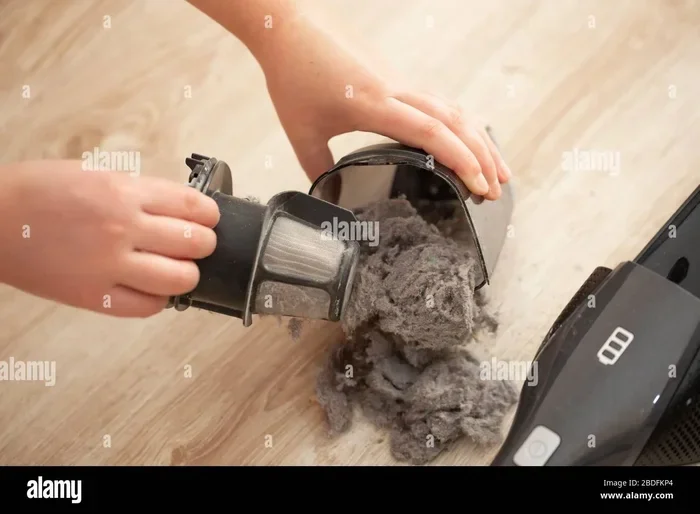
Start by unplugging the charger and removing the battery pack. This simple step protects you from accidental starts and protects the electronics. Next, detach the bin, filter, and any brush roll covers. Work over a trash can so falling dust stays contained and easy to sweep up.
Tap the dustbin gently to release loose crumbs, then wash it with warm water. Hold the filter under running water until the water runs clear. Let it dry fully. Use your soft brush to clean the roller. Wipe the hose with a damp cloth. Reassemble only when every part is bone dry to prevent mold and bad smells.
- Remove the Bin: Pop the dust container off and empty it into a trash bag.
- Rinse the Filter: Hold it under cool water and squeeze out trapped dirt gently.
- Clean the Roller: Cut hair and string wrapped around the brush bar with scissors.
- Wipe the Hose: Run a damp cloth through the tube to clear stuck dust.
- Inspect the Seal: Check the rubber gasket for cracks or debris that break suction.
- Dry Completely: Set parts on a towel for 24 hours before putting them back.
Deep Clean the Motor and Ventilation Ports
The motor spins fast and pulls in air, but it also pulls in fine dust. Over time, this dust coats the inside and blocks heat vents. A hot motor wears out faster and can even burn out early. You need to clear this dust regularly to keep the tool safe.
Use short bursts of compressed air to push dust out of the vents. Never use a vacuum nozzle near the motor, because it pushes dust deeper inside. A dry cotton swab works well for spots you cannot reach with air. This task takes only minutes but greatly extends the life of the tool.


- Blow Out Vents: Short compressed air bursts clear dust from rear and side grilles.
- Swab Tight Spots: A dry cotton swab lifts dust from small motor seams.
- Check the Fan: Look inside the fan cage for tangled hair or debris buildup.
- Avoid Water: Never let moisture touch the motor or electronic parts directly.
- Use a Stand: A storage stand keeps vents facing up and dust from settling.
Battery Care and Safe Charging Habits
The battery gives your vacuum its freedom, but it needs the right care. Leaving it plugged in all the time or storing it empty hurts the cells. Heat is the biggest enemy of lithium ion packs, so you must manage heat. Good habits keep the charge strong and the runtime long. For broader testing and full category picks, explore our in-depth guide to Boost Suction How to Clean a Dyson Filter 2025 Easy.
Charge the battery only when it drops to about 20 percent. Unplug it right after the light turns green. Never charge it near a heater or window. Store the vacuum in a cool, dry spot when you are not using it for a while. These simple moves stop size loss and keep the tool ready when you need it.
- Partial Discharge: Recharge when the gauge hits one fifth full, not when it dies.
- Cool Storage: Keep the vacuum in a closet away from direct sun and heat.
- Full Drain Monthly: Once a month, run the battery down and charge it fully.
- Check the Contacts: Wipe battery and charger terminals with a dry cloth for good flow.
- Replace Old Packs: Swap the battery if runtime drops below half of the original.
Maintenance Schedules That Fit Real Life
A set schedule stops you from guessing when to clean the vacuum. You can tie tasks to simple, easy markers in your week. For example, empty the bin after every few uses. Rinse the filter once a week. Monthly tasks handle deeper cleaning that keeps the machine in top shape.
- Write These Steps: Write these steps on a sticky note or set a phone reminder so you do not forget.
- During Heavy Shedding: During heavy shedding seasons or after big messes, you may need to clean more often.
- Sticking to a Routine: Sticking to a routine saves you from sudden power loss and surprise breakdowns.
- Table Below Shows: The table below shows a clear schedule you can follow right away.
Summary Table: Cleaning Methods Compared
| Task | Frequency | Method | Key Benefit |
|---|---|---|---|
| Empty Dustbin | After every 3-5 uses | Tap and wipe with dry cloth | Prevents clogs and bad smells |
| Rinse Filter | Weekly | Cold water, no soap, air dry | Keeps suction strong and airflow open |
| Clean Brush Roll | Monthly | Cut hair, wipe with damp cloth | Stops jams and floor damage |
| Blow Motor Vents | Monthly | Compressed air in short bursts | Prevents overheating and burnout |
| Full Deep Clean | Every 3 months | Disassemble all parts, wash, dry | Extends total tool life and battery health |
Troubleshooting Common Suction and Power Issues
Even with good care, you may notice the vacuum losing power or making odd sounds. These signs usually point to a simple blockage or a full filter. Checking the most common causes first saves you a service call. Gets your tool running fast again.
Start with the easiest fixes, like emptying the bin or clearing the hose. If suction is still weak, check the filter and the brush roll for hidden debris. Sometimes a full reset or a new battery solves the problem in seconds. The list below walks you through the most common issues and their quick solutions.
- Weak Suction: Empty the bin and check the filter for clogs or dust buildup.
- Hissing Sound: A hiss means a leak. Check the hose seal and bin lid for gaps.
- Brush Roll Stops: Cut hair and string wrapped around the roller to free it up.
- Battery Dies Fast: Run the battery down fully once, then charge it without interruption.
- Smell After Use: Wash the bin. Filter with soap and water, then dry them fully.
- Won’t Turn On: Check the battery charge, the bin seat. The safety latch on the handle.
Best Practices for Daily and Weekly Upkeep
Daily habits make weekly and monthly tasks much faster and easier. A quick dump of the bin. A wipe of the outside keeps dust from building up. These small actions stop problems before they start. Keep the vacuum ready for the next mess. Think of it like rinsing a dish right after you eat. For broader testing and full category picks, explore our in-depth guide to Why a Vacuum Cleaner Loses Suction Over Time and How to Fix It.
Never put the filter back in while it is even slightly damp. Trapped moisture grows mold, blocks airflow. Can cause a musty smell that spreads into your rooms.
Weekly care goes a little deeper and focuses on parts that touch dirt the most. You rinse the filter, check the roller, and wipe down the hose. Doing these steps on the same day each week builds a habit that is hard to break. Below are the best dos and don’ts to guide your routine and protect your investment.
- Do Empty Often: A half-full bin reduces suction and forces the motor to work harder.
- Do Rinse Filters: Clean filters keep airflow steady and the motor cool during use.
- Do Cut Hair Loosely: Use scissors to free the brush roll without damaging the bristles.
- Don’t Use Heat: Never put wet parts in a dryer or near a heater to speed drying.
- Don’t Over-Tighten: Tight screws strip plastic threads and make reassembly harder.
- Don’t Ignore Smells: A sour odor means trapped moisture or mold that needs a full wash.
Final Thoughts and Next Steps
Taking care of your cordless vacuum is simple, fast, and very rewarding. You save money, avoid frustration, and get better cleaning results every time. The steps in this guide give you a clear path from basic wiping to deep motor care. Start with one small habit today, like emptying the bin after each use.
Add one new task each week, like rinsing the filter or checking the brush roll. Soon, these steps become part of your routine and feel completely natural. Your vacuum will run stronger, last longer, and stay ready for any mess. Keep this guide handy for quick checks. Remember that steady care always beats big repairs later.
Frequently Asked Questions
How Often Should I Wash the Filter on My Cordless Vacuum?
Wash the filter once a week if you use the vacuum often. For light use, every two weeks works well. Always let the filter dry fully for 24 hours before you put it back in.
Can I Use Soap to Clean the Dustbin and Filter?
Yes, a tiny drop of mild dish soap helps clean the dustbin and washable filter. Rinse the parts thoroughly under cool water until all soap is gone. Dry them completely before reassembly to prevent mold and smells.
Why Does My Cordless Vacuum Lose Suction After a Few Minutes?
This usually happens because the bin is full or the filter is clogged. Check the bin and rinse the filter with water if it looks dirty. A blocked hose or a full filter forces the motor to work harder and lose power fast.
Is It Safe to Leave My Cordless Vacuum on the Charger All the Time?
It is best to unplug the charger once the light shows a full charge. Leaving it plugged in for days can stress the battery and reduce its total life. Charge it when it drops to about 20 percent and then unplug it right away.
What Should I Do If the Brush Roll Smells Bad?
A bad smell usually means hair, dust, and moisture are trapped on the roller. Remove the roller, cut away any hair, and wash it with warm soapy water. Dry it fully before putting it back in the vacuum.