
If your Dyson vacuum cleaner keeps stopping and starting, it’s usually trying to tell you something’s wrong. The most common culprits are blockages in the airway, a dirty or improperly dried filter, or a failing battery. Less often, issues with the brush bar, motorhead, or internal electronics can be the cause. Fortunately, most of these problems are simple to diagnose and fix yourself with a little inspection and cleaning.
Why Does My Dyson Vacuum Cleaner Keep Stopping and Starting?
There’s nothing quite like the powerful suction of a Dyson vacuum cleaner. It makes cleaning feel almost effortless, doesn’t it? That is, until it suddenly decides to play a game of “stop-and-go” in the middle of your living room. One moment it’s roaring, the next it’s sputtering, pulsing, and then stopping entirely. It’s a common and incredibly frustrating issue that many Dyson owners experience. When your Dyson vacuum cleaner keeps stopping and starting, it’s usually sending a clear signal that something isn’t quite right under the hood.
Don’t panic! In most cases, this annoying behavior isn’t a sign of a major breakdown. Instead, it’s often your Dyson’s intelligent design working as intended. These sophisticated machines have built-in safety mechanisms. They are designed to protect their powerful motors from damage caused by blockages, overheating, or other issues. When airflow is restricted or a component struggles, the vacuum will often pulse or cut out to prevent further harm. Understanding these signals can save you a trip to the repair shop and get you back to sparkling floors in no time.
This comprehensive guide will walk you through all the common reasons why your Dyson vacuum cleaner keeps stopping and starting. We’ll explore everything from simple clogs to more complex electrical glitches. By following our easy-to-understand troubleshooting steps, you’ll be able to diagnose the problem and, in most cases, fix it yourself. Let’s get your Dyson running smoothly and consistently again!
Key Takeaways
- Check for Blockages First: The most frequent reason a Dyson stops and starts is a blockage in the bin, cyclone, wand, hose, or cleaner head. Clear these thoroughly.
- Clean and Dry Filters Properly: Dirty or damp filters severely restrict airflow, triggering the pulsing behavior. Wash them regularly and ensure they are bone-dry before reinserting.
- Evaluate Your Battery Health: For cordless models, a worn-out or faulty battery often manifests as short, pulsing bursts of power before shutting off. Consider replacement if it’s old.
- Inspect the Brush Bar: Hair, strings, or debris wrapped around the brush bar can impede its rotation and cause the vacuum to stop and start. Clean it carefully.
- Understand Safety Mechanisms: Your Dyson is designed to protect its motor from overheating or damage due to obstructions. The stopping and starting is often a safety feature.
- Regular Maintenance Prevents Issues: Proactive cleaning of filters, the brush bar, and checking for blockages significantly reduces the likelihood of your Dyson stopping and starting.
- When to Seek Professional Help: If you’ve tried all common fixes and the problem persists, it might indicate an internal electrical fault or motor issue requiring professional diagnosis or a warranty claim.
Quick Answers to Common Questions
Why does my Dyson V8 keep stopping and starting?
For a Dyson V8, the most common reasons are a blockage in the cleaner head, wand, or bin, a dirty/damp filter, or a failing battery. Check these areas first.
What does it mean when my Dyson is pulsing?
When your Dyson is pulsing (stopping and starting repeatedly), it usually indicates restricted airflow due to a blockage or a clogged filter, or a problem with the battery providing inconsistent power.
How do I reset my Dyson when it keeps stopping?
For cordless models, remove the battery for 15-30 minutes to hard reset the electronics. For corded models, unplug it from the wall for the same duration. Reattach/reinsert and try again.
Can a dirty filter really make my Dyson stop and start?
Absolutely, yes! A dirty filter severely restricts the airflow your Dyson needs to operate. This causes the motor to overheat or struggle, triggering its safety mechanism to pulse or shut down.
My Dyson makes a strange noise before it stops. What could that be?
A strange noise, like a high-pitched whine or grinding sound, often suggests a significant blockage, a damaged brush bar struggling to rotate, or potentially an issue with the motor itself. Inspect for obstructions thoroughly.
📑 Table of Contents
The Most Common Culprits: Blockages and Clogs
When your Dyson vacuum cleaner keeps stopping and starting, the very first place to look is for a blockage. Dyson vacuums rely on unimpeded airflow to operate effectively. Even a small obstruction can disrupt this flow, causing the motor to strain and activate its protective shutdown mechanism. Think of it like trying to breathe with a hand over your mouth; the motor struggles and tells you it needs air!
Checking the Main Bin and Cyclone Assembly
The clear bin on your Dyson is designed to collect dirt and debris. However, if it gets too full, or if certain types of debris are vacuumed up, it can cause a clog right at the entry point.
- Is the Bin Full? A simple solution is often overlooked. If your bin is packed to the max, it can restrict airflow significantly. Empty it fully.
- Check the Cyclone Shroud: Even after emptying the bin, inspect the metal or plastic shroud that surrounds the filter and cyclone cone. Sometimes, fine dust, hair, or even a piece of lint can accumulate around this area, forming a dense blockage. Use a thin tool (like a skewer or a chopstick) to gently dislodge any debris you see. Never use water here!
- Look for Large Objects: Sometimes, a child’s toy, a coin, or a large piece of paper can get sucked into the bin and block the inlet hole, preventing anything else from entering smoothly. Remove it.
Inspecting the Wand and Hose
The wand and hose are long, often flexible pathways through which air and debris travel. They are prime locations for larger blockages.
- Detach and Inspect: For stick vacuums, detach the main wand from both the cleaner head and the main body. For canister or upright models, detach the hose completely.
- Look Through It: Hold each section up to a light source. Can you see clear through it? If not, there’s a blockage.
- Feel for Obstructions: Carefully run a broom handle, a long flexible brush, or even a straightened coat hanger through the wand and hose. Be gentle but firm to push through any clogs. Remember to always push from both ends to see which way the clog moves easiest.
- Beware of Sharp Objects: Be cautious when probing inside the hose, as you might encounter sharp debris.
Examining the Cleaner Head and Brush Bar
The cleaner head, especially the brush bar, is where all the action happens. It’s also a magnet for hair, threads, and other fibrous materials. When your Dyson vacuum cleaner keeps stopping and starting, this is a very common culprit.
- Remove the Cleaner Head: Detach the cleaner head from the wand.
- Flip it Over: Turn the cleaner head upside down to expose the brush bar.
- Clean the Brush Bar: Use scissors or a seam ripper to carefully cut away any tangled hair, threads, or carpet fibers wrapped around the brush bar. Be careful not to cut the bristles themselves. Some Dyson models have a removable brush bar – consult your manual for specific instructions on how to take it out for a more thorough clean.
- Check the Neck and Inlet: Look into the opening where the cleaner head connects to the wand. Sometimes, larger debris like socks or plastic bags can get stuck here, creating a significant blockage.
- Spin Test the Brush Bar: Once clean, try to spin the brush bar manually. It should rotate freely. If it feels stiff or resists movement, there might be internal damage or further obstruction that needs attention.
Filter Troubles: The Heart of Your Dyson’s Airflow
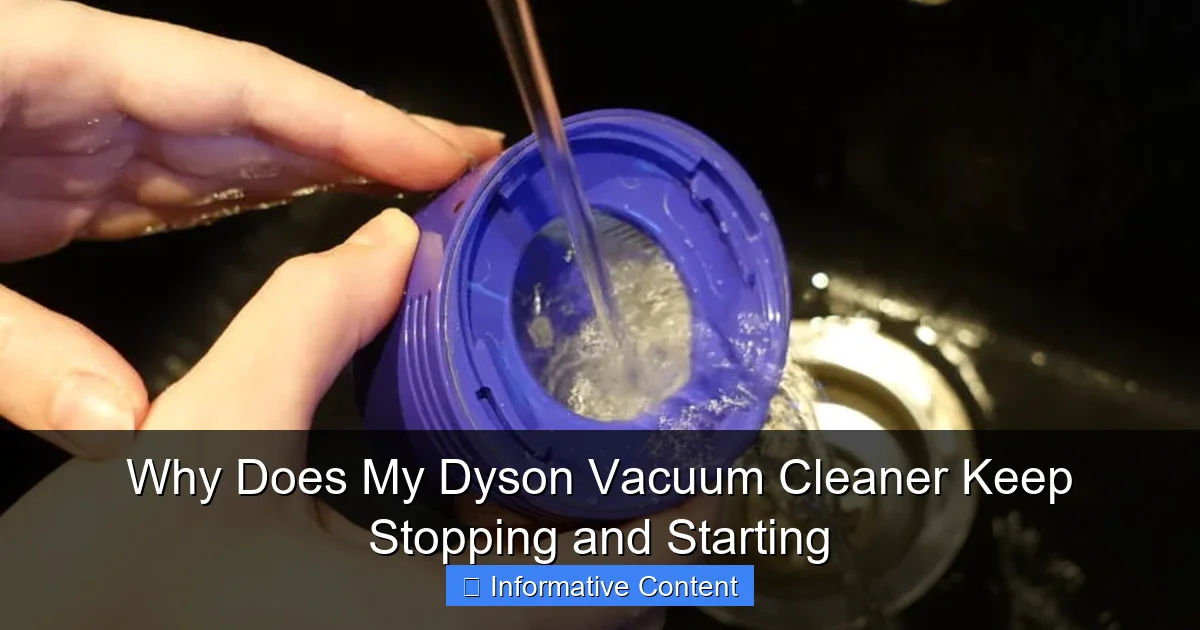
Visual guide about Why Does My Dyson Vacuum Cleaner Keep Stopping and Starting
Image source: trustedreviews.com
Dyson filters are critical for maintaining powerful suction and ensuring clean exhaust air. When your Dyson vacuum cleaner keeps stopping and starting, often the filters are to blame. They need regular cleaning to perform their best.
Why Dirty Filters Are a Problem
Over time, your Dyson’s filters collect an enormous amount of fine dust and allergens. While they do an excellent job, eventually they become clogged. This restriction in airflow forces the motor to work harder, generating more heat and eventually triggering the pulsing or shutdown mode to prevent overheating. It’s your vacuum’s way of saying, “I can’t breathe!”
Proper Filter Cleaning and Drying
Cleaning Dyson filters is usually straightforward, but the drying process is absolutely crucial.
- Locate Your Filters: Most Dyson models have at least one main washable filter (often blue or purple, located at the top of the cyclone assembly or near the motor). Some older models might have a pre-motor and a post-motor filter. Refer to your user manual for exact locations and cleaning instructions for your specific model.
- Rinse with Cold Water: Gently tap the filter over a bin to remove loose debris. Then, rinse it under cold running water. Squeeze it repeatedly until the water runs clear. Do NOT use detergents, dish soap, or hot water, as these can damage the filter material.
- THE DRYING IS CRITICAL: This is where many people go wrong. The filter MUST be bone dry before you put it back into your Dyson. If it’s even slightly damp, it can damage the motor. Leave it to air dry for a minimum of 24-48 hours in a warm, dry place. Avoid direct sunlight or using a tumble dryer, which can warp or damage it. Placing it near a dehumidifier or fan can speed up the process, but patience is key.
- Frequency of Cleaning: Dyson recommends cleaning filters at least once a month, more often if you use your vacuum frequently or in dusty environments.
Battery Issues: The Power Behind the Pause
For cordless Dyson models, a dying or faulty battery is a very common reason why your Dyson vacuum cleaner keeps stopping and starting. Unlike corded models that have a continuous power supply, cordless vacuums rely entirely on their battery pack.
Signs of a Failing Battery
A battery that’s nearing the end of its life will often manifest its decline in specific ways.
- Reduced Run Time: Your vacuum doesn’t last as long on a charge as it used to.
- Inconsistent Power: The vacuum might start strong but then quickly fade, pulse, or cut out within minutes, even after a full charge.
- Sudden Shutdowns: It might just stop entirely, even if the battery indicator shows some charge remaining.
- Flashing Lights: Many Dyson models have indicator lights that will flash a specific pattern to signal a battery error. Check your manual for what these patterns mean.
- Vacuum Refuses to Charge: In severe cases, the battery might not take a charge at all.
Maximizing Battery Lifespan
While all batteries degrade over time, you can help extend their life.
- Don’t Overcharge (Most Models): While modern Dyson batteries often have protection circuits, continuous “trickle charging” for days on end might not be ideal for every battery type. Refer to your manual.
- Avoid Extreme Temperatures: Don’t store or charge your Dyson in very hot or very cold environments.
- Use ECO Mode: For everyday cleaning, using the lower power setting can prolong battery life per charge cycle.
When to Replace the Battery
If your Dyson is more than 2-3 years old and you’re experiencing the symptoms above, a battery replacement is a very likely solution. Dyson sells official replacement batteries, and third-party options are also available. Ensure you get the correct battery for your specific model. Replacing the battery is usually a straightforward process, often involving just a few screws.
Motorhead or Brush Bar Problems
Beyond simple hair tangles, issues with the motorhead itself or a genuinely damaged brush bar can cause your Dyson to stop and start. The motorhead contains its own small motor that drives the brush bar. If this motor struggles or the brush bar is severely impeded, the main vacuum motor might pulse or shut down.
Obstructions in the Motorhead
Sometimes, debris gets past the brush bar and into the inner workings of the motorhead.
- Internal Clogs: Fine dust, pet hair, or even a small piece of carpet pile can accumulate inside the neck of the motorhead, near the drive belt or gears. This is harder to access but can cause significant resistance.
- Damaged Drive Belt: Some cleaner heads use a drive belt to transfer power to the brush bar. If this belt is worn, stretched, or broken, the brush bar won’t spin correctly, causing the motor to struggle. Replacing a drive belt can be a DIY task for some, but might require partial disassembly of the cleaner head.
Worn or Damaged Brush Bar
A physically damaged brush bar can also be the culprit.
- Bent or Broken Bristles: If the bristles are severely bent, worn down, or if the bar itself is warped, it won’t rotate smoothly. This creates drag and can trigger the safety cut-out.
- End Cap Issues: The brush bar sits in end caps that allow it to spin. If these end caps are missing, damaged, or filled with debris, the brush bar won’t turn freely. Clean them thoroughly and ensure they are properly seated.
- Motorhead Sensor: Some Dyson motorheads have a sensor that detects if the brush bar is spinning correctly. If this sensor is faulty, or if the brush bar isn’t spinning due to an obstruction, it can cause the main vacuum to pulse or stop.
Electronic Glitches and Sensor Sensitivity
Dyson vacuums are packed with advanced electronics and sensors. While usually reliable, sometimes these components can misbehave, leading to the frustrating stop-start behavior. If you’ve ruled out all physical blockages, filter issues, and battery problems, you might be looking at an electronic glitch.
The Role of Sensors
Your Dyson has sensors monitoring various aspects of its operation:
- Airflow Sensors: These detect if airflow is restricted (e.g., by a blockage or dirty filter) and signal the motor to pulse or shut down.
- Temperature Sensors: If the motor starts to overheat due to strain (often from blockages), these sensors trigger the protective shutdown.
- Brush Bar Sensors: As mentioned, some cleaner heads have sensors to ensure the brush bar is rotating correctly.
- Battery Management System: For cordless models, this system monitors battery charge, health, and temperature, and can cut power if it detects an issue.
A faulty sensor might give incorrect readings, leading to unwarranted shutdowns.
Resetting Your Dyson
Sometimes, a simple power reset can resolve minor electronic glitches.
- Remove the Battery (Cordless): For cordless models, detach the battery pack. Leave it out for about 15-30 minutes. This allows any residual charge in the capacitors to dissipate and effectively “hard resets” the vacuum’s electronics. Reattach the battery and try again.
- Unplug (Corded): For corded models, simply unplug the vacuum from the wall socket for 15-30 minutes.
- Reboot Sequence: Some models might have a specific reset sequence (e.g., holding down the trigger or power button for a certain duration). Check your manual.
This simple step often clears temporary software or sensor confusion, resolving the issue of why your Dyson vacuum cleaner keeps stopping and starting.
Advanced Troubleshooting & When to Call for Help
If you’ve meticulously gone through all the common issues – cleared every possible blockage, cleaned and dried the filters perfectly, swapped out an old battery, and inspected the brush bar – and your Dyson vacuum cleaner keeps stopping and starting, it might be time to consider less common problems or seek professional assistance.
Less Common Issues (e.g., Internal Wiring)
- Internal Wiring: Over time, especially with frequent bending or impacts, internal wires within the vacuum’s body, wand, or cleaner head can become loose, frayed, or damaged. This can lead to intermittent power supply. Diagnosing this often requires opening up the vacuum, which can be complex and potentially void your warranty.
- Motor Fault: While rare, the main motor itself could be failing. This usually presents as a consistent lack of power, strange noises, or a burning smell, in addition to the stopping and starting. Motor replacement is generally a professional repair.
- Trigger Assembly (Cordless): For some cordless models, the trigger switch can wear out or become faulty, leading to intermittent power. This is a common point of failure with frequent use.
When Professional Help is Needed
Knowing when to throw in the towel and call for expert help is important.
- Under Warranty: If your Dyson is still under warranty (Dyson typically offers a 2-5 year warranty depending on the model), contact Dyson customer support immediately. Do not attempt complex repairs yourself, as this could void the warranty. Provide them with a detailed description of the problem and the troubleshooting steps you’ve already taken.
- Complex Disassembly Required: If diagnosing the issue requires taking apart major components of the vacuum (beyond filter removal or simple brush bar cleaning) and you’re not comfortable with it, it’s best left to a professional.
- Safety Concerns: If you notice sparks, unusual burning smells, or excessive heat, stop using the vacuum immediately and seek professional advice. Electrical issues can be dangerous.
- Tried Everything Else: If you’ve diligently followed all the troubleshooting steps in this guide and your Dyson vacuum cleaner keeps stopping and starting, despite your best efforts, then it’s highly likely to be an internal component failure that requires specialized tools or knowledge.
Ultimately, regular maintenance is your best defense against your Dyson stopping and starting. Make cleaning the filters a monthly habit, regularly check for blockages, and promptly deal with any hair tangles on the brush bar. These simple steps can significantly extend the life and consistent performance of your cherished Dyson vacuum cleaner.
Conclusion
It can be incredibly frustrating when your trusty cleaning companion, your Dyson vacuum cleaner, keeps stopping and starting mid-task. But as we’ve explored, this common issue is almost always a solvable one. From stubborn blockages in the wand or cleaner head to a clogged filter crying out for a wash, or a battery that’s simply run its course, your Dyson is usually just trying to communicate a need.
By systematically checking for blockages, ensuring your filters are clean and bone-dry, assessing your battery’s health, and inspecting the brush bar, you can usually pinpoint the problem and get your vacuum back to full strength. Remember, your Dyson’s pulsing behavior is often a smart safety mechanism, not a sign of impending doom. So, take a deep breath, grab your user manual, and get ready to troubleshoot. With a little patience and the tips from this guide, you’ll have your Dyson running like new, sucking up dirt and dust without any frustrating interruptions. Happy cleaning!
🎥 Related Video: How to Fix DYSON VACUUM Pulsing Problem (Starts & Stops)!!! 20 SECOND FIX | Andrea Jean
📺 Andrea Jean Co
This video is for YOU if you are interested in: dyson v6 cordless easy repair, starts and stops pulsates, dyson v6 v7 v8 common …
Frequently Asked Questions
How often should I clean my Dyson filters to prevent stopping and starting?
Dyson generally recommends cleaning your washable filters at least once a month. If you have pets, use your vacuum frequently, or clean very dusty areas, you might need to clean them more often, perhaps every two weeks.
Can I clean Dyson filters in a washing machine or dishwasher?
No, you should never clean Dyson filters in a washing machine or dishwasher. They should only be rinsed under cold running water. Using detergents or hot water can damage the filter material and potentially void your warranty.
How long does a Dyson vacuum battery typically last before needing replacement?
The lifespan of a Dyson battery varies, but on average, they last between 2 to 4 years with regular use and proper charging habits. You’ll notice a significant decrease in run time and performance as it ages.
Is it safe to use my Dyson if it keeps stopping and starting?
It’s generally not recommended to continue using your Dyson if it consistently stops and starts without troubleshooting. This behavior is often a protective measure, and forcing it to run could cause further damage to the motor or other components.
My Dyson works fine on “Max” mode but stops and starts on lower power settings. Why?
If your Dyson works better on Max mode, it might indicate a marginal blockage that’s only overcome by the highest suction, or a battery that’s just strong enough for max but struggles to maintain consistent power at lower draws. Check for minor blockages first.
Where can I find my Dyson vacuum cleaner’s model number for troubleshooting or parts?
Your Dyson’s model number is typically found on a sticker or plate located on the main body of the vacuum, often near the bin, under the battery (for cordless models), or on the bottom of the motorhead. It’s crucial for finding the correct replacement parts or troubleshooting guides.