
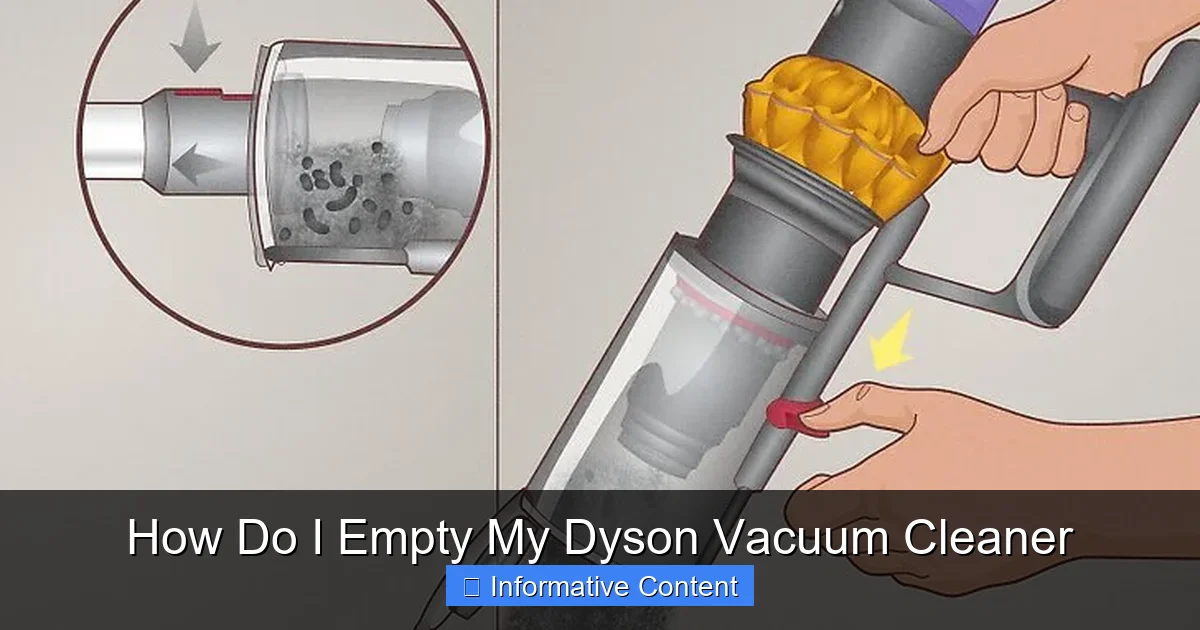
Emptying your Dyson vacuum cleaner is a straightforward process designed for hygiene and convenience, but it varies slightly by model. For cordless models, you typically locate a red or grey lever to release the bin flap. Upright and canister models usually involve detaching the entire bin first, then pressing a button to open its base. Regular, correct emptying prevents clogs, maintains optimal suction, and extends your Dyson’s lifespan, ensuring it always performs at its peak.
How Do I Empty My Dyson Vacuum Cleaner
Dyson vacuum cleaners are renowned for their powerful suction, innovative design, and often, their unique emptying mechanisms. If you’ve just brought home a new Dyson, or perhaps you’re a long-time owner just looking for a refresher, figuring out the best way to empty your Dyson vacuum cleaner can feel like solving a small puzzle. The good news is that Dyson designs its bins for hygiene and ease of use, making the process fairly straightforward once you know the trick for your specific model.
Emptying your Dyson correctly isn’t just about getting rid of the dirt; it’s a crucial step in maintaining your vacuum’s optimal performance. A full or improperly emptied bin can lead to reduced suction, potential blockages, and even put strain on the motor. By learning how to empty my Dyson vacuum cleaner the right way, you’ll ensure your machine continues to pick up every last speck of dust, keeping your home spotless and your vacuum in top condition for years to come.
This comprehensive guide will walk you through the various methods for emptying different Dyson models, from the popular cordless stick vacuums to the robust upright and canister machines. We’ll cover everything from preparation and the step-by-step process to troubleshooting common issues and essential maintenance tips. So, let’s dive in and make emptying your Dyson a quick, clean, and effortless task!
Key Takeaways
- Identify Your Dyson Model: The emptying process differs significantly between cordless stick vacuums (V-series, Gen5detect), upright vacuums (Ball, Cinetic Big Ball Upright), and canister vacuums (Cinetic Big Ball Canister). Knowing your model is the first step.
- Locate the Release Mechanism: Most Dysons feature a prominent red, grey, or silver lever, button, or slider designed to either detach the bin from the main unit or open its bottom flap to release dirt.
- Empty Over a Rubbish Bin: Always position the Dyson’s dust bin directly over a large rubbish bin before activating the release. This ensures all dust, dirt, and debris fall cleanly into the receptacle, minimizing mess and airborne particles.
- Don’t Overfill: Empty your Dyson when the dirt reaches the “MAX” fill line indicator. Overfilling can lead to reduced suction, strain on the motor, and potential blockages within the cyclone assembly.
- Address Blockages Safely: If debris gets stuck after emptying, gently tap the bin against the rubbish bin or use a long, blunt object (like a ruler or a wooden spoon handle) to dislodge it. Never use your fingers or sharp objects to clear blockages.
- Regular Bin and Filter Maintenance: Beyond just emptying, periodically wipe down the inside and outside of the dust bin. If your Dyson bin is washable (check your manual!), ensure it’s completely dry before reattaching. Regularly clean or wash your Dyson’s filter according to manufacturer guidelines.
- Prioritize Safety: Always turn off and unplug (for corded models) your Dyson before attempting to empty or perform any maintenance. Never immerse any electrical components in water.
Quick Answers to Common Questions
How often should I empty my Dyson vacuum cleaner?
You should empty your Dyson vacuum cleaner whenever the dirt reaches the “MAX” fill line on the dust bin. For optimal performance, it’s best not to let it get overly full, as this can reduce suction and potentially lead to blockages.
Can I wash the dust bin of my Dyson vacuum?
Some Dyson dust bins are designed to be washable. You must check your specific model’s user manual to confirm. If washable, rinse with cold water only and ensure it is completely dry (at least 24 hours) before reattaching to prevent motor damage.
What if dirt gets stuck in the cyclone cone after I empty my Dyson vacuum cleaner?
If dirt or hair gets stuck, gently tap the bin against the inside of a rubbish bin. For stubborn clumps, you can use a long, blunt object like a chopstick or a ruler to carefully dislodge the debris. Always ensure the vacuum is off and unplugged first.
Is there a difference in emptying a cordless Dyson versus a corded Dyson?
Yes, there’s a significant difference. Cordless Dysons typically have a “point and shoot” mechanism where you pull a lever to open the bin flap. Corded upright and canister Dysons usually require you to detach the entire bin from the main body first, then press a separate button to open the bin’s bottom flap.
Why is my Dyson losing suction even after I empty my Dyson vacuum cleaner?
If suction is still low after emptying, check for blockages in the wand, cleaner head, or cyclone assembly. Also, ensure your filter is clean and completely dry (if washable), as a dirty or wet filter is a common cause of reduced suction.
📑 Table of Contents
- Getting to Know Your Dyson’s Dust Bin
- Step-by-Step: Emptying Your Cordless Dyson Vacuum (V-Series, Outsize, Gen5detect)
- Step-by-Step: Emptying Your Corded Dyson Vacuum (Upright & Canister Models)
- Troubleshooting Common Bin-Emptying Challenges
- Beyond Emptying: Keeping Your Dyson Bin Clean and Healthy
- Safety First: Important Considerations
Getting to Know Your Dyson’s Dust Bin
Before we get into the nitty-gritty of how to empty your Dyson vacuum cleaner, it’s helpful to understand a little about its design and why regular emptying is so important. Dyson vacuums, regardless of type, all feature a transparent dust bin that collects the dirt and debris. This transparent design isn’t just for aesthetics; it allows you to easily see when it’s full and if there are any blockages.
Why Regular Emptying is Crucial
Think of your Dyson’s dust bin like the lungs of your vacuum cleaner. If they’re full, the machine can’t “breathe” properly, and its performance will suffer. When you consistently empty your Dyson vacuum cleaner as soon as the dirt reaches the “MAX” line, you prevent several issues:
- Maintained Suction Power: A clear bin means unimpeded airflow, allowing your Dyson to maintain its powerful suction.
- Prevention of Blockages: Overfilling can compact dirt, making it harder to empty and potentially creating stubborn blockages in the cyclone cone.
- Extended Lifespan: A vacuum that doesn’t have to work harder due to a full bin experiences less strain on its motor and components.
- Improved Hygiene: Regular emptying prevents dust mites, allergens, and odors from lingering in the bin, especially if you’re cleaning up pet hair or food debris.
Identifying Your Dyson Model
Dyson has innovated over the years, leading to different emptying mechanisms across its product lines. The method for how to empty my Dyson vacuum cleaner will primarily depend on whether you have a cordless stick vacuum (like the V-series, Outsize, or Gen5detect) or a corded upright or canister vacuum (like the Dyson Ball or Cinetic Big Ball). Take a quick look at your vacuum if you’re unsure of its specific model name – it’s usually printed somewhere on the body, often near the bin or motor housing.
Step-by-Step: Emptying Your Cordless Dyson Vacuum (V-Series, Outsize, Gen5detect)
Cordless Dyson vacuums are incredibly popular for their versatility and ease of use. Emptying these models is generally designed to be a quick, one-touch operation.
Preparations Before You Empty
Before you attempt to empty your Dyson vacuum cleaner, always ensure it is switched OFF. While the bin release mechanism is separate from the power button, it’s a good safety habit. Locate a rubbish bin, preferably one with a wide opening, and position your Dyson directly over it. This helps minimize dust clouds.
The Standard Pull-Lever Method (V7, V8, V10, V11, V12, V15, Gen5detect)
Most modern cordless Dyson vacuums use a similar “point and shoot” or pull-lever mechanism for emptying.
- Remove Attachments: If you have any attachments (like the wand or floor head) still connected, it’s often easier to remove them first. This gives you better access and prevents accidental damage.
- Locate the Red or Grey Lever: On most V-series models, you’ll find a prominent red or grey lever, often on top of the cyclone assembly or near the bin. This lever usually slides up or down.
- Position Over Rubbish Bin: Hold the vacuum with one hand, ensuring the bottom of the clear dust bin is pointing down into your rubbish bin.
- Activate the Release: With your other hand, firmly pull the red or grey lever upwards (or slide it down, depending on the model). You’ll hear a click as the bottom flap of the bin opens, releasing the dirt directly into the rubbish bin.
- Clear Any Stuck Debris: Sometimes, dust or hair can get caught around the metal shroud inside the bin. Gently tap the bin against the edge of the rubbish bin to dislodge it. If it’s really stubborn, you might need to manually pull out large clumps, being careful not to touch the interior cyclone components.
- Close the Bin: Once empty, push the bin flap firmly upwards until it clicks securely back into place. Ensure it’s fully closed to maintain suction.
The “Point and Shoot” Bin (V6, early models)
Some older cordless models, like the Dyson V6, feature a slightly different emptying mechanism.
- Detach the Wand/Tools: First, you’ll usually need to detach the main wand and any attached cleaning heads.
- Locate the Red Tab: Find the red tab or button, typically on the back of the handle where the bin meets the motor.
- Position Over Rubbish Bin: Hold the vacuum with the bin pointing downwards into your rubbish bin.
- Press the Tab: Press the red tab. The entire clear bin assembly will slide down, and the bottom flap will open simultaneously, releasing the dirt.
- Close the Bin: Push the bin back up until it clicks securely into its locked position.
Dealing with Stubborn Debris in Cordless Bins
Even with the best design, sometimes hair, fibers, or compacted dust can cling to the cyclone shroud inside the bin. If this happens, once you’ve opened the bottom flap and most of the dirt has fallen out:
- Tap Gently: Lightly tap the side of the clear bin with your hand or against the edge of the rubbish bin.
- Manual Removal (Carefully!): For very stubborn clumps, you might need to reach in. *Always ensure the vacuum is off and unplugged.* Use a long, blunt object like a chopstick, a ruler, or the handle of a cleaning brush to dislodge the debris. Avoid using your fingers, especially near any sharp edges or interior components.
- Never Wash Electrical Parts: Do not wash the entire bin assembly if it’s permanently attached to the motor unit. Only parts specifically indicated in your manual as washable should be cleaned with water.
Step-by-Step: Emptying Your Corded Dyson Vacuum (Upright & Canister Models)
Corded Dyson vacuums, particularly the upright Ball models and canister (cylinder) vacuums, have a slightly different process for how to empty my Dyson vacuum cleaner. Here, you’ll typically detach the entire dust bin assembly from the main body of the vacuum before emptying.
Emptying Upright Dyson Models (Dyson Ball, Cinetic Big Ball Upright)
- Power Off and Unplug: Crucially, always turn off and unplug your upright Dyson before removing the bin.
- Locate the Bin Release Button: This is usually a prominent red or grey button, often on the handle or near the top of the dust bin itself. Press it to release the bin.
- Lift Off the Bin: Carefully lift the entire clear dust bin assembly away from the main vacuum body.
- Position Over Rubbish Bin: Carry the detached bin over to your rubbish bin.
- Locate the Bin Opening Button: On the bottom of the detached bin, or sometimes on the handle of the bin, you’ll find another red or grey button. Press this button. The bottom flap of the bin will swing open.
- Release Dirt: The dirt and debris will fall out. Gently shake or tap the bin to ensure all contents are released.
- Close the Bin: Push the bottom flap firmly upwards until it clicks securely shut.
Emptying Canister/Cylinder Dyson Models (Dyson Cinetic Big Ball Canister, Small Ball)
The process for canister vacuums is very similar to uprights.
- Power Off and Unplug: Always turn off and unplug your canister Dyson before handling the bin.
- Release the Bin: On canister models, the bin usually sits on top or clips into the main body. Locate the release button (often red or grey) and press it to detach the bin.
- Lift and Carry: Lift the entire dust bin assembly away from the canister unit and carry it to your rubbish bin.
- Open the Bottom Flap: Find the second red or grey button on the bin, typically on the underside or handle. Press this to open the bottom flap and release the dirt.
- Close Securely: Once empty, push the bottom flap firmly back into place until you hear it click shut.
Reattaching the Bin Correctly
After emptying, correctly reattaching the bin is just as important as removing it.
- Align the Bin: Carefully align the dust bin with the corresponding slots or guides on the main vacuum body.
- Push Until It Clicks: Gently but firmly push the bin down or into place until you hear a definitive click. This confirms it’s securely locked. If it’s not properly seated, the vacuum may not function, or it might lose suction.
Troubleshooting Common Bin-Emptying Challenges
Even when you know how to empty my Dyson vacuum cleaner, you might encounter a few minor hiccups.
When the Bin Won’t Open
If you press the release button or pull the lever and the bin flap doesn’t open:
- Check for Obstructions: Sometimes, a large piece of debris (like a sock or a toy) might be jammed against the mechanism. Gently shake the vacuum or visually inspect the bin for visible blockages.
- Apply More Pressure: Ensure you are pressing the release button or pulling the lever with enough force. Dyson mechanisms are designed to be firm but should operate smoothly.
- Refer to Your Manual: If all else fails, consult your specific model’s user manual. There might be a slight variation you’re missing.
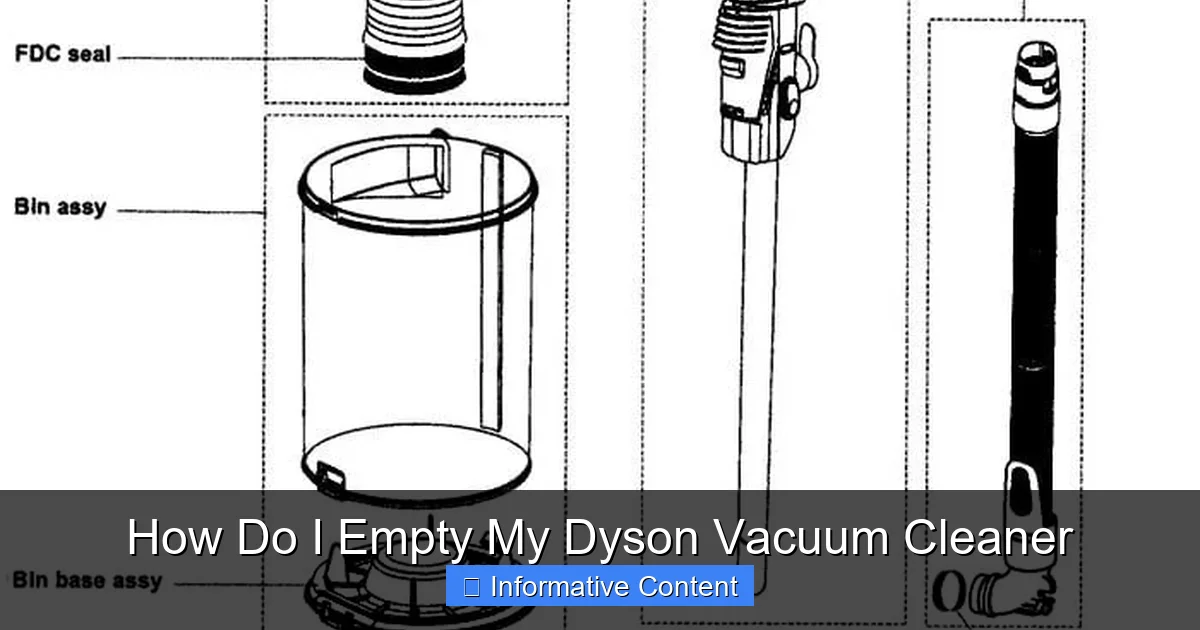
Visual guide about How Do I Empty My Dyson Vacuum Cleaner
Image source: i.pinimg.com
Stubborn Dirt or Hair Getting Stuck
It’s common for hair, lint, and fine dust to cling to the interior of the cyclone shroud, especially with static electricity.
- Tap and Shake: Vigorously tap the clear bin against the inside of your rubbish bin to dislodge clinging debris.
- Use a Blunt Tool: As mentioned, a chopstick, ruler, or wooden spoon handle can be effective for gently pushing out stubborn clumps from the top opening of the bin (with the bottom flap open).
- Do Not Use Water: Unless your manual explicitly states the *entire* bin assembly is washable, do not rinse or immerse the entire unit, especially if it contains electrical components.
Reducing Dust Clouds
Emptying any vacuum can release a puff of dust. To minimize this:
- Empty Over a Large Bin: Use a rubbish bin with a wide opening and ideally, line it with a bag.
- Empty Outdoors: If possible, empty your Dyson outdoors, away from open windows, especially if you have allergies.
- Empty Frequently: A less full bin often results in less compacted and less “explosive” dust release.
Beyond Emptying: Keeping Your Dyson Bin Clean and Healthy
Knowing how to empty my Dyson vacuum cleaner is just one part of keeping it in peak condition. Regular cleaning of the bin itself and maintaining the filter are also vital.
Washing Your Dyson Dust Bin (if applicable)
Some Dyson dust bins, particularly the clear plastic cyclone assembly for cordless models, are designed to be washable. **Always check your specific model’s user manual before washing.**
- Detach the Bin: Follow the steps above to fully detach the clear dust bin from the main vacuum body.
- Remove Any Central Filters (if present): Some bins have a central filter that must be removed before washing the plastic bin.
- Rinse with Cold Water: Rinse the bin thoroughly under cold tap water. Do NOT use detergents, dish soap, or hot water, as these can damage the plastic or internal components.
- Dry Completely: This is the MOST CRITICAL step. The bin *must* be absolutely, completely dry before being reattached to the vacuum. Air dry for at least 24 hours, or even longer in humid conditions. Placing it near a fan or in a well-ventilated area can help. Reattaching a damp bin can damage the motor.
Maintaining Your Dyson Filter
Your Dyson’s filter works hand-in-hand with the bin to trap microscopic particles. Many Dyson filters are washable.
- Locate the Filter: Filters are typically located at the top of the motor housing (cordless models) or within the bin assembly itself (corded models).
- Wash as Directed: Most washable filters should be rinsed under cold running water until the water runs clear. Gently squeeze or tap them to remove excess water.
- Dry Thoroughly: Just like the bin, filters must be COMPLETELY dry before being reinserted. Allow at least 24 hours of air drying.
- Replace When Needed: If a washable filter remains smelly or visibly damaged after washing and drying, or if your Dyson has a non-washable filter, replace it according to Dyson’s recommendations.
General Bin Hygiene Tips
- Wipe it Down: Even if you can’t wash the entire bin, periodically use a damp cloth (not wet!) to wipe down the exterior and interior (after emptying and with the bottom flap open) to remove dust and grime.
- Avoid Harsh Chemicals: Never use abrasive cleaners, solvents, or polishes on your Dyson’s bin or any other part, as these can damage the plastic and seals.
- Check for Damage: During regular emptying, quickly inspect the bin for any cracks, loose seals, or damage to the flap mechanism. Damage can lead to air leaks and reduced suction.
Safety First: Important Considerations
Safety should always be your top priority when performing any maintenance on electrical appliances.
Power Off Before Emptying
For all Dyson models, always ensure the vacuum is switched OFF. For corded models, go a step further and UNPLUG the machine from the wall outlet. This prevents any accidental activation while you’re handling components.
Never Use Water on Electrical Components
Dyson vacuums are sophisticated machines with intricate electrical components. Never immerse any part of the vacuum that is directly connected to the motor or battery in water. Only wash components specifically designated as “washable” by Dyson, and always ensure they are bone dry before reassembly.
Check for Blockages Safely
If you suspect a blockage within the main vacuum body or airways (not just the bin), *never* stick your fingers or hand into the machine while it’s connected to power or turned on. Use a long, blunt object or refer to your Dyson manual for specific blockage clearing instructions for your model.
Knowing how to empty my Dyson vacuum cleaner properly is a fundamental part of Dyson ownership. By following these guidelines, you’ll not only keep your Dyson running efficiently but also extend its life and ensure a consistently clean home. It might seem like a small detail, but regular, correct bin emptying is truly the key to maximizing your Dyson’s legendary performance.
Frequently Asked Questions
How do I know when my Dyson bin is full?
Your Dyson’s dust bin is transparent and has a clearly marked “MAX” fill line. You should empty the bin as soon as the dirt and debris reach or exceed this line to maintain optimal performance and prevent potential issues.
Can I use soap or detergent to clean my Dyson’s dust bin?
No, you should not use soap, detergent, or any cleaning agents when washing your Dyson’s dust bin. Only use cold water. Soaps can leave residue that may affect performance or damage the plastic components over time.
What should I do if my Dyson’s bin flap won’t close properly?
If the bin flap isn’t closing, first check for any debris trapped in the hinge or latch mechanism that might be preventing it from fully seating. Ensure it’s free of obstructions, then apply firm, even pressure until you hear it click securely into place.
Can emptying my Dyson vacuum cleaner indoors cause allergies to flare up?
Yes, emptying the bin can release fine dust and allergens into the air, which might trigger allergies. To minimize this, empty your Dyson over a large rubbish bin, ideally outdoors or in a well-ventilated area, and consider wearing a mask if you’re particularly sensitive.
How do I reattach the dust bin to my Dyson vacuum after emptying it?
After emptying, carefully align the dust bin with the corresponding guides or slots on the main vacuum body. Gently push it into place until you hear a distinct click, indicating that it is securely locked and properly seated, ready for use.
Is it bad to let my Dyson bin get too full before I empty my Dyson vacuum cleaner?
Yes, it is generally bad to let your Dyson bin get too full. Overfilling can lead to reduced suction power, create blockages within the cyclone assembly, and put unnecessary strain on the motor, potentially shortening your vacuum’s lifespan.