
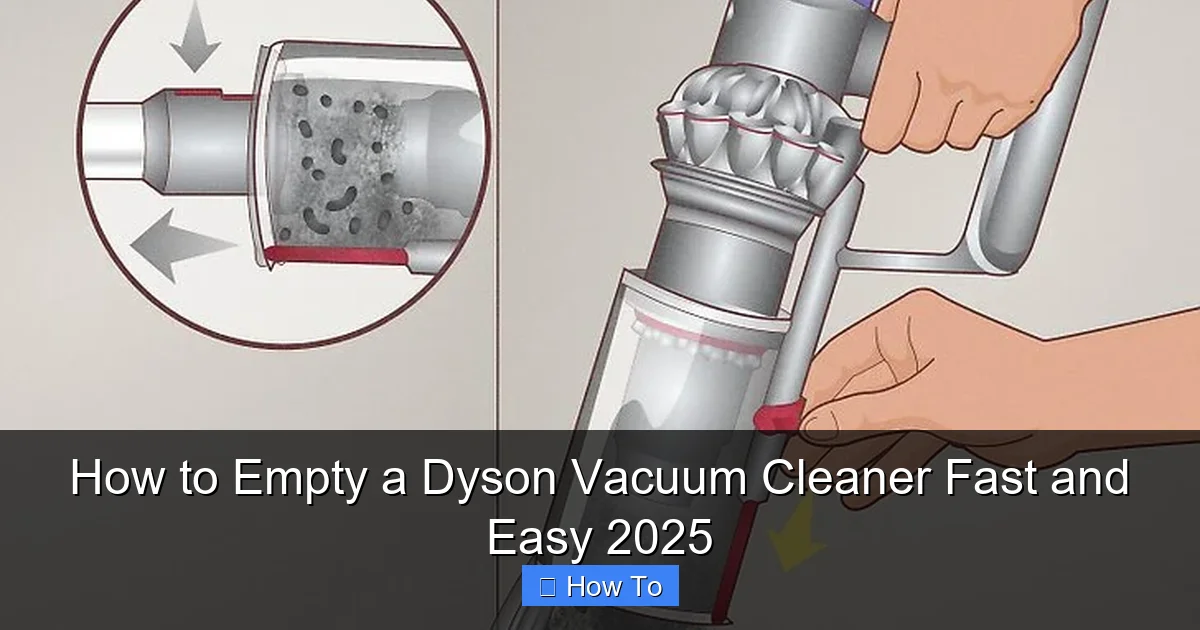
Learning how to empty your Dyson vacuum cleaner is crucial for maintaining its powerful suction and extending its lifespan. This comprehensive 2025 guide makes the process fast and easy, covering all popular models with clear, step-by-step instructions and practical tips. Keep your Dyson performing at its absolute best by following our simple advice on how to empty a Dyson vacuum cleaner regularly and efficiently.
How to Empty a Dyson Vacuum Cleaner Fast and Easy 2025
Ah, the satisfying hum of a Dyson vacuum cleaner at work! It effortlessly sucks up dirt, dust, and pet hair, leaving your floors sparkling clean. But what happens when that clear bin fills up? It’s a question many Dyson owners ask, especially if it’s their first time. Don’t worry, emptying your Dyson vacuum cleaner is designed to be quick, hygienic, and incredibly easy. In fact, with a little know-how, you’ll be emptying your Dyson like a pro in no time!
Welcome to your ultimate 2025 guide on how to empty a Dyson vacuum cleaner. Whether you own a sleek V-series cordless stick, a powerful Outsize, the innovative Gen5detect, or a classic Ball upright, this comprehensive guide will walk you through every step. We’ll cover the distinct methods for different Dyson models, offer practical tips for a mess-free experience, and even tackle common troubleshooting questions. Our goal is to make sure your Dyson continues to perform at its peak, providing you with a cleaner home effortlessly.
Let’s dive in and learn how to make emptying your Dyson vacuum cleaner a breeze!
Key Takeaways
- Prioritize Safety: Always unplug your Dyson or ensure it’s switched off before attempting to empty the dust bin to prevent accidental activation.
- Model-Specific Methods: Dyson cordless stick vacuums often use a “point and shoot” mechanism, while upright and canister models typically require detaching the bin first before opening the base.
- Regular Emptying is Key: Empty your Dyson vacuum cleaner after each major use, or when the “MAX” line is reached, to maintain optimal suction power and prevent blockages.
- Position Over a Trash Can: Always position the clear bin deep inside a large trash can before releasing the dirt to minimize dust and debris from escaping into your freshly cleaned space.
- Gentle Tap for Stubborn Debris: If dirt gets stuck, gently tap the side of the clear bin with your hand (never a hard object) or use a long, blunt tool to dislodge it from the inside.
- Keep the Bin Clean: Occasionally wipe down the inside and outside of the clear bin with a damp, lint-free cloth after emptying to prevent residue buildup and maintain clarity.
- Troubleshooting is Simple: Most common emptying issues, like a stuck bin or stubborn dirt, can be resolved quickly with simple techniques outlined in this guide.
Quick Answers to Common Questions
My Dyson bin won’t open – what should I do?
First, ensure the vacuum is off/unplugged. Check for any visible large debris wedged in the opening. Then, firmly press the release lever or button, sometimes it requires a solid push. If it’s still stuck, gently tap the bin to dislodge any internal blockage, but avoid excessive force.
How often should I empty my Dyson vacuum?
Ideally, you should empty your Dyson vacuum cleaner after every major use, or as soon as the dirt reaches the “MAX” fill line on the clear bin. This ensures optimal suction power and prevents strain on the motor.
What’s the best way to prevent dust from flying everywhere when I empty it?
Always position the bin deep inside a large trash can. Using a trash can with a liner bag is even better, as you can quickly tie it off. Some users find emptying outdoors on a windy day helpful, but ensure the dust doesn’t just blow back into your home.
Can I wash the clear dust bin of my Dyson?
While you can usually wipe the clear bin with a damp cloth, check your specific model’s manual before submerging it. Some bins have electronic components or delicate filters that should not get wet. Always ensure it’s completely dry before reattaching it to the vacuum.
How can I prevent hair and fluff from getting stuck in the bin’s cyclone?
To prevent blockages, try to empty your Dyson before the bin becomes overly full. For long hair, sometimes a quick wipe with a damp paper towel around the cyclone shroud after emptying can help prevent buildup. Periodically, carefully use a blunt tool to dislodge any stuck fluff.
Safety First: Essential Precautions Before Emptying Your Dyson
Before you even think about emptying the dust bin, safety should always be your top priority. Taking a few moments to ensure your Dyson is safely prepared can prevent accidents and make the process much smoother.
Unplug or Power Off Your Dyson
If you have a corded Dyson upright or canister model, always unplug it from the wall socket before attempting to remove or empty the bin. For cordless stick vacuums, ensure the machine is completely switched off and, if possible, remove the battery or ensure the trigger is not accidentally pressed. This prevents the vacuum from accidentally starting up while your hands are near the opening, which could be surprising and potentially dangerous.
Read Your User Manual
While this guide offers general instructions for how to empty a Dyson vacuum cleaner, specific models might have unique quirks or features. Always refer to your Dyson’s official user manual for any model-specific instructions or warnings. You can usually find a digital copy on the Dyson website by searching for your specific model.
Emptying Your Dyson Cordless Stick Vacuum (V-Series, Outsize, Gen5Detect)
Dyson’s cordless stick vacuums are renowned for their lightweight design and powerful suction. Emptying them is typically a “point and shoot” affair, designed for maximum hygiene. This method applies to popular models like the V7, V8, V10, V11, V12 Detect Slim, V15 Detect, Outsize, and the very latest Gen5detect.
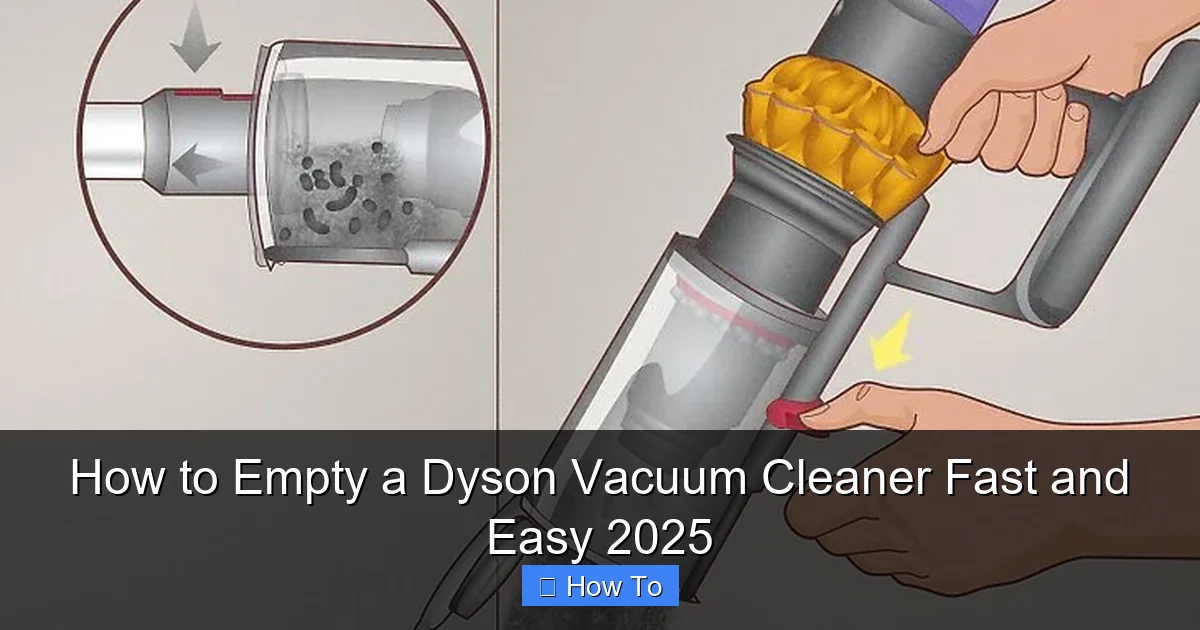
Visual guide about How to Empty a Dyson Vacuum Cleaner Fast and Easy 2025
Image source: wikihow.com
Step 1: Prepare for Emptying
Find a large trash can. It’s best to use one that’s deep enough so you can place the vacuum’s clear bin well inside to minimize dust escaping. Have a damp cloth handy, just in case.
Step 2: Locate the Bin Release Mechanism
The bin release mechanism on most Dyson cordless stick vacuums is typically a red lever or button. Its exact placement varies slightly by model:
- Older V-series (V7, V8): The red lever is usually on the top of the cyclone assembly. You pull it upwards.
- Newer V-series (V10, V11, V12, V15, Outsize, Gen5detect): The red lever is often positioned on the front or side of the bin, near the top. You push it downwards or forwards.
Take a moment to identify this red lever or button on your specific Dyson model.
Step 3: Position Over a Waste Bin
Hold your Dyson vacuum cleaner with the clear bin pointed downwards, directly over the center of your trash can. Ensure the end of the bin is deep inside the can. This is crucial for containing the dust and debris when you empty your Dyson.
Step 4: Actuate the Release and Empty
With the bin positioned correctly over the trash can, activate the red release mechanism:
- If it’s a lever, pull it firmly upwards or push it downwards/forwards, depending on your model. You’ll hear a click, and the cyclone shroud will lift, while the bottom flap of the clear bin will open simultaneously.
- The dirt and debris will drop out of the bottom of the bin. Give it a gentle shake if necessary to ensure all contents are released.
Step 5: Close and Secure the Bin
Once all the dirt has fallen out, gently push the cyclone shroud back down until the bottom flap clicks securely into place. You should hear a clear click indicating that the bin is sealed. If it doesn’t click, gently push harder until it does. Ensure it’s fully closed before using your Dyson again.
Practical Tips for Cordless Stick Vacuums
- Prevent the Dust Cloud: Position the bin as far down into the trash can as possible. Some users even line their trash cans with a plastic bag specifically for emptying the Dyson to contain dust.
- Stubborn Debris: If hair or larger debris gets stuck, a gentle tap on the side of the clear bin (never hit it with a hard object!) can help. You can also carefully use a long, blunt tool (like the end of a wooden spoon or a dust brush handle) to dislodge it from the top, ensuring not to damage any internal components.
- Wipe Down: After emptying, a quick wipe of the clear bin with a slightly damp microfiber cloth can keep it looking new and prevent dust buildup on the exterior.
Emptying Your Dyson Upright or Canister Vacuum (Ball, Cinetic Big Ball)
Dyson’s upright and canister vacuums, like the popular Ball series or Cinetic Big Ball, often have larger dust bins and a slightly different emptying process. The key difference is usually detaching the bin first.
Step 1: Detach the Clear Bin
First, you need to remove the clear bin assembly from the main body of the vacuum cleaner. Look for a large, often red, button or lever near the top of the clear bin where it connects to the main unit. Press this button firmly to release the bin. Gently pull the bin upwards and away from the vacuum body.
Step 2: Prepare for Emptying
Again, find a large waste bin. Because these bins can hold more, and the release mechanism is on the bottom, positioning it carefully is key to avoid a mess. It’s highly recommended to use a trash can with a liner bag for easy disposal and dust containment when you empty your Dyson.
Step 3: Locate the Bin Release Latch
With the clear bin detached, turn it upside down or to the side so you can see the bottom. You’ll find another red button or latch, usually on the side or bottom edge, that releases the base of the bin. This is separate from the button you used to detach the whole bin.
Step 4: Open the Bin Base and Empty
Hold the detached bin firmly over the trash can, with the bottom flap positioned deep inside. Press the red bin release latch. The bottom flap will swing open, allowing the dirt and debris to fall out. You might need to gently shake or tap the bin to ensure all contents are emptied. For Cinetic Big Ball models, the dirt may fall out as a more compressed mass.
Step 5: Close and Reattach the Bin
Once empty, firmly push the bottom flap of the clear bin back up until it clicks securely into place. Ensure it’s fully sealed. Then, carefully align the clear bin with the main body of your Dyson vacuum cleaner and push it down until it clicks firmly back into position. You should hear a solid click, indicating it’s properly secured.
Practical Tips for Upright/Canister Vacuums
- Controlling the Dust: These bins can create a bigger dust cloud. Consider emptying outdoors if possible, or inside a large, lined trash can.
- Dislodging Compressed Dirt: Upright Dyson bins can sometimes compact dirt, especially with fine dust or pet hair. If it doesn’t fall out easily, a gentle but firm tap on the side of the bin (avoiding the plastic release mechanisms) or using a blunt object to push from the top can help.
- Cleaning the Shroud: The conical mesh shroud inside the bin can accumulate dust and hair. Periodically, you can use a small brush (like an old toothbrush) or a damp cloth to clean around this area after emptying, ensuring it’s completely dry before reassembling.
Advanced Tips for a Cleaner Emptying Experience
Emptying your Dyson vacuum cleaner doesn’t have to be a dusty ordeal. Here are some pro tips for keeping things clean and hygienic.
Wear Gloves
For those sensitive to dust or simply wanting to keep their hands clean, wearing disposable gloves can make a huge difference. It helps avoid direct contact with dust and potential allergens.
Use a Large Trash Bag
Instead of just a trash can, open a large, sturdy trash bag and hold the Dyson’s bin inside it as you release the contents. This creates a barrier that traps dust and prevents it from escaping into the air.
Wipe Down the Bin Regularly
Over time, fine dust can coat the inside and outside of the clear bin, even after emptying. Periodically, (perhaps once a month or every few empties) wipe the entire clear bin with a damp, lint-free cloth. Make sure the bin is completely dry before reattaching it to the vacuum.
When to Empty Your Dyson for Optimal Performance
Knowing when to empty your Dyson vacuum cleaner is just as important as knowing how.
When the ‘MAX’ Line is Reached
All Dyson clear bins have a “MAX” fill line. When dirt and debris reach or exceed this line, it’s a clear signal that it’s time to empty. Continuing to vacuum with a full bin can reduce suction power and put unnecessary strain on the motor.
After Each Major Use
For best performance and hygiene, many Dyson experts recommend emptying the bin after every significant use. Even if it hasn’t reached the “MAX” line, starting each cleaning session with an empty bin ensures maximum suction from the start. This is particularly important if you have pets or a household prone to a lot of dust.
Troubleshooting Common Emptying Issues
Even with the best instructions, you might encounter a minor hiccup. Here’s how to troubleshoot common issues when you empty your Dyson vacuum cleaner.
Dust Bin Not Opening
- Check for Obstructions: Sometimes large pieces of debris can get wedged, preventing the flap from opening. Gently try to dislodge any visible blockages.
- Ensure Correct Pressure: Make sure you are pressing or pulling the release lever firmly and in the correct direction. Sometimes it requires a bit more force than expected.
- Refer to Manual: If it’s completely stuck, consult your specific model’s manual or Dyson’s online support for detailed troubleshooting.
Debris Stuck in the Cyclone or Bin
- Gentle Tapping: As mentioned, a few gentle taps on the side of the clear bin can help dislodge stuck dirt.
- Blunt Tool Assistance: For persistent blockages, carefully use a long, blunt object (like a wooden spoon handle, never anything sharp or metallic) to push the debris through from the top opening (on cordless models) or from the main opening after removing the bin (on uprights).
- Avoid Force: Never force the debris out with excessive force or by hitting the bin, as this can damage the plastic.
Bin Not Reattaching Properly
- Align Carefully: Ensure the bin is perfectly aligned with the main body of the vacuum. There are usually grooves or guides that help it slide into place.
- Check for Obstructions: Look for any small piece of debris that might be preventing a flush fit.
- Listen for the Click: Make sure you hear a distinct click when reattaching, both for the bin to the vacuum and for the bin’s bottom flap to close. If there’s no click, it’s not securely attached.
Maintenance Beyond Emptying: Keeping Your Dyson in Top Shape
Emptying the bin is a crucial step, but it’s part of a larger maintenance routine that ensures your Dyson vacuum cleaner remains a powerful cleaning ally for years to come.
Wash Your Filters Regularly
Most Dyson vacuums have washable filters. Check your manual for specific instructions on how often and how to wash them. Typically, they need rinsing under cold water until the water runs clear, followed by a minimum of 24-48 hours of air-drying before reinsertion. Clean filters are vital for maintaining strong suction and air quality.
Inspect the Brush Bar
Periodically check the cleaner head’s brush bar for tangled hair, strings, or debris. Many Dyson models feature a tangle-free head, but it’s still good practice to inspect. If necessary, carefully remove any obstructions to ensure the brush bar spins freely and effectively picks up dirt.
Clean the Clear Bin Itself
While emptying removes the bulk of the dirt, the clear plastic can become hazy or coated with fine dust residue over time. Occasionally, you can remove the clear bin and wipe its interior and exterior with a damp, lint-free cloth. Ensure it’s completely dry before putting it back on the vacuum. Do not submerge the entire bin assembly in water unless specifically instructed by your manual, as some parts may not be designed to get wet.
Conclusion: Keeping Your Dyson Vacuum Cleaner Performing at its Best
You’ve successfully learned how to empty a Dyson vacuum cleaner, covering all the essential steps and practical tips for various models. It’s clear that Dyson has engineered its vacuum cleaners for convenience and hygiene, making the emptying process as simple and mess-free as possible.
Remember, regularly emptying your Dyson is not just about clearing out the dirt; it’s about maintaining consistent, powerful suction, prolonging the life of your machine, and ensuring your home remains truly clean. By following these simple instructions, whether you own a cordless stick, an upright, or a canister model, you’ll keep your Dyson vacuum cleaner operating at its peak performance, ready for whatever cleaning challenge comes next in 2025 and beyond.
So, go ahead, confidently empty your Dyson, and enjoy the pristine results!
🎥 Related Video: how to empty ur dyson V8…#dyson #dysonv8 /mayang rosales
📺 Mayang Rosales