
Keeping your Shark vacuum cleaner performing its best starts with regular and proper emptying. This guide will show you exactly how do you empty a Shark vacuum cleaner, covering various models from uprights to stick vacs. Learn simple, hygienic steps to dispose of debris, deep clean the dust cup, and troubleshoot common issues, ensuring your vacuum maintains powerful suction for a spotless home.
You’ve invested in a Shark vacuum cleaner, a powerful ally in your quest for a spotless home. From tackling pet hair to banishing dust bunnies, your Shark works hard. But like any diligent worker, it needs a little help to keep going strong. And the most fundamental piece of maintenance? Knowing exactly how do you empty a Shark vacuum cleaner.
It might seem like a simple task, but doing it correctly and regularly is key to maintaining peak performance, extending your vacuum’s lifespan, and ensuring a hygienic home environment. A full dust cup isn’t just an inconvenience; it can lead to decreased suction, potential clogs, and even circulating allergens back into your air. So, let’s dive deep into the world of Shark vacuum emptying, ensuring you’re a pro in no time!
Key Takeaways
- Regular Emptying is Crucial: Empty your Shark vacuum cleaner’s dust cup regularly to maintain optimal suction power, prevent clogs, and ensure hygienic cleaning.
- Safety First: Always unplug your Shark vacuum before attempting to empty or clean any part of it to prevent accidental activation.
- Locate the Release Button: Most Shark models have a clearly marked button or latch to release the dust cup from the main body and another to open the bottom flap for emptying.
- Different Models, Slightly Different Methods: While the core principle is the same, uprights, stick vacs, handhelds, and robot Shark vacuums have minor variations in how their dust bins are removed and emptied. Always consult your specific model’s manual if unsure.
- Beyond Just Emptying: For optimal performance, periodically deep clean the dust cup with water (if washable and permitted by your manual) and clean internal screens or filters.
- Handle with Care: Empty your vacuum over a trash can to minimize dust dispersion. Consider wearing gloves if you have allergies or prefer not to touch the debris directly.
- Troubleshoot Common Issues: If the dust cup is hard to remove or open, double-check that you’re pressing the correct buttons firmly. Persistent issues might indicate a blockage or a need for a deeper clean.
Quick Answers to Common Questions
How often should I empty my Shark vacuum cleaner?
It’s generally recommended to empty your Shark vacuum cleaner’s dust cup after every use, or at least when the debris reaches the “Max Fill” line indicated on the bin. If you have pets or are cleaning particularly dusty areas, you might need to empty it more frequently to maintain optimal suction.
Can I wash my Shark vacuum’s dust cup?
Many Shark dust cups are washable, but not all. You must check your specific model’s user manual to confirm if it’s safe to wash. If it is, use cool water and ensure all components are 100% air-dried for at least 24-48 hours before reassembly to prevent mildew and damage.
What if my Shark vacuum’s dust cup is stuck and won’t release?
First, ensure the vacuum is unplugged. Double-check that you are pressing the correct release button firmly. Sometimes a large piece of debris can get wedged, preventing the bin from detaching or opening. Avoid forcing it, and gently try to identify any obstructions.
Why does my Shark vacuum have low suction even after emptying the dust cup?
Low suction after emptying usually indicates another issue. Check that the dust cup is securely reattached and all latches are closed. Also, inspect and clean your pre-motor (foam and felt) and post-motor (HEPA) filters, as clogged filters are a common cause of suction loss. Finally, check the hose and nozzle for any blockages.
Can I empty my Shark vacuum cleaner outdoors?
Yes, emptying your Shark vacuum cleaner outdoors is an excellent idea, especially if you have allergies or are sensitive to dust. It helps to prevent fine dust and allergens from recirculating inside your home. Just be sure to do it on a non-windy day to avoid scattering debris.
📑 Table of Contents
- Why Proper Emptying Matters for Your Shark’s Performance
- Getting Ready: What You Need Before You Empty Your Shark Vacuum
- Step-by-Step Guide: How to Empty Standard Shark Upright and Canister Models
- Specifics for Shark Stick, Handheld, and Robot Vacuums
- Beyond the Bin: Deep Cleaning Your Dust Cup and Filters
- Troubleshooting Common Issues and Maintenance Tips
- Conclusion
Why Proper Emptying Matters for Your Shark’s Performance
Think of your vacuum cleaner like an athlete. If their lungs are full of gunk, they can’t run as fast or as efficiently. The same goes for your Shark. The dust cup is its lung, storing all the dirt, dust, and debris it inhales. When it gets full, a few things start to happen that compromise its effectiveness.
Maintaining Optimal Suction Power
The primary reason to empty your Shark vacuum cleaner regularly is to preserve its incredible suction power. As the dust cup fills up, airflow inside the vacuum can become restricted. This restriction means less air can pass through the motor and into the nozzle, directly translating to weaker suction. You might notice your vacuum isn’t picking up as much as it used to, leaving behind crumbs or pet hair that it would normally tackle with ease. Learning how do you empty a Shark vacuum cleaner properly ensures that air can flow freely, keeping your vacuum performing at its very best.
Preventing Clogs and Overheating
A severely overflowing dust cup isn’t just about reduced suction. It can force debris into areas it shouldn’t go, potentially leading to clogs in the hose, filters, or even around the motor. These clogs are a nightmare to clear and can put undue strain on the motor, leading to overheating. Overheating can shorten the lifespan of your vacuum and, in extreme cases, even pose a safety risk. Regular emptying prevents this buildup and keeps your Shark running cool and clear.
Ensuring a Hygienic Cleaning Experience
Nobody wants to clean their home with a dirty tool. A dust cup full of old dirt, dust, allergens, and pet dander can start to smell over time. More importantly, if it’s too full, the vacuum might not effectively trap these particles, potentially blowing some fine dust back into the air you breathe. This is especially critical for households with allergy sufferers or pets. By mastering how do you empty a Shark vacuum cleaner, you ensure that the dirt stays contained and your cleaning efforts contribute to a truly fresh and healthy environment.
Getting Ready: What You Need Before You Empty Your Shark Vacuum
Before you begin the emptying process, a little preparation can go a long way in making it quick, clean, and hassle-free. Most of the time, you won’t need anything special, but a few considerations can improve the experience.
Visual guide about How Do You Empty a Shark Vacuum Cleaner
Image source: vacuumtester.com
The Essentials: Unplug and Locate Your Bin
- Unplug Your Vacuum: This is the golden rule for any vacuum maintenance! Always, always unplug your Shark vacuum cleaner from the wall outlet before you start messing with the dust cup or any other part. This prevents accidental activation and ensures your safety.
- Find a Designated Trash Can: Make sure you have a large enough trash can nearby. Emptying over a smaller bin can lead to spillages. For best results, use a trash can with a liner to easily dispose of the contents without making a mess in the bin itself.
Optional but Recommended Tools
- Gloves: If you’re sensitive to dust or simply prefer not to touch the grime directly, a pair of disposable gloves can be very helpful.
- Small Brush or Cleaning Tool: Sometimes, dust and hair can get stuck around the filter screen inside the dust cup. A small brush (often included with your Shark vacuum) or even an old toothbrush can be handy for dislodging stubborn debris.
- Outdoor Space (if possible): For very dusty or allergy-triggering contents, emptying your Shark vacuum cleaner outdoors can prevent dust from recirculating inside your home.
Step-by-Step Guide: How to Empty Standard Shark Upright and Canister Models
Most Shark upright and canister models share a similar design for their dust cups. The process is generally straightforward once you know where the release buttons are. Let’s walk through it.
Removing the Dust Cup from the Vacuum Body
- Locate the Dust Cup Release Latch/Button: On most Shark uprights and canisters, you’ll find a prominent button or latch, often near the top or side of the dust cup where it connects to the main vacuum body. It might be labeled “DUST CUP RELEASE” or have an arrow pointing to it.
- Press and Pull: Firmly press this release button and gently pull the dust cup away from the vacuum’s main body. It should detach fairly easily. If it feels stuck, double-check that you’re pressing the correct button and pulling in the right direction. Do not force it.
Emptying the Debris into the Trash
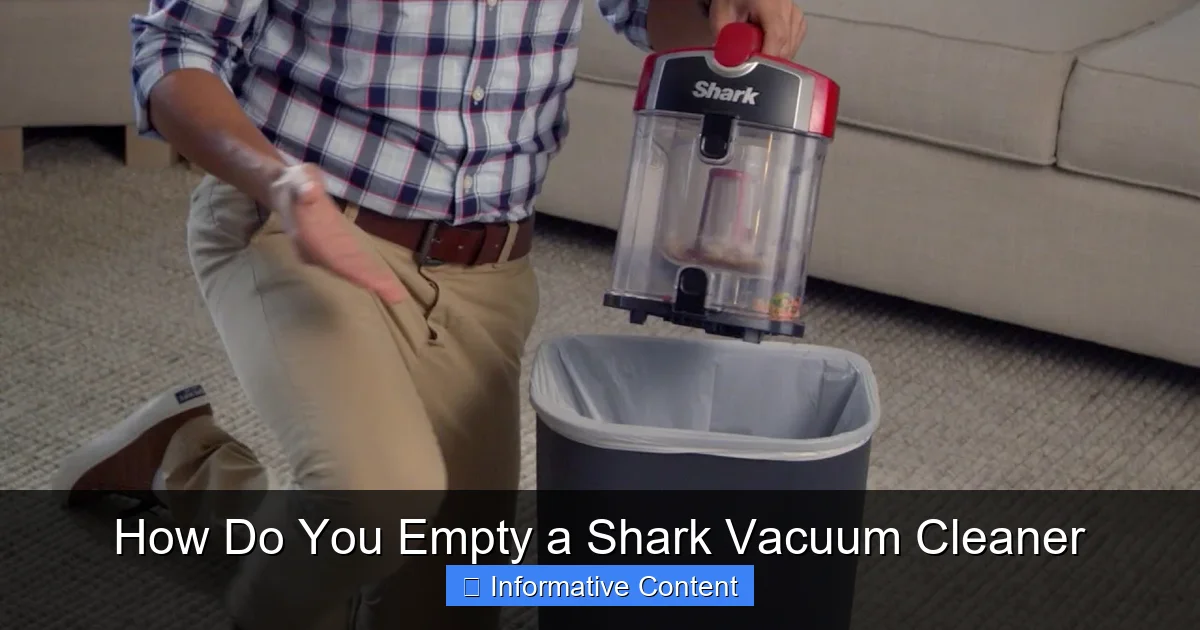
- Position Over a Trash Can: Hold the removed dust cup over your trash can.
- Find the Bottom Empty Release Button: Look for another button, usually on the bottom or front of the dust cup, which controls a hinged flap at the very bottom. This button is often clearly marked with a trash can icon or an arrow.
- Press to Open and Empty: Press this button firmly. The bottom flap will swing open, allowing the accumulated dirt, dust, and debris to fall out into the trash can. You might need to shake the dust cup gently to dislodge all the contents, especially if there’s a lot of pet hair or fine dust.
- Check for Stubborn Debris: Sometimes hair and lint can get tangled around the cyclonic cone or filter screen inside the dust cup. Gently tap the sides or use your fingers (wearing gloves!) or a small brush to dislodge any stuck debris. Be careful not to damage any internal components.
Reattaching the Dust Cup
- Close the Bottom Flap: Ensure the bottom flap is securely closed and latched back into place. You should hear a click, indicating it’s sealed.
- Realign and Reattach: Line up the dust cup with its corresponding slot on the vacuum body. Gently push it back into place until it clicks, confirming it’s securely attached. Give it a gentle tug to ensure it won’t fall off during operation.
And just like that, you’ve successfully learned how do you empty a Shark vacuum cleaner for standard models! It’s a quick process that makes a huge difference.
Specifics for Shark Stick, Handheld, and Robot Vacuums
While the core principle is the same – detach, open, empty, reattach – Shark’s various models have slightly different dust cup designs. Here’s a quick overview for their more specialized vacuums.
Emptying Shark Stick Vacuums (e.g., Rocket, Vertex, Stratos)
Shark stick vacuums are known for their lightweight and versatile design. The dust cup is typically located near the handle or motor housing.
- Detach the Handheld/Dust Cup Unit: Many Shark stick vacs allow you to detach the main handheld unit (which contains the dust cup) from the stick and floor nozzle. There’s usually a button to release this.
- Locate the Dust Cup Release: On the handheld unit, find the button or lever that releases the dust cup itself. It often slides off or detaches from the motor.
- Open the Bottom Flap: Once removed, hold the dust cup over a trash can. Find the release button for the bottom flap (similar to uprights). Press it and let the debris fall out. Some models might have a top and bottom opening for easier cleaning.
- Clear Internal Screen: Stick vac dust cups are often smaller and the internal screen can get clogged with fine dust or hair. Use a small brush to clean around this area.
- Reassemble: Close the flap, reattach the dust cup to the handheld unit, and then reattach the handheld unit to the stick, if applicable.
Emptying Shark Handheld Vacuums (e.g., WandVac, Pet Perfect)
Shark handhelds are designed for quick cleanups, so their dust bins are usually the simplest to empty.
- Position Over Trash: Hold the handheld vacuum directly over your trash can.
- Press Release Button: Most handhelds have a single, prominent button that releases the dust cup and/or opens the emptying flap simultaneously. Press this button. The front part of the vacuum (the nozzle and dust cup) will typically swing open or detach, allowing debris to fall out.
- Tap and Clean: Tap the unit gently to ensure all debris is released. Clear any hair or lint from the internal filter screen.
- Close and Click: Snap the dust cup assembly back into place until it clicks securely.
Emptying Shark Robot Vacuums (e.g., IQ Robot, AI Robot)
Robot vacuums require frequent emptying due to their smaller dust bins and constant operation.
- Access the Dust Bin: Depending on your model, the dust bin might pull out from the side or lift out from the top of the robot vacuum. Consult your robot’s manual for the exact location.
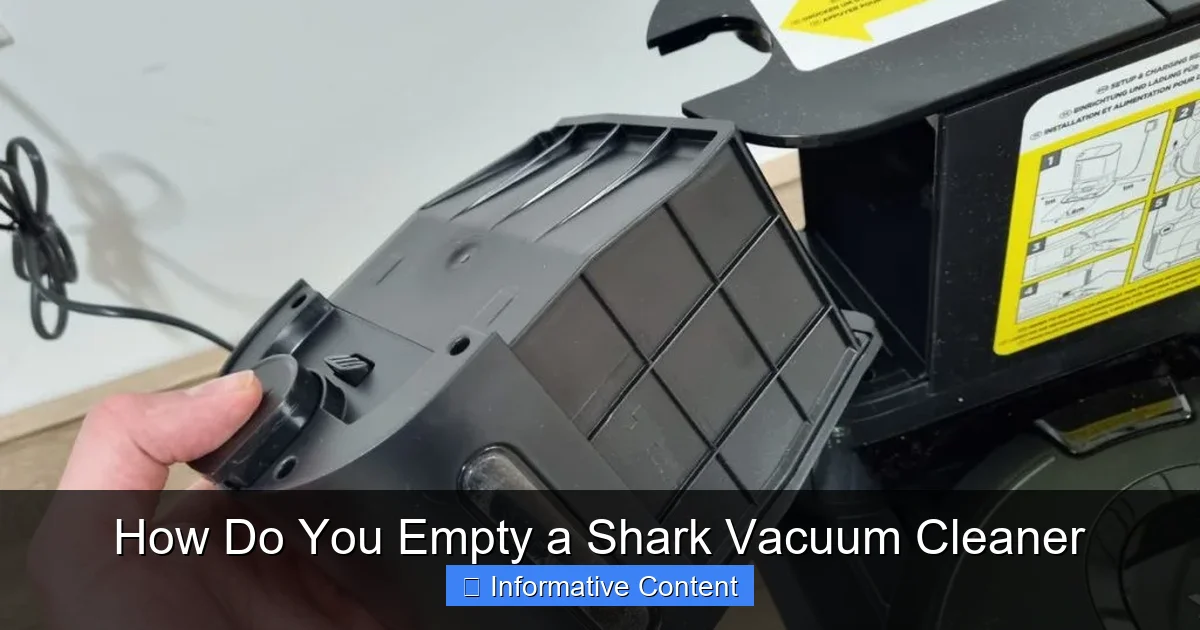
- Remove Filters (Optional but Recommended): Many robot bins have a filter (often a HEPA filter) that sits within or on top of the bin. It’s good practice to remove this filter first and tap it over the trash can to dislodge dust.
- Open the Bin and Empty: Locate the latch or opening mechanism on the dust bin itself. Open it up and empty the contents into the trash.
- Wipe Clean: Robot dust bins can accumulate fine dust. Wiping the inside with a dry cloth can help maintain cleanliness.
- Reinsert Filters and Bin: Place any removed filters back into the bin, ensuring they are seated correctly. Then slide or click the dust bin back into your robot vacuum.
Beyond the Bin: Deep Cleaning Your Dust Cup and Filters
Simply knowing how do you empty a Shark vacuum cleaner is a great start, but for truly optimal performance and hygiene, you need to go a step further. Periodically, your dust cup and its internal components need a more thorough clean.
Washing the Dust Cup (If Permitted)
Not all Shark dust cups are washable, so it’s crucial to check your specific model’s user manual first. If it is washable:
- Remove Completely: Ensure the dust cup is fully detached from the vacuum and completely empty of debris.
- Remove Internal Components: Take out any removable internal screens, cyclonic cones, or pre-motor foam/felt filters. These need to be cleaned separately.
- Rinse with Water: Rinse the dust cup and removable plastic components under cool tap water. Avoid using hot water or harsh detergents, as these can warp plastic or damage seals.
- Clean Thoroughly: Use a soft brush or cloth to gently scrub away any caked-on dust or grime from the inside surfaces. Pay special attention to the cyclonic cone where dust often collects.
- Dry Completely: This is perhaps the most critical step. ALL parts must be 100% air-dried before reassembly. This can take 24-48 hours. Reassembling a damp dust cup can lead to mildew, odors, and even damage the vacuum’s motor. Find a warm, dry place to let them air out.
Cleaning Internal Screens and Pre-Motor Filters
Inside most Shark dust cups, there’s a mesh screen or a cyclonic element. This part can get coated in fine dust, which restricts airflow. Use a dry cloth or a small, stiff brush (like an old toothbrush) to gently brush away any accumulated dust from these screens. Never wash felt or foam filters that are designed to be brushed clean; check your manual.
Your Shark vacuum also has pre-motor filters (often foam and felt). These are usually located near the dust cup, under a separate cover. These filters need regular rinsing (check manual) or tapping clean. Allowing these to get clogged severely impacts suction, even if the dust cup is empty. Always ensure these are completely dry before putting them back.
Troubleshooting Common Issues and Maintenance Tips
Even with a good understanding of how do you empty a Shark vacuum cleaner, you might encounter a few minor hiccups. Here’s how to address them.
Dust Cup Won’t Release or Open
- Check the Right Button: Are you pressing the correct release button? There’s usually one to remove the cup from the vacuum and another to open the bottom flap. They can look similar.
- Firm Press: Sometimes, the buttons require a firm, decisive press.
- Blockage: If the bottom flap is jammed, there might be a large piece of debris (like a sock or a toy) wedged in there. You might need to gently try to dislodge it from the top opening (if accessible) or manually force the flap open carefully.
Debris Stuck Inside After Emptying
- Gentle Tapping: Often, a few firm taps on the side of the dust cup (while it’s open and over the trash) will dislodge stubborn dust and hair.
- Use a Tool: A chopstick, the handle of a brush, or the crevice tool of your vacuum (when the vacuum is off!) can be used to gently poke and free stuck debris, especially from around the cyclonic cone.
- Deep Clean: If debris is consistently sticking, it might be time for a full wash of the dust cup as described above.
Lost Suction After Emptying
If you’ve just emptied your Shark vacuum cleaner but still have weak suction, consider these:
- Did You Close All Latchers?: Ensure the bottom flap of the dust cup is securely closed and that the dust cup itself is properly reattached to the vacuum body. Any air leak will reduce suction.
- Check Filters: Have you cleaned your pre-motor (foam and felt) and post-motor (HEPA) filters recently? Clogged filters are a major cause of suction loss, even with an empty dust cup.
- Check for Clogs Elsewhere: There might be a clog in the hose, floor nozzle, or extension wand. Turn off and unplug the vacuum, then visually inspect these areas and use a broom handle or similar object to dislodge any blockages.
General Emptying Schedule
While Shark recommends emptying your dust cup after every use, practical reality sometimes differs. A good rule of thumb is to empty it when the debris reaches the “Max Fill” line. However, if you’re cleaning a particularly dusty area, have pets, or notice a dip in suction, empty it sooner. For robot vacuums, daily emptying is often recommended due to their smaller bins.
By understanding not only how do you empty a Shark vacuum cleaner, but also how to deep clean and troubleshoot, you’ll ensure your powerful cleaning companion remains at the top of its game for years to come.
Conclusion
Knowing how do you empty a Shark vacuum cleaner is more than just a chore; it’s a fundamental aspect of vacuum maintenance that directly impacts your cleaning efficiency, the longevity of your appliance, and the overall hygiene of your home. It’s a quick, simple process that, when done correctly and regularly, ensures your Shark vacuum continues to deliver powerful, consistent suction every time you use it.
Whether you own an upright, a stick, a handheld, or a robot Shark, the core steps remain the same: unplug, detach the dust cup, empty, and reattach. By taking those extra few minutes to clear out the debris, and occasionally giving the dust cup and filters a thorough clean, you’re not just emptying a bin—you’re investing in a cleaner home and a longer life for your trusted Shark vacuum cleaner. So, go forth and empty with confidence!
Frequently Asked Questions
How do I know when my Shark vacuum cleaner needs emptying?
Your Shark vacuum cleaner typically has a “Max Fill” line on the dust cup. When the debris reaches or exceeds this line, it’s time to empty it. You might also notice a decrease in suction power or the vacuum sounding different as it struggles to pull air through the full bin.
Is there a specific way to dispose of the vacuum contents?
The best way is to empty the contents directly into a lined trash can. This helps contain the dust and makes it easy to tie up and dispose of. For allergy sufferers, emptying outdoors or wearing a mask and gloves can minimize exposure to dust and allergens.
Can I use any cleaning products to clean the dust cup?
No, it’s generally recommended to only use cool water for washing your Shark vacuum’s dust cup, if it’s washable. Harsh detergents or hot water can damage the plastic, seals, or other components. Always refer to your specific model’s manual for cleaning instructions.
My Shark dust cup has a strong smell even after emptying. What should I do?
A persistent smell often indicates that the dust cup itself needs a deeper clean. If your model is washable, give it a thorough rinse with cool water and ensure it’s completely dry before reassembling. Also, check and clean your filters, as trapped debris and pet dander in filters can also cause odors.
How do I prevent dust from flying everywhere when I empty the vacuum?
To minimize dust dispersion, hold the dust cup as far down into the trash can as possible before pressing the release button. You can also empty it inside a large plastic bag that’s placed within the trash can. Emptying outdoors on a calm day is another effective method.
Do all Shark vacuum models empty the same way?
While the core principle of detaching, opening, and emptying is similar across all Shark models, the exact location and type of release buttons and latches can vary. Uprights, stick vacs, handhelds, and robot vacuums each have slightly different designs, so it’s always good to consult your specific model’s manual if you’re unsure.