
Mastering your Dyson vacuum cleaner for a spotless home is simpler than you think! This guide walks you through everything, from initial setup and understanding different models to effectively using attachments and maintaining your device. Learn to maximize your Dyson’s performance for powerful, efficient cleaning every time.
Dyson Vacuum Cleaner How to Use
Welcome to the world of Dyson, where innovative engineering meets everyday cleaning challenges! If you’ve recently invested in a Dyson vacuum cleaner, you’re now holding a powerful tool designed to make your home cleaner and healthier. Dyson is renowned for its cutting-edge technology, incredible suction power, and intelligent design, but getting the most out of your machine means knowing exactly how to use it.
Whether you’re new to Dyson or just looking to refine your cleaning routine, this comprehensive guide will walk you through everything you need to know. We’ll cover initial setup, understanding your specific model, mastering its features, and keeping it in top condition. By the end, you’ll feel confident in your ability to harness the full power of your Dyson vacuum cleaner, ensuring a spotless home every time. Let’s dive into how to use your Dyson vacuum cleaner effectively and efficiently!
Key Takeaways
- Initial Setup is Crucial: Proper assembly, charging (for cordless models), and familiarizing yourself with components like the bin and filters set the stage for effective cleaning.
- Understand Your Model: Dyson offers various types (cordless, upright, canister); knowing your specific model’s features, power modes, and attachments is key to optimizing its use.
- Master Attachments: Each Dyson tool has a specific purpose, from crevice tools for tight spots to soft roller heads for hard floors. Using the right attachment enhances cleaning efficiency significantly.
- Empty the Bin Regularly: To maintain strong suction and prevent blockages, always empty the dustbin when it reaches the max fill line, or after each use.
- Clean Filters Routinely: Dyson filters are washable and essential for maintaining suction power and air quality. Clean them at least monthly (or as recommended) and ensure they are bone dry before reinserting.
- Regular Maintenance Extends Lifespan: Beyond filter cleaning, checking the brush bar for tangles, wiping down surfaces, and proper battery care (for cordless) will keep your Dyson performing like new for years.
Quick Answers to Common Questions
How often should I charge my cordless Dyson vacuum?
For optimal battery life, it’s best to charge your cordless Dyson after every use, even if the battery isn’t completely depleted. Avoid letting it sit with a completely drained battery for long periods.
Can I wash the filter with soap or detergent?
No, you should only wash your Dyson filter with cold tap water. Using soap, detergent, or putting it in a dishwasher can damage the filter material and affect its performance.
Why is my Dyson losing suction power?
Loss of suction is most commonly due to a full dustbin, a clogged filter, or a blockage in the wand, cleaner head, or hose. Check these areas first, and ensure your filter is clean and completely dry.
Which attachment is best for pet hair on upholstery?
The Mini Motorized Tool (sometimes called the Hair Screw Tool) is specifically designed to effectively remove pet hair and ground-in dirt from upholstery, stairs, and car interiors thanks to its anti-tangle conical brush bar.
How do I know when my cordless Dyson battery is fully charged?
Most Dyson cordless models have an indicator light or an LCD screen that shows the charging status. When fully charged, the light will typically turn off or show “100%” on the screen.
📑 Table of Contents
- Getting Started: Unboxing and Initial Setup
- Understanding Your Dyson Model and Its Features
- Mastering Basic Operation: Power, Emptying, and Modes
- Utilizing Attachments and Accessories for Specialized Cleaning
- Optimal Cleaning Techniques for Every Surface
- Essential Maintenance for Longevity and Performance
- Conclusion
Getting Started: Unboxing and Initial Setup
The first step in learning how to use your Dyson vacuum cleaner is getting it ready for action right out of the box. Don’t worry, it’s usually a straightforward process designed to get you cleaning quickly.
Unpacking Your Dyson
When you first open the box, you’ll find various components: the main body of the vacuum, different attachments, perhaps a charger, and of course, the instruction manual. Take a moment to lay everything out and identify the pieces. Dyson packaging is often designed to be efficient, so sometimes parts might be nestled together.
Assembly – It’s Easier Than You Think!
Most Dyson vacuums, especially the cordless stick models, click together with ease.
- For Cordless Stick Models: Typically, you’ll connect the main cleaner head to the wand, and then the wand to the main motor/bin unit. Listen for a satisfying “click” to confirm each connection is secure. If your model has a docking station, assemble that according to the instructions and mount it near a power outlet.
- For Upright or Canister Models: Assembly might involve attaching the handle to the main body or connecting the hose and wand. Again, Dyson designs these to be intuitive, so follow the visual cues and the clicks.
Don’t force anything. If a part isn’t fitting, double-check the orientation. The instruction manual (or a quick search for a video guide for your specific model) is your best friend here.
First Charge and Power
If you have a cordless Dyson, charging is your next critical step.
- Charging Your Cordless Dyson: Connect the charger to the battery (or docking station if applicable) and plug it into a wall outlet. Most Dyson cordless vacuums require a full charge before their first use, which can take several hours (often 3.5 to 4.5 hours). You’ll usually see an indicator light to show it’s charging and when it’s full. It’s important not to run the battery completely flat during its first few uses to help condition it for a longer lifespan.
- Corded Models: Simply plug them into an appropriate power outlet, and you’re ready to go! Ensure the cord is fully extended to prevent overheating.
Understanding Your Dyson Model and Its Features
Visual guide about Dyson Vacuum Cleaner How to Use
Image source: dyson-h.assetsadobe2.com
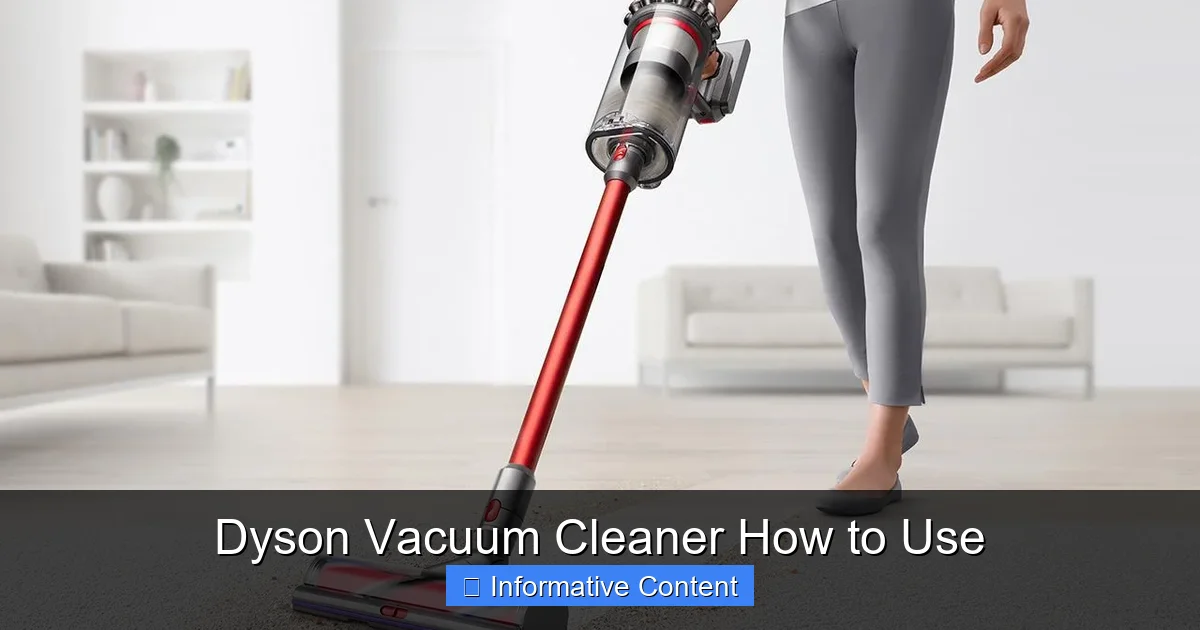
Dyson offers a fantastic range of vacuum cleaners, each with unique strengths. Knowing your specific model and its features is key to truly understanding how to use your Dyson vacuum cleaner to its full potential.
Cordless Stick Vacuums (e.g., V-series, Gen5detect, Outsize)
These are perhaps the most popular for their versatility and convenience.
- Power Modes: Most cordless models feature multiple power modes. “Eco” or “Standard” mode is great for everyday cleaning and extends battery life. “Boost” or “Max” mode delivers maximum suction for stubborn dirt and deep carpets, but it will significantly reduce run time. Toggle between these modes using a button usually located near the trigger or on the display.
- Digital Display: Newer models come with LCD screens that show battery life, selected power mode, and sometimes even particle count (on Gen5detect models). Pay attention to these indicators to manage your cleaning.
- Trigger or Power Button: Some models have a trigger you hold down for power, while others have a single button to turn it on and off. Familiarize yourself with yours.
Upright Vacuums (e.g., Ball Animal, Cinetic Big Ball)
Designed for robust cleaning, especially across larger carpeted areas.
- Ball Technology: Dyson uprights use a unique ‘Ball’ design for easy steering around furniture with a twist of the wrist.
- Self-Adjusting Cleaner Head: Many uprights automatically adjust suction and brush bar height for different floor types, making the transition from carpet to hard floor seamless.
- Hose and Wand: A built-in hose and wand allow you to reach high, low, and difficult spots without moving the entire machine.
Canister Vacuums (e.g., Cinetic Big Ball Canister)
Known for strong, consistent suction and effortless maneuvering.
- Articulated Steering: The main body pivots on a ball, following you easily without getting snagged.
- Large Capacity: Often have larger dustbins suitable for bigger homes or more extensive cleaning tasks.
Mastering Basic Operation: Power, Emptying, and Modes
Now that your Dyson is ready, let’s get into the practical aspects of how to use your Dyson vacuum cleaner for everyday tasks.
Powering On and Off
- Cordless Models: If it has a trigger, simply squeeze it to start and release to stop. For button-operated models, press the power button once to turn on and again to turn off.
- Corded Models: Plug it in, then press the main power button usually located on the body of the machine or near the handle.
Remember to turn off your Dyson before changing attachments or performing any maintenance.
Selecting Power Modes (Cordless Only)
As mentioned, cordless models offer different power settings.
- For Daily Chores: Use “Eco” or “Standard” mode for light debris on hard floors or low-pile carpets. This preserves battery life significantly.
- For Deep Cleaning: Switch to “Boost” or “Max” mode for high-traffic areas, pet hair on carpets, or embedded dirt. Be mindful of the reduced run time in this mode.
Experiment to see which mode suits different cleaning tasks in your home.
Emptying the Dustbin – A Quick and Hygienic Process
Dyson’s bagless technology is a huge convenience, but proper emptying is crucial for maintaining suction power.
- When to Empty: Always empty the bin when dirt reaches the “MAX” fill line. Ideally, empty it after every significant cleaning session to prevent clogging and maintain optimal performance.
- How to Empty:
- Remove the wand (on stick models) or detach the hose (on uprights/canisters).
- Position the bin over a trash can.
- Locate the red lever or button, usually on the side or bottom of the bin.
- Push or pull the lever. The bottom of the bin will open, releasing the dirt. On some models, pushing the lever also pushes a shroud down to scrape off debris, ensuring a clean empty.
- Close the bin flap securely until it clicks.
- Tip: Emptying into a larger outdoor bin helps prevent dust from recirculating in your home.
Utilizing Attachments and Accessories for Specialized Cleaning
Dyson vacuums come with an array of cleverly designed attachments, each serving a specific purpose. Understanding how to use your Dyson vacuum cleaner’s tools will dramatically improve your cleaning efficiency and results.
The Main Cleaner Head
This is your primary tool.
- Motorbar™ Cleaner Head (for carpets and hard floors): Many Dyson models feature this anti-tangle head that automatically clears hair from the brush bar. It’s perfect for switching between carpets and hard floors without changing heads.
- Fluffy Optic™/Soft Roller Cleaner Head (for hard floors): Exclusive to some cordless models, this head has soft woven nylon and anti-static carbon fiber filaments that capture fine dust and large debris from hard floors without scratching. The Optic versions even illuminate hidden dust!
Key Attachments and Their Uses
- Crevice Tool: Your go-to for tight spaces, corners, skirting boards, and between sofa cushions. Its slim design reaches where other tools can’t.
- Combination Tool: This versatile tool usually has two functions: a wide nozzle for general debris and a brush attachment that slides down for dusting shelves, keyboards, and delicate surfaces.
- Mini Motorized Tool: Often called the “hair screw tool,” this small, powerful head is perfect for removing pet hair and ground-in dirt from upholstery, stairs, and car interiors. Its conical brush bar prevents hair tangling.
- Stubborn Dirt Brush: Features stiff bristles to dislodge dried-on mud and tough dirt from durable carpets and car mats.
- Soft Dusting Brush: A gentle brush with fine nylon bristles, ideal for dusting delicate surfaces like lampshades, blinds, and electronics without scratching.
- Upholstery Tool: Designed with a wide mouth and sometimes velvet strips to effectively clean fabric furniture, mattresses, and curtains.
How to Attach and Detach Tools
Dyson attachments typically snap into place with a simple click mechanism. To remove, locate the release button (often red or grey) on the tool or wand, press it, and pull the tool off. Always ensure the vacuum is off before swapping attachments.
Optimal Cleaning Techniques for Every Surface
Knowing how to use your Dyson vacuum cleaner effectively means more than just turning it on. It involves employing the right techniques for different surfaces and scenarios.
Cleaning Hard Floors
- Use the Right Head: For hard floors, the Soft Roller Cleaner Head (Fluffy/Optic) is supreme. If you only have the Motorbar™ head, it still works very well.
- Motion: Use long, overlapping strokes. Don’t press down too hard; let the vacuum do the work. The soft roller head is particularly good at picking up both fine dust and larger crumbs in a single pass.
- Power Mode: “Eco” or “Standard” mode is usually sufficient for hard floors, saving battery life.
Cleaning Carpets and Rugs
- Motorized Head: Always use a motorized cleaner head (like the Motorbar™) for carpets. The rotating brush bar agitates the carpet fibers, lifting embedded dirt and pet hair.
- Slow and Steady: Move the vacuum slowly over carpeted areas, allowing the brush bar enough time to work. Overlapping passes ensure thorough cleaning.
- High-Traffic Areas: For areas with heavy foot traffic or stubborn dirt, switch to “Boost” or “Max” mode for a few passes.
- Area Rugs: For delicate rugs, you might switch to a lower power mode or use a non-motorized attachment to avoid damage.
Tackling Stairs and Upholstery
- Stairs: The Mini Motorized Tool is fantastic for carpeted stairs. For hard stairs, use the Crevice Tool for edges and the Combination Tool for the treads.
- Upholstery: The Mini Motorized Tool excels at removing pet hair and crumbs from sofas and chairs. For general dust, the Upholstery Tool or Soft Dusting Brush is better.
Reaching High and Low Spots
The lightweight design of Dyson stick vacuums makes them excellent for cleaning ceilings, curtain rails, and high shelves.
- Use the Wand: Detach the main cleaner head and attach a smaller tool like the Crevice Tool or Soft Dusting Brush directly to the wand for extended reach.
- Under Furniture: The low profile of Dyson cleaner heads allows them to glide easily under most furniture. For very low gaps, consider using the Crevice Tool directly on the main unit.
Essential Maintenance for Longevity and Performance
Regular maintenance is paramount to keep your Dyson vacuum cleaner working like new. Neglecting these simple steps can lead to decreased suction and a shorter lifespan for your machine. This is a critical part of knowing how to use your Dyson vacuum cleaner correctly.
Cleaning the Filter – The Key to Sustained Suction
Dyson filters are designed to capture microscopic particles, but they need regular cleaning to prevent clogging.
- Frequency: Most Dyson filters should be washed monthly (or more frequently if you have pets or use your vacuum heavily). Check your manual for specific recommendations for your model.
- How to Clean:
- Locate the filter (often colored purple or blue, typically at the top of the main unit or within the cyclone assembly).
- Remove it by twisting or pulling as instructed by your manual.
- Rinse the filter under cold running water, squeezing it gently (like a sponge) until the water runs clear. Do NOT use detergent.
- Shake off excess water and leave it to air dry for at least 24 hours (or longer) in a warm place with good airflow. It MUST be bone dry before reinserting. Never put a damp filter back into your Dyson, as this can damage the motor.
- Tip: Having a spare filter can be handy so you can continue cleaning while one is drying.
Checking and Cleaning the Brush Bar
Hair, strings, and fibers can get tangled around the brush bar, reducing its effectiveness and potentially straining the motor.
- Frequency: Check the brush bar regularly, especially if you have long-haired family members or pets.
- How to Clean:
- Turn off and unplug the vacuum (or remove the battery).
- Remove the cleaner head from the wand.
- Use scissors or a seam ripper to carefully cut away any tangled hair or threads. Many Dyson cleaner heads have a unique anti-tangle design or a clear access point to the brush bar.
- Ensure the brush bar can spin freely.
- Reattach the cleaner head.
- Tip: Never use sharp objects to poke inside the cleaner head where they might damage internal components.
Wiping Down Your Dyson
A quick wipe-down keeps your Dyson looking good and prevents dust buildup on the exterior. Use a damp cloth (not wet!) and avoid harsh chemicals.
Battery Care (for Cordless Models)
Proper battery care helps maintain its lifespan and performance.
- Charge Regularly: Don’t leave the battery completely depleted for extended periods.
- Avoid Extreme Temperatures: Don’t charge or store your Dyson in very hot or very cold environments, as this can degrade battery performance.
- Store Partially Charged: If storing for a long time, it’s often best to store the battery with about 50% charge rather than full or empty.
Conclusion
Congratulations! You’re now equipped with a thorough understanding of how to use your Dyson vacuum cleaner to its fullest potential. From the moment you unbox it to the routine maintenance that keeps it running smoothly, every step plays a role in achieving that signature Dyson clean.
Remember, your Dyson vacuum cleaner is a powerful and sophisticated cleaning tool. By following these guidelines – understanding your model, using the right attachments, employing optimal cleaning techniques, and committing to regular maintenance – you’ll ensure a cleaner home and a longer life for your appliance. Enjoy the satisfaction of a truly spotless space, made possible by mastering your Dyson!
Frequently Asked Questions
What is the best way to store a Dyson vacuum cleaner?
For cordless stick models, using the provided docking station is ideal as it keeps the vacuum charged and organized. Upright and canister models should be stored in a cool, dry place, ensuring the cord is neatly wrapped to prevent damage.
Can I vacuum liquids with my Dyson?
No, Dyson vacuum cleaners are designed for dry vacuuming only. Attempting to vacuum liquids can severely damage the motor and electrical components, and will void your warranty.
How do I clean a clogged Dyson brush bar?
Turn off and unplug your Dyson (or remove the battery). Remove the cleaner head and use scissors or a seam ripper to carefully cut away any tangled hair or fibers from the brush bar. Ensure the brush bar spins freely before reassembling.
My Dyson smells bad after use. What should I do?
A bad smell often indicates a dirty filter, a full or dirty dustbin, or a blockage with decaying organic matter. Empty and clean the dustbin thoroughly, wash and fully dry the filter, and check for any obstructions in the cleaner head or wand.
Are Dyson filters replaceable, or only washable?
Most Dyson filters are washable and designed for the lifetime of the machine, provided they are maintained correctly. However, if a filter becomes damaged or excessively worn, replacement filters are available for purchase.
How do I switch between different power modes on my cordless Dyson?
On most cordless Dyson models, there’s a dedicated button, often near the display or the top of the main unit, that allows you to cycle through the different power modes like Eco, Standard, or Boost/Max. The selected mode is usually indicated on the digital screen or by an LED light.