
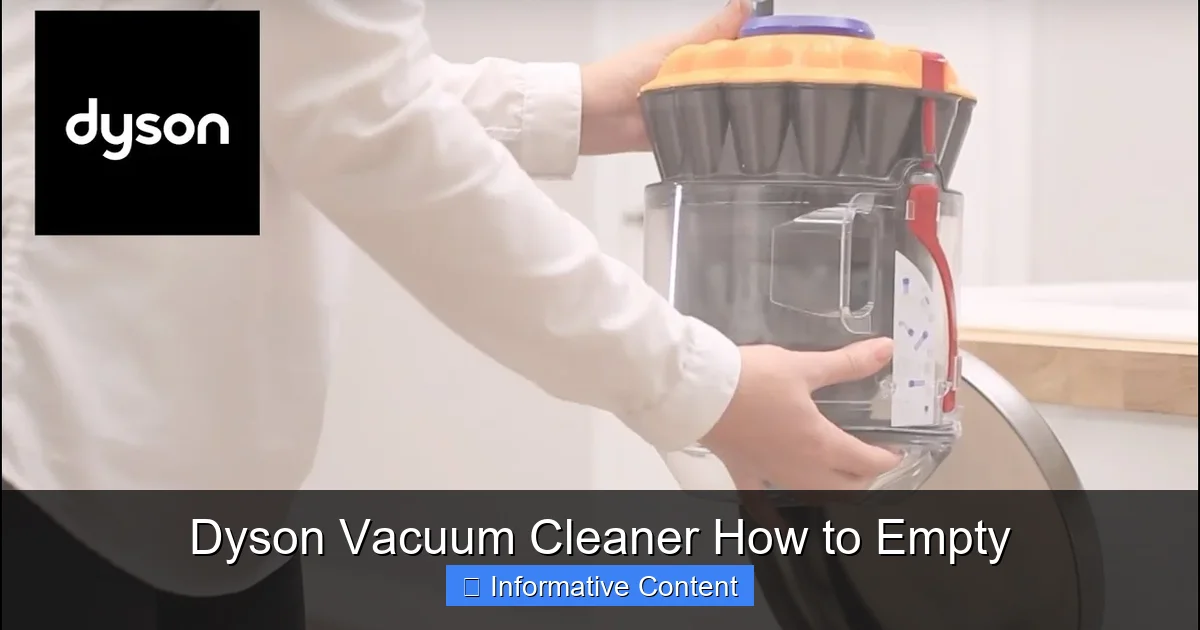
Emptying your Dyson vacuum cleaner regularly is crucial for its performance and longevity. This comprehensive guide walks you through the straightforward process for various Dyson models, ensuring you maintain optimal suction and a clean home. Discover simple steps to prevent blockages, minimize dust, and keep your Dyson operating at its best.
Welcome, fellow Dyson owner! You’ve invested in a powerhouse of cleaning technology, a machine designed to make keeping your home spotless a breeze. But like any high-performance tool, your Dyson needs a little love and regular attention to keep it running at its absolute best. One of the simplest, yet most crucial, maintenance tasks is knowing *how to empty your Dyson vacuum cleaner* correctly and efficiently.
It might seem like a small detail, but a full dust bin isn’t just an inconvenience; it can significantly impact your vacuum’s suction power, its lifespan, and even the air quality in your home. Nobody wants their state-of-the-art Dyson underperforming because of a neglected bin! This article is your comprehensive guide to mastering the art of emptying your Dyson, covering various models, offering practical tips, and troubleshooting common hiccups. Get ready to keep your Dyson in top-notch condition and continue enjoying its incredible cleaning capabilities.
Key Takeaways
- Regular Emptying is Essential: To maintain optimal suction power and prevent your Dyson vacuum cleaner from overheating or losing efficiency, empty the dust bin frequently, ideally after every major use or when dirt reaches the “MAX” line.
- Safety First: Always unplug your Dyson (for corded models) or ensure it’s turned off before attempting to empty the dust bin. This prevents accidental activation and potential injury.
- Understand Your Model: While the basic principle of emptying is similar, specific Dyson models (cordless stick, upright, canister) have slightly different release mechanisms. Familiarize yourself with your vacuum’s specific design.
- Minimize Dust Clouds: To reduce dust dispersal, empty the bin directly into a trash bag or outside. For stubborn dust, gently tap the bin against the inside of the trash receptacle.
- Beyond Emptying: Complement regular emptying with periodic checks for blockages in the airway, wiping down the exterior of the bin, and cleaning filters as recommended by Dyson for holistic maintenance.
- Troubleshooting Common Issues: If the bin doesn’t release or dirt sticks, double-check that the release button is fully depressed and consider gently rotating the bin for better dust release.
Quick Answers to Common Questions
How often should I empty my Dyson vacuum cleaner?
You should empty your Dyson when the dirt reaches the “MAX” fill line on the dust bin, or ideally, after every significant use to maintain optimal suction power.
Can I wash the dust bin of my Dyson?
Some Dyson dust bins can be rinsed with cold water, but this depends on the specific model. Always consult your Dyson manual to confirm if your bin is washable and ensure it is completely dry before reattaching.
What should I do if the bin release button is stuck?
Ensure you are pressing the correct button firmly. Check for any visible debris around the button that might be preventing it from fully engaging. Avoid forcing it, as this could cause damage.
Will my Dyson vacuum lose suction if the bin is full?
Yes, a full dust bin restricts airflow, causing the motor to work harder and significantly reducing your Dyson’s suction power, making it less effective at cleaning.
Is it better to empty my Dyson outside?
Yes, emptying your Dyson vacuum cleaner outdoors is highly recommended to minimize the dispersal of fine dust, allergens, and pet dander back into your home’s air.
📑 Table of Contents
Why Emptying Your Dyson is Crucial for Peak Performance
Regularly emptying your Dyson vacuum cleaner isn’t just about making space for more dirt; it’s fundamental to maintaining the machine’s efficiency, longevity, and overall hygienic operation. Think of it as a vital health check for your cleaning companion.
Maintaining Suction Power
The primary reason to empty your Dyson’s bin is to preserve its powerful suction. Dyson vacuums are engineered to create a strong airflow that picks up dirt, dust, and debris. When the dust bin becomes full, this airflow is restricted. Imagine trying to breathe through a clogged nose – it’s difficult and inefficient. The same principle applies here. A full bin creates back pressure, forcing the motor to work harder, which can lead to reduced suction and less effective cleaning. Emptying it ensures a clear path for air and debris, allowing your Dyson to perform at its peak, just as it was designed to.
Extending Your Vacuum’s Lifespan
When the dust bin is full and the airflow is restricted, your Dyson’s motor has to exert more effort to pull air through the system. This increased strain can lead to overheating and premature wear and tear on internal components. Over time, consistently running your vacuum with a full bin can shorten its overall lifespan, leading to costly repairs or replacements sooner than necessary. Regular emptying reduces this stress, allowing the motor to work efficiently and protecting your investment for years to come. It’s a simple act that makes a big difference to your Dyson’s health.
Hygiene and Air Quality
Your Dyson vacuum cleaner is designed to trap microscopic dust, allergens, and pet dander, preventing them from recirculating into your home’s air. However, a dust bin overflowing with these particles can become a breeding ground for bacteria or even start to emit stale odors, especially if damp debris has been collected. Emptying the bin regularly helps to remove these contaminants from your living space entirely. Furthermore, a properly emptied and maintained bin ensures that your Dyson’s filtration system can effectively do its job, contributing to cleaner, healthier air for you and your family.
Getting Ready: Safety First and What You Need

Visual guide about Dyson Vacuum Cleaner How to Empty
Image source: wikihow.com
Before you dive into emptying your Dyson vacuum cleaner, a few preparatory steps will ensure the process is safe, clean, and hassle-free.
Safety Precautions
Safety should always be your top priority. For corded Dyson models (like the upright Ball™ series), *always unplug the vacuum cleaner from the wall outlet* before you begin. This prevents any accidental activation that could lead to injury. For cordless Dyson models (V-series, Outsize, Gen5detect), ensure the vacuum is turned off and remove it from its charging dock. While not strictly necessary, some people with dust allergies or sensitivities might prefer to wear disposable gloves or a mask to minimize exposure to dust and allergens during the emptying process.
Essential Tools
The beauty of emptying a Dyson is that it generally requires no special tools! Your hands are usually all you need. However, you will need a suitable receptacle to empty the dirt into. A sturdy trash can or a large rubbish bag is perfect. If you’re particularly concerned about dust, using a plastic bag that you can quickly tie shut after emptying is an excellent strategy. For stubborn, compacted dust, a gentle tap or two against the inside of the bin might be needed, but no other tools are typically required for the basic emptying process.
Finding the Right Spot
Where you choose to empty your Dyson can significantly impact the amount of dust you release into the air. Ideally, empty the bin outdoors, especially on a non-windy day. This allows any fine dust particles to disperse safely into the environment rather than settling back into your home. If emptying outside isn’t an option, do it directly into a large trash bag in a well-ventilated area, like a garage or utility room. Hold the bin deep inside the bag before opening the flap to trap as much dust as possible.
Step-by-Step Guide to Emptying Your Dyson (Different Models)
While Dyson offers various models, the core principle of *how to empty your Dyson vacuum cleaner* remains surprisingly consistent: locate the bin, release it, and open the bottom flap. However, the exact buttons and mechanisms vary slightly. Let’s look at the general process and then specific nuances for popular models.
General Principles Across Models
No matter which Dyson you own, the process usually involves these steps:
- Locate the Bin: The clear dust bin is easily identifiable.
- Find the Release Mechanism: There’s always a button or lever designed to either detach the bin from the main body or open its bottom flap. This is usually red or grey.
- Position for Emptying: Hold the bin over your trash can or bag.
- Activate the Release: Press the button/lever to open the bin and release the dirt.
- Close and Reattach: Once empty, close the bin flap securely and reattach the bin to the vacuum (if it was detached).
Let’s get into the specifics for common types of Dyson vacuums.
Emptying Cordless Stick Models (V7, V8, V10, V11, V15, Gen5detect, etc.)
Dyson’s popular cordless stick vacuums often feature a “point and shoot” mechanism, making emptying incredibly hygienic and straightforward.
- Remove from Wand: For most V-series models, it’s easiest to remove the main cleaner head and wand first. Simply press the red quick-release button on the top of the wand to detach it. This gives you better control over the bin. Some newer models, like the Gen5detect, integrate the bin more seamlessly, so removing the wand isn’t always necessary but can still be helpful.
- Position Over Bin: Hold the vacuum with the clear bin pointing downwards, directly over your trash receptacle. Ensure the bin is deep inside the bag or can to minimize dust escape.
- Locate the Red Lever/Slider: On most V-series models (V7, V8, V10, V11, V15, Outsize), you’ll find a prominent red lever or slider on the top of the cyclone assembly (the part above the clear bin).
- Push Down to Empty: Firmly push or slide this red lever downwards. As you do, the bin base will open, and the shroud (the metal mesh inside) will push down, scraping dirt off, and ejecting it cleanly into the bin. You’ll hear a click as it opens.
- Close the Bin: Once all the dirt has fallen out, push the red lever/slider back up until the bin base clicks securely shut. Make sure it’s fully closed to prevent leaks during your next clean.
- Reattach Wand (if removed): If you removed the wand, snap it back into place until it clicks.
Pro Tip: If dust gets stuck, gently tap the side of the bin while it’s open, or gently shake it. Avoid using your fingers or sharp objects to dislodge dirt inside the bin, as you might damage the delicate cyclone components.
Emptying Upright Models (Dyson Ball™ and Animal™ Series)
Dyson upright vacuums, known for their powerful cleaning, have a slightly different process for emptying their larger bins.
- Unplug and Detach Bin: First, ensure your Dyson upright is unplugged from the mains power. Then, locate the red or grey button, typically near the top handle or side of the clear bin, that allows you to detach the entire bin assembly from the main body of the vacuum. Press this button and lift the bin away.
- Position Over Bin: Carry the detached bin to your trash can. Hold it over the bin, again ensuring it’s deep enough to catch all the falling dirt.
- Locate the Bin Release Button: On the bottom of the detached bin, or sometimes on the side, you’ll find another red or grey button. This is the button that opens the bottom flap.
- Press to Open: Press this button firmly. The base of the clear bin will swing open, releasing the dirt into the trash.
- Close and Reattach: Once empty, push the bin base firmly back into place until it clicks securely shut. Then, carefully align the bin with the vacuum’s body and push it back on until you hear a click, indicating it’s locked in place.
Pro Tip: For stubborn dust or pet hair caught around the central cone in an upright bin, you might need to gently shake the bin upside down once the flap is open. Some upright models also allow you to remove the central shroud for deeper cleaning, but check your manual for specific instructions as this varies.
Beyond Emptying: Keeping Your Dyson Clean and Clear
Emptying the dust bin is a great start, but a truly well-maintained Dyson benefits from a little extra attention to cleanliness. These additional steps will ensure your vacuum continues to perform flawlessly.
Wiping Down the Bin
Even with a clean-eject mechanism, some fine dust might cling to the inside or outside of the clear bin. Periodically, after emptying, take a moment to wipe down the exterior of the bin with a damp (not wet) cloth. For a deeper clean, after the bin is empty and detached, you can sometimes (depending on the model) rinse the bin with cold water. *Crucially, ensure it is completely, 100% dry before reattaching it to your vacuum cleaner.* Moisture can damage electrical components or promote mold growth. Check your specific Dyson manual to confirm if your bin is water-washable.
Checking for Blockages
Reduced suction isn’t always due to a full bin; sometimes, a blockage is the culprit. After emptying, take a quick visual inspection:
- Bin Inlet: Look into the opening where dirt enters the bin from the main vacuum body. Is anything lodged there?
- Wand/Hose: Detach the wand or hose and look through it. A coin, sock, or large piece of debris can easily get stuck.
- Cleaner Head: Inspect the cleaner head for any large items wrapped around the brush bar or blocking the intake port.
If you find a blockage, turn off and unplug the vacuum, and carefully remove the obstruction. Never force objects into the vacuum to clear a blockage, as this can cause damage.
Filter Maintenance
While not directly related to *how to empty your Dyson vacuum cleaner*, filter maintenance is integral to overall vacuum performance. Most Dyson vacuums have washable filters, typically located in the cyclone assembly (cordless models) or within the ball/bin area (upright models). These filters need to be washed with cold water at recommended intervals (usually monthly). Always allow them to air dry completely for at least 24-48 hours before putting them back into the vacuum. A damp filter can damage the motor! Refer to your manual for precise filter location and washing instructions for your specific model.
Cleaning the Brush Bar
The cleaner head’s brush bar is where a lot of action happens. Hair, threads, and debris can wrap around it, reducing its effectiveness and making it harder for your Dyson to pick up dirt. Periodically, check your brush bar for tangles. Most Dyson cleaner heads have an easy-release mechanism (often a small coin slot or clip) that allows you to remove the brush bar for cleaning. Use scissors to carefully cut away any wrapped hair, ensuring you don’t cut the bristles themselves. This simple step can dramatically improve your vacuum’s performance, especially on carpets.
Troubleshooting Common Emptying Issues
Even with a clear understanding of *how to empty your Dyson vacuum cleaner*, you might occasionally encounter a minor snag. Here are solutions to some common problems.
Bin Not Releasing
If your bin won’t detach from the main unit (upright models) or the bottom flap won’t open (all models), double-check that you are pressing the correct button firmly and completely. Sometimes, a stubborn click mechanism just needs a little more pressure. Ensure there isn’t any debris physically wedged around the release button preventing it from fully engaging. If you have an upright model, confirm the vacuum is fully upright and not tilted, as some safety mechanisms might prevent bin release if it’s not in the correct position.
Dust Not Falling Out Completely
This is a common issue, especially with fine dust, pet hair, or compacted debris.
- Aggressive Tapping: While holding the bin over the trash, give it a few firm (but not damaging) taps against the inside edge of the trash can. This can help dislodge stubborn contents.
- Gentle Shaking: With the flap open, gently shake the bin.
- Check for Wedged Debris: Occasionally, a larger piece of debris or a clump of hair can get wedged, preventing other dirt from falling out. Carefully inspect the opening and the central shroud (if accessible) and manually remove any visible obstructions using your fingers (if safe) or a non-sharp tool like a stick.
Remember, never force anything or use sharp objects inside the bin that could scratch or damage the cyclone components.
Excessive Dust Clouds
If you’re finding that emptying your Dyson creates a significant dust cloud, despite your best efforts, consider these approaches:
- Empty Outdoors: This is the best solution for minimizing indoor dust.
- Deep into Bag: Hold the bin as deep as possible into a large trash bag before opening the flap. As the dirt falls, quickly pull the bag opening around the bin to trap dust.
- Damp Paper Towel at Bottom: Some users place a slightly damp paper towel at the bottom of the trash can or bag before emptying. The moisture can help trap fine dust particles.
- Wear a Mask: If you have severe allergies or asthma, wearing a dust mask can provide personal protection during the emptying process.
Conclusion
Mastering *how to empty your Dyson vacuum cleaner* is a fundamental step in ensuring your machine delivers exceptional cleaning performance every single time. It’s a simple, quick task that yields significant benefits, from maintaining powerful suction and extending the life of your vacuum to promoting better hygiene in your home.
By following the steps outlined for your specific model, understanding the importance of regular emptying, and incorporating a few extra cleaning habits, you’ll keep your Dyson in pristine condition. Don’t let a full dust bin hold back your Dyson’s incredible power. Make emptying a regular part of your cleaning routine, and enjoy the sparkling results only a well-maintained Dyson can provide!
Frequently Asked Questions
How do I know when my Dyson bin is full?
Most Dyson vacuum cleaners feature a transparent dust bin with a “MAX” fill line indicated on its side. When the accumulated dirt and debris reach or exceed this line, it’s time to empty the bin to ensure optimal performance.
Can I use a damp cloth to clean the inside of the bin?
It’s best to avoid using a damp cloth directly inside the dust bin if it’s not designed for washing, as moisture can damage internal components or leave residue. If your manual confirms the bin is washable, you can rinse it, but always ensure it’s completely dry before reattaching.
My Dyson dust bin smells bad, what can I do?
A bad smell often indicates that damp debris or organic matter has been collected. First, empty the bin thoroughly. If your model’s bin is washable, rinse it with cold water and allow it to air dry completely for at least 24-48 hours. Ensure your filters are also clean and dry.
What if dirt gets stuck in the bin and doesn’t fall out?
If dirt is stuck, gently tap the side of the open bin against the inside of your trash can. For cordless models, sometimes rotating the bin slightly while open can help dislodge compacted dust. Avoid using fingers or sharp objects to prevent damage.
Is there a different way to empty older Dyson models?
While the core principle is similar, older Dyson models might have slightly different button placements or bin release mechanisms. Always refer to the user manual specific to your Dyson model for the most accurate and safe emptying instructions.
Does emptying the Dyson bin help with filter life?
Yes, emptying the bin regularly contributes to better filter life. A full bin restricts airflow, making the filters work harder to trap particles. By keeping the bin clear, you reduce the strain on the filters, helping them remain effective for longer between washes.