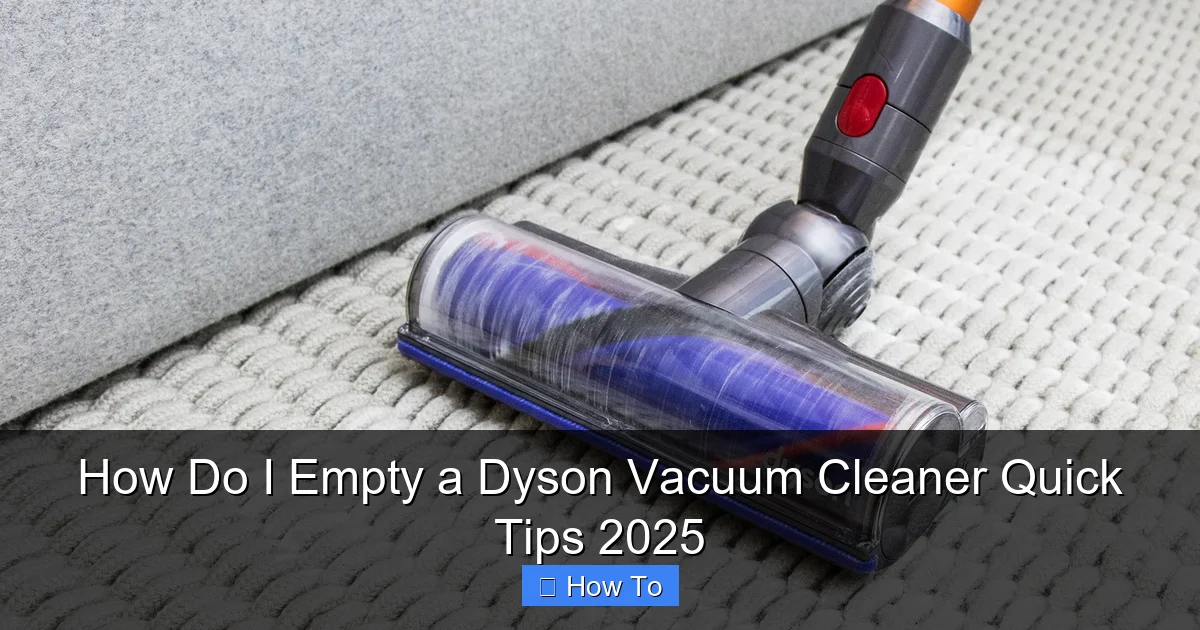
How Do I Empty a Dyson Vacuum Cleaner Quick Tips 2025
Emptying your Dyson vacuum cleaner is simple when you know the steps, ensuring peak performance and a healthier home. This guide provides comprehensive, easy-to-follow instructions for all Dyson models, from cordless stick vacuums to uprights, helping you maintain your machine and prevent dust exposure in 2025. Discover model-specific techniques, practical tips, and troubleshooting advice to make emptying your Dyson a breeze, keeping it running like new.
Welcome to your essential guide on how to empty a Dyson vacuum cleaner! In 2025, keeping your home spotless is easier than ever with advanced cleaning technology, but even the best machines need a little care. Learning how to properly empty your Dyson vacuum cleaner isn’t just about getting rid of dirt; it’s about maintaining peak performance, prolonging its lifespan, and ensuring a hygienic cleaning experience. Whether you’ve just unboxed a brand-new Dyson Gen5detect or you’re a long-time owner of a trusty Dyson Ball, this comprehensive guide will walk you through the process, step by easy step.
Many people find themselves wondering, “How do I empty a Dyson vacuum cleaner without making a mess?” or “Is my Dyson V15 emptied the same way as an older Dyson Ball?” The good news is that while Dyson has innovated various emptying mechanisms across its range, they are all designed to be intuitive and efficient. This guide will cover the most common types of Dyson vacuum cleaners, providing you with specific instructions, practical tips, and even troubleshooting advice to make emptying your Dyson a breeze.
Let’s get ready to clear out that dirt and keep your Dyson vacuum cleaner performing at its absolute best!
Key Takeaways
- Model-Specific Methods: Dyson vacuums (cordless stick, upright, handheld) have distinct, yet simple, emptying mechanisms. Always identify your model first.
- Regular Emptying is Crucial: For optimal suction and machine longevity, empty your Dyson vacuum cleaner before the MAX line is reached.
- Minimize Dust Exposure: Always empty your Dyson over a bin or into a sealed bag, ideally outdoors, to prevent dust and allergens from re-entering your home.
- Simple Lever/Button Release: Most Dyson models feature an intuitive push-button or lever system to release the bin flap, making the process quick and easy.
- Check for Blockages: While emptying your Dyson, take a moment to inspect the bin and cyclone shroud for any stubborn blockages that could impede airflow.
- Wipe Down the Bin: After emptying, a quick wipe of the clear bin with a damp cloth helps keep it clean and prevents grime buildup over time.
- Safety First: For corded models, unplug before detaching the bin. For cordless, ensure the vacuum is switched off.
Quick Answers to Common Questions
How often should I empty my Dyson?
Always empty your Dyson vacuum cleaner when the dirt reaches the “MAX” line. For optimal performance and hygiene, it’s best to empty it after every significant cleaning session, even if it hasn’t reached the maximum fill line.
Can I wash the dust bin of my Dyson?
The clear dust bin of most Dyson models can be wiped clean with a damp, lint-free cloth. However, Dyson generally advises against washing the entire bin or any of its internal cyclone components with water, as moisture can damage the internal mechanisms and electronics. Always refer to your specific model’s manual for detailed cleaning instructions.
What if my Dyson bin is stuck and won’t open?
First, ensure the vacuum is off and unplugged. Check for any visible blockages preventing the flap from opening. Make sure you’re pressing the release button firmly and completely. If it’s still stuck, gently tap the bin (while over a waste bin) to dislodge any compacted dirt. Avoid forcing it, and consult your user manual or Dyson support if the issue persists.
Why does dust fly everywhere when I empty my Dyson?
Dust clouds occur when emptying your Dyson from too high above the waste bin, or if the waste bin opening is too small. To prevent this, hold the clear bin as close to the bottom of a large waste receptacle as possible, or empty it directly into a large bin bag. Emptying outdoors is the most effective solution for minimizing dust dispersion.
Do all Dyson vacuum cleaners empty the same way?
No, while Dyson designs its emptying mechanisms to be intuitive, there are slight variations depending on the model type. Cordless stick vacuums often have a “point and shoot” lever, while upright and cylinder models usually require detaching the bin first, then pressing a separate button to open the bottom flap. Always identify your specific Dyson model to follow the correct emptying procedure.
Preparation is Key: Gather Your Tools and Spot
Before you even touch your Dyson vacuum cleaner, a little preparation can save you from a dusty aftermath. This step is crucial for making the process of emptying your Dyson clean and efficient.
Choose the Right Location
Dust and debris, especially fine particles, can easily escape and settle back into your home environment. To minimize this, we strongly recommend emptying your Dyson vacuum cleaner:
- Outdoors: If possible, take your Dyson outside to an outdoor bin. This is the absolute best way to prevent allergens and dust from recirculating indoors.
- Over a large waste bin: If emptying outdoors isn’t an option, use the largest possible household waste bin available. A tall bin helps contain the dust cloud.
- Avoid windy areas indoors: Don’t empty near open windows or fans inside, as this will only spread the dust.
Have a Bin Bag Ready (Optional, but Recommended)
For an extra layer of cleanliness, especially if you’re emptying indoors, consider using a separate bin bag specifically for the vacuum’s contents. You can hold the bag open and directly empty the Dyson into it, then tie it off immediately. This is particularly useful for those with allergies or asthma.
Ensure Your Dyson is Off and Disconnected
- For cordless models: Make sure your Dyson vacuum cleaner is switched OFF. You don’t want it accidentally starting during the process.
- For corded models: Always unplug your Dyson from the wall socket before attempting to empty or perform any maintenance. Safety first!
Emptying Cordless Stick Dyson Vacuum Cleaners (V-Series, Gen5detect, Outsize)
Dyson’s cordless stick vacuums are incredibly popular, and thankfully, emptying your Dyson V-series model is designed to be quick and hygienic. Most modern Dyson cordless models (like the V10, V11, V15 Detect, Gen5detect, and Outsize) feature a “point and shoot” mechanism.
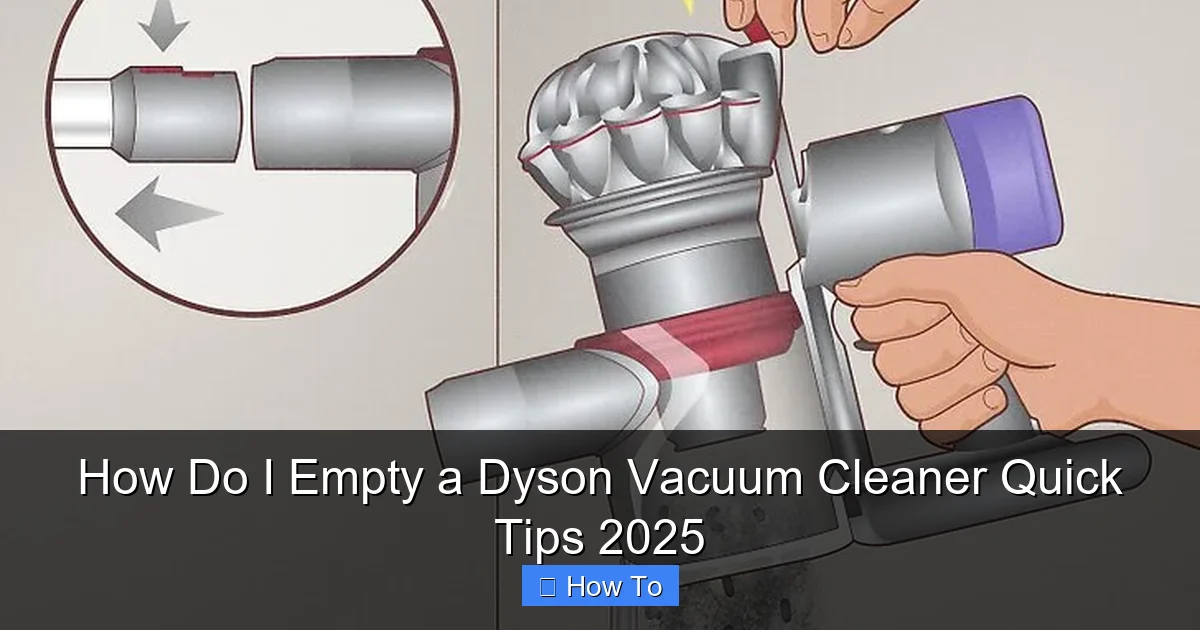
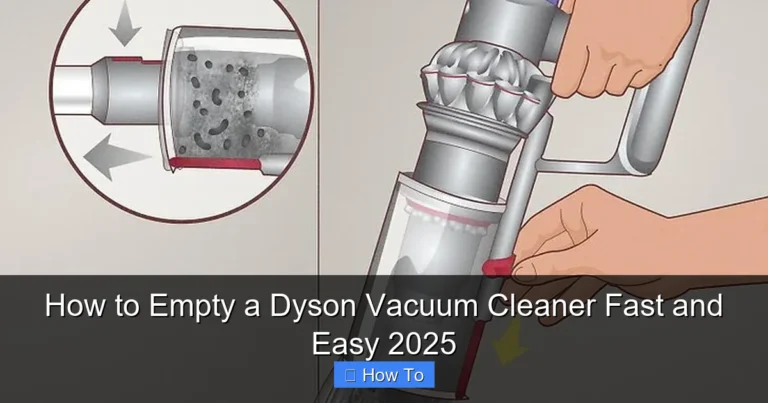
Visual guide about How Do I Empty a Dyson Vacuum Cleaner Quick Tips 2025
Image source: wikihow.com
Understanding the “Point and Shoot” Mechanism
This design allows you to hold the vacuum over a bin and, with one swift motion, push a lever that ejects the dust and debris directly downwards. It’s engineered to minimize contact with dust and prevent it from flying back up.
Step-by-Step for V-Series Models (V10, V11, V15 Detect, Gen5detect, Outsize)
- Remove the Wand/Attachments: First, you’ll need to remove any attached wand or cleaning head from the main body of the Dyson vacuum cleaner. There’s usually a red or grey quick-release button at the top where the wand connects to the bin. Press this button and pull the wand away.
- Position Over the Bin: Hold the main body of the Dyson vacuum cleaner horizontally, with the clear bin pointed downwards directly over your waste bin or bin bag. Ensure the opening of the bin is well inside the waste receptacle.
- Locate the Red Lever: On the top of the main cyclone assembly, you’ll see a prominent red lever (or sometimes a grey one with a red indicator). This lever controls the bin release.
- Push the Lever Down Firmly: With your other hand, push the red lever downwards all the way until it clicks. As you do this, the cyclone shroud inside the bin will move downwards, and the base flap of the clear bin will simultaneously open.
- Empty the Contents: The dirt and debris will now fall out into the bin. You might need to gently shake the Dyson vacuum cleaner to ensure everything comes out. If anything is stuck, resist the urge to stick your hand in; use a brush handle or a stick to dislodge it.
- Close the Bin: Once the bin is empty, push the red lever back upwards until it clicks securely into its original position. You’ll hear and feel it lock into place. Ensure the base flap is fully closed.
- Reattach the Wand: Reconnect the wand or any attachments, ensuring they click firmly into place.
Special Note for Older V-Series (V6, V7, V8)
If you have an older V-series model like the V6, V7, or V8, the emptying mechanism is slightly different, though still very easy:
- Remove the Wand/Attachments: Similar to newer models, detach the wand and any cleaning heads.
- Position Over the Bin: Hold the Dyson vacuum cleaner horizontally over your bin.
- Locate the Red Latch: On the top of the cyclone unit, you’ll find a red latch or clip.
- Pull Up the Latch: Pull this red latch upwards firmly. This will cause the cyclone assembly to lift up, and the bottom flap of the clear bin will automatically open, releasing the dirt.
- Empty and Close: Once empty, push the cyclone assembly back down until the bottom flap clicks shut, and the red latch secures it.
Pro Tips for Cordless Emptying
- Don’t Overfill: Always empty your Dyson vacuum cleaner before the dirt reaches the “MAX” line on the clear bin. Overfilling can make emptying messier and reduce suction.
- Gentle Tap: If some dust clings to the sides, a gentle tap on the side of the bin (when it’s still over the waste bin) can help dislodge it.
- Check the Shroud: Occasionally, hair and debris can get caught around the mesh shroud inside the bin. Use a dry cloth or a small brush to clean this area after emptying, but never use water directly inside the cyclone.
Emptying Upright and Cylinder Dyson Vacuum Cleaners (Ball, Cinetic Big Ball, Animal)
Dyson’s upright and cylinder models, known for their powerful suction and maneuverability, also have a straightforward emptying process. These models typically involve detaching the clear bin from the main body of the vacuum and then releasing a flap at the bottom.
Detaching the Clear Bin
- Switch Off and Unplug: If you have a corded model, ensure it’s unplugged from the wall socket. For all models, make sure the vacuum is switched off.
- Locate the Bin Release Button: On most Dyson upright and cylinder models, you’ll find a clear or red button/lever near the top handle of the clear bin. This is your bin release button.
- Press and Lift: Press this button firmly and lift the entire clear bin assembly straight up and away from the main body of the Dyson vacuum cleaner. It should detach quite easily.
Releasing the Base Flap
- Position Over the Bin: Take the detached clear bin, carry it to your waste bin (preferably outdoors), and hold it with the bottom facing downwards, well inside the waste receptacle.
- Locate the Bin Release Catch (again!): On the underside of the clear bin (or sometimes integrated into the top handle, depending on the model), you’ll find another red or grey button or latch. This is the button that opens the bottom flap of the bin. For some models, it’s the *same* button you used to detach the bin – pressing it a second time will open the flap.
- Press to Open: Press this second button or latch firmly. The bottom flap of the clear bin will swing open, allowing the dirt and debris to fall out.
- Clear Out Contents: Give the bin a gentle shake to ensure all the dirt has fallen out. If there’s a stubborn clump, you might need to carefully dislodge it with a brush handle (never your fingers).
Reattaching the Bin
- Close the Flap: Push the bottom flap of the clear bin upwards until it clicks securely into place. Make sure it’s fully sealed.
- Align and Attach: Position the clear bin back onto the main body of the Dyson vacuum cleaner. There are usually grooves or guides to help you align it correctly. Push it down firmly until you hear a click, indicating it’s securely attached.
Pro Tips for Upright/Cylinder Emptying
- Two-Stage Release: Remember that for many uprights, the same button might be used twice: once to release the bin from the vacuum, and a second time (while holding the detached bin over a trash can) to open the bottom flap.
- Check the Shroud/Filter: Some upright models have a washable filter or a metal shroud inside the bin. While emptying, take a quick look to ensure nothing is obviously clogged.
- Don’t Force It: If the bin isn’t detaching or reattaching easily, double-check that you’re pressing the correct buttons and aligning it properly. Forcing it can cause damage.
Emptying Dyson Handheld Vacuum Cleaners (e.g., V7 Trigger, DC34)
Smaller Dyson handhelds, often used for quick clean-ups, follow a similar principle to their stick vacuum counterparts but are usually even more compact.
Locate the Release Catch
Similar to the cordless stick models, handheld Dyson vacuum cleaners typically have a red or grey release catch on the top or side of the clear bin. This catch opens the bottom flap.
Open and Empty
- Ensure Off: Make sure the handheld Dyson vacuum cleaner is switched off.
- Position Over Bin: Hold the handheld vacuum over your waste bin.
- Press the Catch: Press the release catch firmly. The bottom of the clear bin will swing open, releasing the collected dust and debris.
- Close Securely: Once empty, push the bin flap back up until it clicks securely into place.
After Emptying: Quick Maintenance for a Healthier Dyson
Learning how to empty a Dyson vacuum cleaner properly also includes a little post-emptying care. This simple routine will keep your machine sparkling and hygienic.
Wipe Down the Bin
Even after emptying, fine dust can cling to the inside of the clear bin. Take a damp, lint-free cloth (do NOT use abrasive cleaners or harsh chemicals) and wipe the inside and outside of the clear bin. This prevents dust buildup and keeps the bin looking clear. Ensure it’s completely dry before reattaching it to the vacuum, especially the metal components.
Check and Clean Filters (Brief Mention)
While this guide focuses on emptying, remember that your Dyson vacuum cleaner also has washable filters that require periodic cleaning. Most models have at least one filter that can be rinsed under cold water. Refer to your Dyson’s user manual for specific filter locations and cleaning schedules, as clean filters are essential for maintaining suction and air quality. Regular filter maintenance goes hand-in-hand with regularly emptying your Dyson.
Troubleshooting Common Dyson Emptying Issues
Even with the best instructions, sometimes things don’t go exactly as planned. Here are solutions to common problems you might encounter when you empty a Dyson vacuum cleaner.
Dust Cloud Catastrophe
Problem: When you empty your Dyson, a huge cloud of dust billows out, making a mess and potentially triggering allergies.
Solution: This usually happens if you’re emptying from too high above the bin, or if the bin isn’t large enough. Always empty your Dyson as close to the bottom of your waste receptacle as possible. Consider using a large bin bag that you can tightly seal immediately after emptying. As mentioned, emptying outdoors is the ideal solution for this issue.
Bin Won’t Open
Problem: You press the release button, but the bin flap or bottom won’t open.
Solution:
- Check for Blockages: Sometimes, large debris can get jammed and prevent the flap from opening. Visually inspect the opening.
- Firm Press: Ensure you are pressing the release button or lever firmly and all the way. Sometimes it needs a definitive click.
- Model Specifics: Double-check your user manual. Some models have a slightly different mechanism or require a two-step process (e.g., press once to detach, press again to open).
- Contact Support: If it remains stuck after trying these steps, there might be a mechanical fault. Contact Dyson customer support.
Blockages in the Bin or Cyclone
Problem: After emptying your Dyson, you notice hair, fluff, or larger debris still stuck inside the clear bin or wrapped around the metal mesh (cyclone shroud).
Solution:
- Don’t Use Your Hand: Never reach into the bin with your fingers. Use a long, thin, non-sharp object like a chopstick, a ruler, or the handle of a brush to carefully dislodge the blockage.
- Gently Tap: A firm tap on the side of the bin can sometimes help dislodge stubborn material.
- Remove Cyclone (if applicable): Some Dyson models allow you to carefully remove the central cyclone unit for deeper cleaning. Consult your manual before attempting this, as it varies by model.
- Preventative Measures: Regularly emptying your Dyson before it gets too full helps prevent these blockages.
Bin Won’t Reattach
Problem: After emptying, the clear bin won’t click back into place on the main vacuum body.
Solution:
- Check Alignment: Ensure the bin is correctly aligned with the grooves and connectors on the vacuum’s body. It should slide smoothly into place.
- Flap Closed: Make sure the bottom flap of the clear bin is fully closed and securely latched. If it’s even slightly ajar, the bin won’t reattach properly.
- Firm Push: Give it a firm but gentle push until you hear the satisfying click, indicating it’s locked.
- Inspect for Damage: Check for any visible damage to the clips or connection points on both the bin and the vacuum.
Conclusion: Keep Your Dyson Performing at Its Best
Congratulations! You now have all the knowledge you need to confidently empty your Dyson vacuum cleaner, no matter the model, ensuring it continues to deliver powerful, consistent cleaning performance for years to come. Remember, regularly emptying your Dyson is one of the simplest yet most effective maintenance tasks you can perform to keep your home clean and your vacuum in top condition.
By following these step-by-step instructions, using our practical tips, and knowing how to troubleshoot common issues, you’ll find that emptying your Dyson is a quick and hygienic process. Keep these “Quick Tips 2025” in mind, and you’ll always be ready to tackle the dirt. Happy vacuuming!
🎥 Related Video: how to empty ur dyson V8…#dyson #dysonv8 /mayang rosales
📺 Mayang Rosales