My Vacuum Cleaner Turn Off When Hot Why
If your vacuum cleaner shuts off when hot, it’s usually a built-in safety feature called a thermal cut-out switch protecting the motor from damage. The most common reasons include clogged filters, blocked hoses, or a full dirt bin, all of which force the motor to work harder and overheat. Simple troubleshooting and regular maintenance can often resolve this issue, keeping your vacuum running efficiently and extending its lifespan.
There’s nothing quite as frustrating as being in the middle of cleaning your home, only for your trusty vacuum cleaner to suddenly stop working. You might notice it feels warm, maybe even hot, and then silence. You ask yourself, “my vacuum cleaner turn off when hot why?” If this sounds familiar, you’re certainly not alone. This is a very common issue that many vacuum owners face. But don’t worry, it’s usually not a sign of a major breakdown, and often, it’s an easy fix.
That moment of silence, when your vacuum goes quiet, is actually your vacuum cleaner looking out for itself. Most modern vacuum cleaners, from handheld models to powerful uprights, come equipped with a crucial safety feature designed to protect the motor from damage. This feature kicks in when the motor gets too hot, shutting everything down before permanent harm can occur. So, when you’re wondering, “my vacuum cleaner turn off when hot why,” the answer often points back to this clever safety mechanism.
In this article, we’re going to dive deep into understanding why your vacuum cleaner might be getting too hot and stopping. We’ll explore the main culprits behind this common problem, walk you through simple troubleshooting steps you can take yourself, and share some fantastic tips to prevent it from happening again. By the time you finish reading, you’ll have a much clearer idea of why your vacuum is acting this way and how to keep it running smoothly for years to come. So, let’s figure out “my vacuum cleaner turn off when hot why” together!
Key Takeaways
- Thermal Cut-Out Switch: Your vacuum shuts off when hot because of a safety device designed to prevent the motor from serious damage due to overheating.
- Common Causes of Overheating: Clogged filters, blocked hoses or brush rolls, a full dust bin, and motor strain from excessive use are the primary culprits.
- Immediate Action: When your vacuum stops, unplug it immediately, allow it to cool completely for at least 30-60 minutes, and then begin troubleshooting.
- Troubleshooting Steps: Always check and clean the filters, empty the dust bin, clear any blockages in the hose, nozzle, or brush roll before restarting.
- Preventative Maintenance is Key: Regular cleaning of filters, emptying the bin, and checking for tangles will significantly reduce the chances of your vacuum overheating.
- Motor Strain: Avoid overworking your vacuum by not using it for too long, vacuuming inappropriate items, or on very thick carpets without adjusting settings.
- When to Seek Help: If your vacuum continues to overheat after thorough cleaning, or if you notice burning smells or unusual noises, it might be time for professional repair or replacement.
Quick Answers to Common Questions
Why does my vacuum cleaner turn off when hot?
Your vacuum cleaner turns off when hot because it has a built-in safety feature called a thermal cut-out switch. This switch automatically shuts down the motor to prevent overheating and permanent damage.
What is the most common reason a vacuum overheats?
The most common reason a vacuum overheats is restricted airflow, typically caused by clogged filters, a full dirt bin, or blockages in the hose, nozzle, or brush roll. These issues force the motor to work harder, generating excess heat.
How long should I let my vacuum cool down after it overheats?
You should let your vacuum cleaner cool down completely for at least 30 to 60 minutes after it overheats. This allows the thermal cut-out switch to reset and the motor to return to a safe operating temperature.
Can a full dirt bin make my vacuum overheat?
Yes, absolutely. A full dirt bin or bag restricts the airflow through the vacuum, making the motor work harder to draw air and debris. This increased effort generates heat, which can cause the vacuum to overheat and shut off.
What should I check first if my vacuum turns off when hot?
After unplugging and letting it cool, the very first thing you should check is the filters. Clogged filters are the most frequent cause of restricted airflow and subsequent overheating.
📑 Table of Contents
The Lifesaver: Understanding the Thermal Cut-Out Switch
When your vacuum cleaner suddenly stops and feels hot, it’s almost always due to a brilliant little invention called a thermal cut-out switch, or sometimes a thermal overload protector. This isn’t a fault; it’s a safety feature! It’s there to prevent something much worse from happening. Think of it like a superhero for your vacuum’s motor, jumping into action when things get too hot.
What is a Thermal Cut-Out Switch?
A thermal cut-out switch is essentially a sensor and a breaker built into your vacuum’s motor. It constantly monitors the temperature of the motor. If the motor’s temperature rises above a safe operating level, this switch automatically cuts off the power supply. This immediately stops the vacuum from running. It’s a proactive measure to prevent the motor from overheating to a point where it could burn out, get damaged, or even become a fire hazard. So, when you ask “my vacuum cleaner turn off when hot why,” the thermal cut-out switch is the direct cause of the shutdown.
How Does It Work?
The switch is typically made from bimetallic strips or a thermistor. As the motor heats up, the temperature of these components also rises. Once a critical temperature is reached, the switch opens an electrical circuit, cutting off power to the motor. The vacuum will then stay off until the motor cools down to a safe temperature, and usually, you’ll need to manually reset it by turning the vacuum off and then on again, or in some cases, by pressing a specific reset button. This cool-down period is essential for the switch to reset and for the motor to recover. It gives you a chance to figure out “my vacuum cleaner turn off when hot why” and fix the underlying issue.
Why It’s Essential
Without this safety device, your vacuum’s motor would just keep running, getting hotter and hotter until it failed. This could lead to melted plastic, exposed wires, or even smoke and fire. The thermal cut-out switch protects not only your expensive appliance but also your home and your safety. So, next time you’re wondering “my vacuum cleaner turn off when hot why,” remember it’s doing you a favor, saving you from a potentially bigger problem.
Common Culprits: Why Your Vacuum Gets Hot
Now that we know *what* makes your vacuum stop, let’s explore *why* it’s getting hot in the first place. The motor gets hot because it’s working too hard. Anything that obstructs airflow or adds resistance to the moving parts will make the motor strain, generate more heat, and eventually trigger that thermal cut-out switch. Here are the most common reasons you might find yourself asking “my vacuum cleaner turn off when hot why.”
Visual guide about My Vacuum Cleaner Turn Off When Hot Why
Image source: vacmasterguide.com
Clogged Filters
This is by far the most common reason for overheating. Your vacuum’s filters, whether they’re foam, HEPA, or cloth, are designed to trap dust and allergens, keeping the air clean. Over time, these filters become saturated with dirt. When a filter is clogged, air cannot flow through the vacuum easily. The motor then has to work much harder to pull air through the restricted path, leading to increased heat generation. If you’re pondering “my vacuum cleaner turn off when hot why,” a dirty filter is often the first place to look. Regularly checking and cleaning or replacing your filters is crucial.
Blocked Hoses or Nozzles
Just like clogged filters, blockages in the hose, wand, or nozzle attachments can severely restrict airflow. Socks, hair ties, paper, even small toys can get sucked up and create a stubborn clog. When the air can’t move freely through these parts, the motor again strains excessively, causing it to overheat. Imagine trying to breathe through a straw that’s half-clogged; your lungs would work much harder. The same principle applies here. This is a very common reason “my vacuum cleaner turn off when hot why” during a cleaning session.
Full Dirt Bin or Bag
It sounds simple, but a full dust bin or dirt bag can act just like a clogged filter. Once the collection area is packed with debris, there’s less space for air to circulate efficiently. This forces the motor to work overtime to try and pull air and dirt into an already full container. Many people forget to empty their vacuum until it’s overflowing, but by then, the airflow is already compromised, making the motor work harder and hotter. So, if you’re wondering “my vacuum cleaner turn off when hot why,” and your bin is full, you’ve found a likely answer.
Tangled or Stuck Brush Roll
For upright and stick vacuums, the brush roll (or beater bar) is essential for agitating carpet fibers and picking up debris. This rotating brush can easily get tangled with long hair, threads, pet fur, or even small pieces of string. When the brush roll is heavily tangled or gets completely stuck, it creates immense resistance. The motor that drives the brush roll, and often the main suction motor, has to exert significant power to try and move it. This struggle generates a lot of heat, causing the vacuum to shut off. If “my vacuum cleaner turn off when hot why” is your question, check that brush roll!
Motor Strain from Improper Use
Sometimes, the vacuum simply works too hard because of how it’s being used.
- Vacuuming heavy debris: Trying to suck up large, heavy objects, or too much fine dust (like drywall dust) can overload the motor.
- Incorrect surface settings: Using your vacuum on a very thick carpet with the brush roll setting too low can cause the brush to dig in too much, creating drag and making the motor strain.
- Overly long cleaning sessions: Even a perfectly clean vacuum can overheat if used continuously for extended periods, especially older models or those not designed for heavy-duty work.
These scenarios increase the workload on the motor, leading to excess heat. If “my vacuum cleaner turn off when hot why” keeps happening after a long session, it might just need a break.
Age and Wear of the Motor
Like any mechanical device, vacuum cleaner motors can wear out over time. Bearings can seize, internal components can get dusty, or the motor might simply lose efficiency. An older motor that isn’t running as smoothly as it once did will have to work harder to perform the same task, naturally generating more heat. While less common than clogs, an aging motor can definitely be why “my vacuum cleaner turn off when hot why” more frequently.
Troubleshooting Steps: What To Do When It Stops
When your vacuum cleaner unexpectedly shuts down, don’t panic! Most of the time, it’s something you can fix yourself with a few simple steps. Here’s a practical guide on how to troubleshoot and get your vacuum running again after asking “my vacuum cleaner turn off when hot why.”
Step 1: Unplug and Cool Down
This is the most crucial first step. As soon as your vacuum stops, immediately unplug it from the wall socket. This ensures your safety and prevents any further strain on the motor. Then, place your vacuum in a cool, well-ventilated area and let it cool down completely. This usually takes at least 30 to 60 minutes, or even longer depending on how hot it got. Don’t try to restart it immediately. The thermal cut-out switch needs to reset, and the motor needs to reach a safe temperature. Patience here is key to understanding “my vacuum cleaner turn off when hot why” and fixing it.
Step 2: Inspect and Empty the Dirt Bin/Bag
Once cooled, start your inspection.
- For Bagless Vacuums: Remove the dust cup and empty all contents into the trash. Give the cup a quick wipe or rinse if it’s washable (make sure it’s completely dry before reassembling).
- For Bagged Vacuums: Replace the full bag with a fresh, empty one. Even if it’s not completely full, a partially full bag can still restrict airflow.
A clear collection system is vital for good airflow. This simple check can often answer “my vacuum cleaner turn off when hot why” directly.
Step 3: Check and Clean or Replace Filters
This is often the primary culprit. Locate all your vacuum’s filters. Most vacuums have at least one pre-motor filter and sometimes a post-motor (HEPA) filter.
- Pre-Motor Filter: This is usually near the dust bin. If it’s washable, rinse it under cold water until the water runs clear. Let it air dry completely for at least 24 hours (or as per manufacturer instructions) before putting it back. If it’s not washable or looks very old and worn, replace it.
- Post-Motor (HEPA) Filter: This is often located near the exhaust. Some are washable, some are not. Follow your manufacturer’s instructions. If it’s dirty and not washable, replace it.
Never use a damp filter, as this can damage the motor. Cleaning filters drastically improves airflow and reduces motor strain, often solving “my vacuum cleaner turn off when hot why.”
Step 4: Clear Blockages in Hoses, Wands, and Attachments
Now, it’s time to play detective for clogs.
- Main Hose: Detach the main hose from both ends (where it connects to the vacuum body and the wand). Look through it. If you can’t see daylight, there’s a blockage. Use a broom handle, a stiff wire hanger (unbent), or a flexible plumbing snake to gently push the clog through. Avoid sharp objects that could puncture the hose.
- Wand and Attachments: Check these for any obstructions.
- Nozzle/Inlet: Look at the opening where the vacuum meets the floor. Debris can sometimes get stuck right at the entrance.
Clearing these pathways is critical for optimal airflow, directly addressing why “my vacuum cleaner turn off when hot why.”
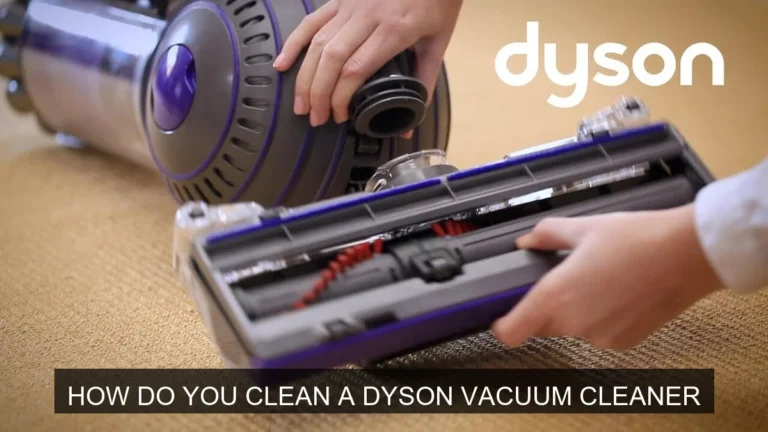
Step 5: Clean the Brush Roll
Turn the vacuum cleaner over to access the brush roll.
- Remove Tangled Hair/Fibers: Use a pair of scissors (be careful not to cut the bristles or the belt) to cut away any tangled hair, threads, or pet fur that has wrapped around the brush roll. Many brush rolls have a groove designed for this purpose.
- Check for Obstructions: Ensure nothing else is jammed in the brush roll housing that might prevent it from spinning freely.
- Inspect the Belt: If your vacuum has a belt-driven brush roll, check if the belt is intact and properly seated. A broken or stretched belt will prevent the brush roll from spinning, causing motor strain if the main motor tries to power it.
A freely spinning brush roll reduces motor load significantly, helping answer “my vacuum cleaner turn off when hot why.”
Step 6: Reassemble and Test
Once you’ve cleaned everything thoroughly and ensured all parts are dry, reassemble your vacuum cleaner carefully. Plug it back in and try turning it on. If you’ve addressed the underlying cause, your vacuum should now run without immediately overheating. If it still stops, repeat the cooling process and double-check everything, or consider moving to more advanced solutions.
Prevention is Key: Keeping Your Vacuum Cool and Happy
Stopping your vacuum from overheating in the first place is always better than troubleshooting it after it shuts down. A proactive approach will extend the life of your appliance and ensure it’s always ready when you need it. Here are some simple habits to adopt that will prevent you from asking “my vacuum cleaner turn off when hot why” in the future.
Regular Maintenance Schedule
Don’t wait for your vacuum to stop working before you give it some attention. Set a routine for maintenance. For average use, aim to check filters and the brush roll monthly, and deep clean yearly. More frequent checks are needed if you have pets or a large home. This is your best defense against “my vacuum cleaner turn off when hot why.”
Empty the Dirt Bin/Bag Frequently
Make it a habit to empty the dust bin after every 1-2 uses, or when it reaches about two-thirds full. For bagged vacuums, replace the bag before it’s completely full. This simple act ensures optimal airflow and prevents the motor from straining. It’s a very easy way to avoid “my vacuum cleaner turn off when hot why.”
Clean or Replace Filters Regularly
Follow your manufacturer’s guidelines for filter cleaning and replacement. Washable filters should be cleaned regularly and allowed to dry completely. Non-washable filters should be tapped out to remove loose dust and replaced as recommended (usually every 3-6 months, depending on use). Clean filters are happy filters, and they are crucial for preventing “my vacuum cleaner turn off when hot why.”
Keep the Brush Roll Free of Tangles
After every few vacuuming sessions, turn your vacuum over and inspect the brush roll. Use scissors or a seam ripper to carefully cut and remove any tangled hair, strings, or fibers. A clear brush roll spins freely, putting less strain on the motor. This quick check can save you from wondering “my vacuum cleaner turn off when hot why.”
Clear Hoses and Attachments
Periodically check the main hose, wand, and any attachments for signs of blockages. If you notice a decrease in suction, that’s a good indicator that a clog might be forming. Addressing these early prevents them from becoming major airflow restrictions.
Use the Right Settings for the Surface
Many vacuums have adjustable height settings for different carpet piles or a switch to turn off the brush roll for hard floors. Using the correct setting prevents the motor from overworking. For example, a low setting on a thick carpet will make the brush roll drag, increasing motor strain. Adjusting these settings helps to prevent “my vacuum cleaner turn off when hot why.”
Don’t Overwork Your Vacuum
Avoid using your vacuum continuously for very long periods. If you have a large area to clean, give your vacuum short breaks to cool down. Also, refrain from vacuuming up items that are too large, sharp, or very fine (like construction dust, which can clog filters instantly). Use a shop vac for those tougher jobs if you have one. This helps preserve your motor and keeps you from asking “my vacuum cleaner turn off when hot why.”
When to Call for Help: Recognizing Serious Issues
While most overheating issues can be resolved with simple cleaning and maintenance, there are times when the problem might be more serious. If you’ve diligently followed all the troubleshooting steps and your vacuum still frequently asks “my vacuum cleaner turn off when hot why,” it might be time to consider professional help or even a replacement.
Persistent Overheating Despite Cleaning
If your vacuum continues to shut off even after you’ve thoroughly cleaned all filters, emptied the bin, cleared all blockages, and ensured the brush roll is free, this suggests an internal problem. The motor itself might be failing, or there could be an issue with the thermal cut-out switch not resetting properly or being too sensitive. This is a clear sign that the issue is beyond basic user maintenance.
Burning Smell or Unusual Noises
If you notice a distinct burning smell (like burning rubber or electrical components) coming from your vacuum, or if it starts making unusual grinding, screeching, or excessively loud noises, stop using it immediately. These are strong indicators of significant motor problems or electrical faults. Continuing to use it could be dangerous and worsen the damage. A burning smell is a definite red flag when you’re thinking “my vacuum cleaner turn off when hot why.”
Electrical Problems
Any signs of frayed cords, sparks, or intermittent power loss (unrelated to overheating) also indicate serious electrical issues. Do not attempt to fix electrical problems yourself unless you are a qualified professional. Electrical faults can be very dangerous. If you suspect an electrical issue, unplug the vacuum and do not use it again.
Professional Repair vs. Replacement
If you suspect a serious internal problem, you have a couple of options:
- Professional Repair: Take your vacuum to an authorized service center. They have the tools and expertise to diagnose and repair motor issues or replace faulty components. This can be a cost-effective solution for higher-end or newer models.
- Replacement: For older, lower-cost models, the cost of repair might outweigh the cost of a new vacuum. Consider the age of your vacuum, the severity of the problem, and the cost of a new equivalent model when making this decision.
It’s important to weigh these options carefully if your vacuum keeps shutting off, even after meticulous cleaning, and you’re still wondering “my vacuum cleaner turn off when hot why.”
Understanding why “my vacuum cleaner turn off when hot why” is usually a simple matter of identifying and clearing blockages or dirty components. By regularly cleaning your vacuum’s filters, emptying its dirt bin, clearing brush rolls, and checking for hose clogs, you can significantly extend its lifespan and maintain its powerful suction. Think of these maintenance tasks as giving your vacuum cleaner a little spa day; it needs to be clean to perform its best. Remember, that thermal cut-out switch is your vacuum’s guardian angel, protecting it from harm. So, the next time it stops, you’ll know exactly why, and you’ll be equipped with the knowledge to get it running smoothly again. Happy vacuuming!
🎥 Related Video: Why is My Vacuum Cleaner Overheating?
📺 Appliance Princess
Why is my vacuum cleaner overheating? I thought you said it wasn’t doing so hot at cleaning your floor. It still isn’t. The vacuum …
Frequently Asked Questions
How often should I clean my vacuum filters?
The frequency depends on usage and filter type. Generally, washable filters should be rinsed monthly and air-dried completely, while non-washable filters might need replacement every 3-6 months. Always consult your vacuum cleaner’s manual for specific recommendations.
Can pet hair cause my vacuum to overheat?
Yes, pet hair is a very common culprit! It can quickly clog filters, fill dirt bins, and, most notably, wrap tightly around the brush roll, causing significant resistance and making the motor overheat.
Is it safe to continue using a vacuum that frequently overheats?
No, it’s not safe to continuously use a vacuum that frequently overheats. Ignoring the issue can lead to permanent motor damage, electrical faults, or even a fire hazard. Address the underlying cause promptly.
What if my vacuum overheats even after cleaning everything?
If your vacuum still overheats after thorough cleaning, filter replacement, and clearing all blockages, the issue might be internal to the motor or thermal switch. At this point, it’s best to seek professional repair or consider replacing the unit.
Does vacuuming large debris make it overheat?
Yes, trying to vacuum large, heavy, or inappropriate debris (like construction dust, screws, or wet items) can put excessive strain on the motor. This forced hard work generates more heat and can easily trigger the thermal cut-out switch.
Can old age cause a vacuum cleaner to overheat?
Yes, an older vacuum cleaner motor can become less efficient over time due to wear and tear, internal dust accumulation, or failing bearings. An inefficient motor has to work harder to maintain suction, leading to increased heat generation and more frequent overheating.