Why Is My Vacuum Cleaner So Loud
If your vacuum cleaner suddenly sounds like a jet engine, it’s usually a cry for help! A significantly louder vacuum often signals a solvable problem, most commonly a blockage in the hose, a clogged filter restricting airflow, or tangled debris around the brush roll. Addressing these issues can not only restore peace to your cleaning routine but also improve your vacuum’s performance and lifespan.
Why Is My Vacuum Cleaner So Loud?
Ah, the symphony of a clean home! Or, wait… is that a symphony, or the sound of a small jet taking off in your living room? We’ve all been there: you flick the switch on your trusty vacuum cleaner, expecting the familiar hum, but instead, you’re greeted with a roar that makes you wonder if it’s about to achieve liftoff. It’s frustrating, right? That sudden, ear-splitting noise isn’t just annoying; it’s often a clear signal that something isn’t quite right with your cleaning companion.
A vacuum cleaner that is suddenly very loud can be a symptom of various issues, some minor and easily fixable, others a bit more serious. You might be wondering, “Why is my vacuum cleaner so loud all of a sudden?” Don’t worry, you’re not alone in this mystery. The good news is that most loud vacuum cleaner problems have straightforward solutions. By understanding the common culprits, you can often diagnose and fix the issue yourself, saving you money, time, and your eardrums. Let’s dive into the world of vacuum noise and uncover the reasons behind that alarming racket.
Key Takeaways
- Normal vs. Abnormal Noise: While all vacuums make some noise, a sudden increase in loudness or a change in sound usually indicates a problem that needs attention.
- Clogs are the Top Culprit: Blockages in the hose, attachments, brush roll, or intake are the most frequent reasons why your vacuum cleaner is so loud, restricting airflow and straining the motor.
- Filters Demand Attention: Dirty or clogged filters severely impede airflow, causing the motor to work harder, which generates more noise and reduces suction power.
- Brush Roll Inspection is Crucial: Tangled hair, string, or debris around the brush roll can create loud grinding or rattling sounds and prevent proper cleaning.
- Motor Strain and Overheating: Persistent unusual noises (like grinding or burning smells) could signal motor problems, which might require professional repair or replacement.
- Regular Maintenance is Key: Routinely checking for clogs, cleaning/replacing filters, and clearing the brush roll can prevent excessive noise, maintain efficiency, and extend your vacuum’s life.
Quick Answers to Common Questions
Why is my vacuum cleaner making a high-pitched noise?
A high-pitched noise, often a whine or scream, usually indicates restricted airflow due to a clog (in the hose, attachments, or intake), a very dirty filter, or sometimes worn motor bearings. Check for blockages and clean your filters first.
Can a full dust bag or canister make my vacuum louder?
Yes, a full dust bag or canister can restrict airflow significantly, forcing the motor to work harder to maintain suction, which in turn generates more noise and reduces cleaning efficiency.
Is it safe to use my vacuum if it’s suddenly very loud?
If your vacuum cleaner is suddenly very loud and the sound is unusual (e.g., grinding, screaming, or accompanied by a burning smell), it’s best to stop using it immediately. Continued use could cause further damage to the motor or create a safety hazard.
How often should I clean my vacuum filters to prevent noise?
The frequency depends on usage, but typically, pre-motor filters should be checked and cleaned (if washable) every 1-3 months, and post-motor/HEPA filters replaced every 6-12 months. Always check your vacuum’s manual for specific recommendations.
What should I do if I can’t find a clog but my vacuum is still loud?
If you’ve thoroughly checked for clogs and cleaned filters but your vacuum is still loud, inspect the brush roll for tangles or damage. Also, check for loose parts or worn belts. If the noise persists and sounds like a motor issue, consider professional repair or replacement.
📑 Table of Contents
- The Basics of Vacuum Noise: What’s Normal and What’s Not?
- Clogs: The Number One Culprit When Your Vacuum is Loud
- Dirty or Clogged Filters: A Common Source of Noise
- Brush Roll Issues: Grinding and Rattling
- Motor Problems: A More Serious Concern for a Loud Vacuum Cleaner
- Other Potential Sources of Noise
- Conclusion: Quiet Your Cleaning Routine
The Basics of Vacuum Noise: What’s Normal and What’s Not?
Before we start troubleshooting, it’s helpful to understand what “normal” vacuum noise sounds like. No vacuum cleaner is silent – they all generate some level of noise due to the powerful motor and the airflow they create. However, there’s a distinct difference between a regular operating hum and a sound that makes you want to cover your ears.
Understanding Decibels (dB) and Your Vacuum
Vacuum cleaners typically operate in the range of 60 to 80 decibels (dB). For reference, 60 dB is like a normal conversation, while 80 dB is closer to a garbage disposal or a loud street. High-performance vacuums, especially those with powerful motors, might naturally be on the louder side of this spectrum. So, if your vacuum has always been a bit noisy but is still doing its job efficiently, it might just be designed that way.
What’s “Normal” for a Vacuum Cleaner?
A normal vacuum cleaner sound is usually a consistent hum or whir, perhaps a bit louder when it’s working harder on thick carpets or picking up a particularly large piece of debris. You might hear the motor speeding up and slowing down slightly. What’s *not* normal, and a strong indicator of a problem, is:
- A sudden, dramatic increase in volume.
- A high-pitched whine or scream.
- A grinding, rattling, or thumping sound.
- A sudden change in the pitch or tone of the motor.
- The vacuum sounding like it’s struggling or straining more than usual.
If you notice any of these changes, it’s time to investigate why your vacuum cleaner is so loud.
Clogs: The Number One Culprit When Your Vacuum is Loud
When someone asks, “Why is my vacuum cleaner so loud?” the first answer that usually comes to mind for experienced users is “Clogs!” And for good reason – blockages are incredibly common and dramatically impact a vacuum’s performance and noise level. When dirt, dust, hair, or larger debris gets stuck, it restricts the airflow essential for suction. This forces the motor to work harder to pull air through the constricted path, leading to increased strain, overheating, and, you guessed it, a lot more noise.
Where Do Clogs Usually Form?
Clogs can pop up in several places, creating a bottleneck in your vacuum’s system:
- The Vacuum Hose: This is a prime spot for socks, paper, toys, or clumps of pet hair to get stuck.
- Attachments: Any nozzle or crevice tool can become blocked, especially at the narrower openings.
- Brush Roll Area: Long hair, threads, or string can wrap around the brush roll, preventing it from spinning freely and sometimes getting sucked into the intake.
- Main Intake Port: The opening where air and debris first enter the vacuum head can get blocked by larger items.
- Dust Bin/Bag Inlet: The entry point into the collection chamber can sometimes get jammed.
How to Check for and Clear Clogs
This is often the quickest fix if your vacuum cleaner is so loud.
- Unplug Your Vacuum: Safety first! Always disconnect power before sticking your hands into any part of the vacuum.
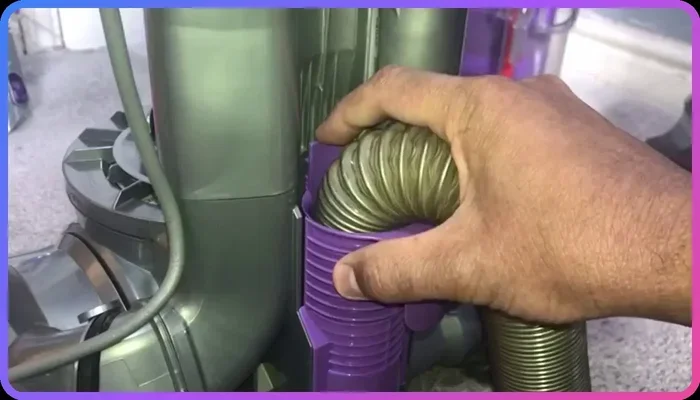
- Remove and Check the Hose: Disconnect the hose from both the vacuum body and the wand/attachments. Hold it up to a light source. Can you see through it? If not, carefully use a broom handle (without a sharp end), a thin stick, or a specific clog-clearing tool to push the blockage through. Be gentle to avoid puncturing the hose.
- Inspect the Attachments: Detach all nozzles and wands and visually inspect them for blockages.
- Examine the Brush Roll Area: Flip the vacuum head over. Use scissors or a seam ripper to carefully cut and remove any hair, string, or threads wrapped around the brush roll. Also, check the opening that leads from the brush roll housing into the main body of the vacuum.
- Check the Intake Port: This is the opening directly behind the brush roll. Clear any debris that might be jammed there.
Once you’ve cleared any clogs, reassemble your vacuum and test it. You’ll likely find that the noise level has significantly dropped, and suction has improved.
Prevention Tips
To avoid future clogs, try to vacuum up obvious large items before you start. Be mindful of areas with lots of hair (pet or human). Consider emptying your dustbin frequently, as a full bin can contribute to blockages.
Visual guide about Why Is My Vacuum Cleaner So Loud
Image source: appliancesforlife.com
Dirty or Clogged Filters: A Common Source of Noise
Filters are the unsung heroes of your vacuum cleaner, trapping dust and allergens to ensure clean air. However, when these filters become choked with dirt and debris, they become a major reason why your vacuum cleaner is so loud. Just like a clog, a dirty filter restricts airflow, forcing the motor to work overtime to compensate. This extra strain directly translates into more noise and reduced suction power.
Types of Vacuum Filters
Most vacuums have at least one filter, and many have multiple:
- Pre-Motor Filters: These are usually foam or pleated paper filters located before the motor. They catch larger particles, protecting the motor. They often need to be cleaned regularly.
- Post-Motor Filters (HEPA Filters): These are typically found after the motor and capture very fine dust particles and allergens, releasing cleaner air. HEPA filters are crucial for allergy sufferers. Some are washable, while others need to be replaced.
When and How to Clean or Replace Filters
Check your vacuum’s manual for specific instructions on filter maintenance. Generally:
- Pre-Motor Filters: Should be checked and cleaned (if washable) or replaced every 1 to 3 months, depending on usage. If washable, rinse them under cool water until the water runs clear, then let them air dry completely (for at least 24-48 hours) before putting them back. A damp filter can damage the motor!
- Post-Motor/HEPA Filters: Many HEPA filters are not washable and need to be replaced every 6 to 12 months. Some higher-end models may have washable HEPA filters.
If your vacuum cleaner is so loud, take a moment to pull out your filters and inspect them. You’ll often be surprised at how much dirt they’ve accumulated.
The Impact on Airflow and Noise
Think of your vacuum’s motor as a pair of lungs. Filters are like the airways. If your airways are clogged, your lungs have to work much harder to get air, and you’ll make more noise trying to breathe. Similarly, a clogged filter makes the vacuum motor strain, producing a higher-pitched whine or a louder hum. By ensuring your filters are clean and clear, you allow the motor to breathe easily, reducing unnecessary noise and improving overall cleaning efficiency.
Brush Roll Issues: Grinding and Rattling
For upright and stick vacuums, the brush roll (also known as a beater bar) is crucial for agitating carpet fibers and sweeping debris into the suction path. When something goes wrong with the brush roll, it can contribute significantly to why your vacuum cleaner is so loud, often producing grinding, rattling, or even thumping sounds.
Tangled Hair and Debris
This is a very common issue. Long hair, pet fur, threads, and even small pieces of fabric can become tightly wound around the brush roll. This can:
- Reduce its effectiveness: It won’t pick up dirt as well.
- Cause drag: The motor has to work harder to spin the impeded brush roll.
- Create noise: The tangled mass can rub against the housing or bearings, leading to grinding or squealing.
To fix this, unplug the vacuum, flip it over, and carefully use scissors or a seam ripper to cut away all the wrapped material. Make sure the brush roll spins freely by hand once cleared.
Worn or Damaged Brush Roll Bearings
Over time, the bearings that allow the brush roll to spin smoothly can wear out or become damaged. When this happens, the brush roll might wobble, grind, or seize up, creating a very noticeable and unpleasant noise. If you’ve cleared the tangles and the brush roll still makes a terrible sound or doesn’t spin easily by hand, it might be time to replace the brush roll assembly or its bearings.
Adjusting Brush Height
Many vacuums have adjustable brush height settings for different floor types. If the brush roll is set too low for your carpet, it can drag excessively, putting strain on the motor and generating more noise. Ensure the brush height is appropriate for the surface you’re cleaning. If it’s too high, it won’t clean well; if too low, it will cause excessive friction and noise.
Motor Problems: A More Serious Concern for a Loud Vacuum Cleaner
While clogs and filters are often the primary reasons why your vacuum cleaner is so loud, sometimes the issue lies with the heart of the machine: the motor itself. Motor problems are generally more serious and might require professional intervention or even a replacement vacuum.
Signs of a Struggling Motor
If you’ve checked for clogs, cleaned your filters, and ensured the brush roll is clear, but your vacuum is still making an alarming noise, pay close attention to the sound:
- High-Pitched Whining/Screaming: This can indicate worn motor bearings.
- Grinding Sound: Could be internal motor components rubbing together.
- Burning Smell: This is a critical warning sign of an overheating motor, possibly due to a severe blockage, a failing motor, or an electrical issue. Turn off and unplug the vacuum immediately if you smell burning.
A motor that’s struggling will inevitably be louder as it tries to overcome resistance or as its internal components wear down.
Overheating and Ventilation
Motors generate heat during operation. Vacuums are designed with ventilation systems to dissipate this heat. If these vents become blocked with dust or if the motor is overstraining due to constant clogs, it can overheat. An overheated motor will often become louder and may eventually shut down as a protective measure. Always ensure the vacuum’s air vents (usually on the sides or back) are clear of obstruction.
When to Seek Professional Help or Replace
If you suspect a motor problem – especially if there’s a burning smell, sparks, or the vacuum simply won’t turn on – it’s best to stop using it. Attempting DIY motor repairs can be dangerous.
- For high-end or newer vacuums: It might be worth taking it to a professional vacuum repair shop for a diagnosis.
- For older or less expensive models: The cost of motor repair might exceed the cost of a new vacuum cleaner. In this case, it might be more economical to invest in a replacement.
Don’t ignore persistent, unusual motor noises; it’s why your vacuum cleaner is so loud and could signify a bigger problem down the line.
Other Potential Sources of Noise
Beyond the major culprits, several other less common but equally frustrating issues can explain why your vacuum cleaner is so loud. It’s worth checking these if the previous steps haven’t solved the problem.
Worn Belts and Their Sound
Many upright vacuums use a rubber belt to transfer power from the motor to the brush roll. Over time, these belts can stretch, fray, or even break.
- Squealing: A worn or loose belt might slip, causing a high-pitched squealing sound.
- Thumping/Slapping: A damaged or partially broken belt might make a thumping or slapping noise as it moves unevenly.
To check the belt, unplug the vacuum, remove the bottom plate covering the brush roll, and inspect the belt’s condition. Replacing a belt is usually a simple and inexpensive fix.
Leaky Seals and Gaskets
Your vacuum cleaner relies on airtight seals and gaskets to maintain strong suction. If these seals crack, wear out, or become dislodged, air can leak out, causing the motor to work harder to compensate for the lost pressure. This extra effort can result in an increase in noise. Check around the dustbin, hose connections, and filter housing for any visible damage or gaps.
Full Bags or Canisters
While not always the direct cause of extreme loudness, a vacuum bag that’s bursting at the seams or a dustbin that’s completely full can impede airflow. This restriction forces the motor to strain, leading to increased noise. Always try emptying the bag or canister as a first troubleshooting step. It’s a simple act of maintenance that can prevent your vacuum cleaner from getting too loud.
Loose Components or Screws
Sometimes, the simplest explanation is the right one. Vibrations from normal use can cause screws to loosen or internal components to shift. If you hear a rattling or buzzing sound that you can’t attribute to anything else, carefully inspect the housing, attachments, and baseplate for any loose parts. Tightening a screw or re-seating a component might be all it takes to quiet things down.
Conclusion: Quiet Your Cleaning Routine
Hearing your vacuum cleaner emit a deafening roar instead of a gentle hum can be quite alarming, but as we’ve explored, understanding why your vacuum cleaner is so loud is often the first step towards a simple fix. From the ubiquitous problem of clogs and dirty filters to issues with brush rolls, belts, or even the motor itself, there are many reasons a vacuum might become overly noisy.
The good news is that in most cases, a little troubleshooting and regular maintenance can quickly restore peace and quiet to your cleaning routine. Regularly checking for blockages, cleaning or replacing filters, and clearing the brush roll of tangled debris are simple habits that not only reduce noise but also improve your vacuum’s suction power and extend its lifespan. So, the next time your vacuum starts to protest with an unusually loud noise, remember these tips. A quiet, efficient vacuum cleaner isn’t just a dream; it’s a perfectly achievable reality with a bit of care and attention. Happy cleaning!
🎥 Related Video: Why is My Vacuum Cleaner so Loud?
📺 Appliance Princess
Why is my vacuum cleaner so loud? Some models are just known for being loud. Dyson is rather quiet. That’s because Dyson has …
Frequently Asked Questions
How can I make my vacuum cleaner less noisy in general?
Regular maintenance is key to keeping your vacuum quieter. This includes frequently emptying the dustbin or replacing the bag, cleaning or replacing filters as recommended, and regularly removing hair and debris from the brush roll. Ensuring proper airflow helps the motor work efficiently and quietly.
What’s the difference between a high-pitched whine and a grinding sound?
A high-pitched whine often indicates airflow restriction (clogged hose/filter) or potentially worn motor bearings. A grinding sound, on the other hand, typically points to friction from mechanical parts, such as debris caught in the brush roll, damaged brush roll bearings, or internal motor issues that are more severe.
My vacuum cleaner smells like burning when it’s loud. What does that mean?
A burning smell accompanied by loud noise is a serious warning sign. It usually means the motor is severely overheating, possibly due to a major blockage, a failing motor, or an electrical fault. Turn off and unplug the vacuum immediately and do not use it again until it has been inspected by a professional.
Can pet hair make my vacuum cleaner louder?
Absolutely! Pet hair is a common culprit. It can easily clog hoses and filters, and it frequently wraps tightly around the brush roll, causing friction, reducing efficiency, and forcing the motor to work harder, all of which contribute to a louder vacuum.
Are some vacuum cleaner types naturally louder than others?
Yes, different types and models of vacuum cleaners have varying noise levels. Generally, upright vacuums with powerful motors and brush rolls can be louder than canister vacuums, and cheaper models might have less noise dampening. Suction power often correlates with decibel levels, though some premium models are designed for quieter operation despite high power.
How can I prevent my vacuum cleaner from getting loud in the future?
Preventative maintenance is the best strategy. Establish a routine of emptying the dirt receptacle after each use, cleaning or replacing filters regularly, inspecting the hose and brush roll for blockages/tangles before or after each cleaning session, and ensuring the vacuum’s air vents are clear. This proactive approach will help maintain optimal performance and keep the noise down.