Quick Guide How to Empty The Dyson Vacuum Cleaner 2025
Keeping your Dyson vacuum cleaner running efficiently means regular emptying. This guide provides a simple, step-by-step process for safely and effectively emptying your Dyson’s dustbin, regardless of the model year 2025. You’ll learn how to locate release mechanisms, dispose of debris cleanly, and maintain your vacuum for optimal performance and longevity.
Welcome to your essential guide for keeping your Dyson vacuum cleaner performing at its absolute best in 2025! A Dyson is a fantastic piece of technology, renowned for its powerful suction and innovative design. But even the best vacuum needs a little TLC, and one of the most fundamental tasks is knowing how to empty its dustbin correctly.
You might think emptying a vacuum cleaner is straightforward, but with Dyson’s unique engineering, there are specific steps and best practices that can make the process cleaner, safer, and more effective. Plus, doing it right ensures your Dyson continues to deliver that deep clean you expect, extending its lifespan and maintaining its warranty.
In this comprehensive guide, we’ll walk you through everything you need to know about emptying your Dyson vacuum cleaner. Whether you own a cordless stick vacuum like a V15 Detect, a versatile Outsize, a powerful upright Ball Animal, or an older cylinder model, the principles are largely the same, with slight variations in mechanism. We’ll cover safety, step-by-step instructions for different models, practical tips, and even a troubleshooting section to address common concerns. By the end, you’ll be a pro at keeping your Dyson dustbin clear and your home spotless!
Key Takeaways
- Safety First: Always unplug your Dyson vacuum cleaner before attempting to empty or clean it to prevent accidental activation.
- Know Your Model: Dyson vacuum cleaner models have varying bin release mechanisms. Familiarize yourself with yours to avoid frustration and potential damage.
- Empty Over a Trash Bin: Position the dustbin deep inside a larger trash bin to minimize dust and allergens escaping back into your home environment.
- Don’t Overfill: Empty your Dyson when the dirt reaches the MAX line. Overfilling can reduce suction power and stress the motor.
- Regular Bin Cleaning: Occasionally wipe down or rinse (if applicable and specified by Dyson) your dustbin to remove fine dust and maintain hygiene.
- Check for Blockages: While emptying, quickly scan the bin inlet and cyclonic shroud for any stuck debris that could impede airflow.
- Proper Reassembly: Ensure the dustbin is securely clicked back into place after emptying and cleaning to maintain a sealed system and optimal suction.
Quick Answers to Common Questions
How do I know when to empty my Dyson?
Always empty your Dyson vacuum cleaner when the dirt reaches the ‘MAX’ fill line clearly marked on the clear dustbin. For optimal performance, it’s often best to empty it after every significant cleaning session.
Can I wash my Dyson dustbin with water?
Generally, the clear plastic dustbin can be wiped with a damp cloth. Some specific Dyson vacuum cleaner models allow for rinsing the *clear bin only* under cold water, but you must always consult your model’s manual first. Ensure it’s completely dry before reattaching.
Why does dust stick to the inside of my Dyson bin?
Static electricity causes fine dust and pet hair to cling to the plastic. You can minimize this by gently tapping the bin over the trash can or, for removable bins, occasionally wiping the inside with a slightly damp cloth.
What if the bin release button is stuck?
First, ensure your Dyson vacuum cleaner is unplugged. Check for any visible obstructions around the button. Sometimes, a firm, decisive push is needed. If it’s still stuck after checking for blockages, consult your Dyson manual or customer support.
Is it bad to overfill my Dyson’s dustbin?
Yes, overfilling your Dyson vacuum cleaner’s dustbin significantly reduces suction power by restricting airflow and can put undue strain on the motor. Always empty it before it reaches the ‘MAX’ line for optimal performance and to prolong its lifespan.
Before You Begin: Preparation and Safety First
Before you even think about opening your Dyson’s dustbin, a few quick steps will ensure a smooth and safe experience. Safety isn’t just a suggestion; it’s crucial for protecting both you and your valuable appliance.
1. Ensure Your Dyson is Powered Off and Unplugged
This is the golden rule. For cordless models (V-series, Outsize), simply ensure the power button is off. For corded upright or cylinder Dyson vacuum cleaner models, always disconnect the machine from the power outlet. This prevents any accidental activation while you’re handling the bin, which could cause injury or scatter dust everywhere.
2. Gather Your Supplies
You won’t need much, but having these items ready will make the process easier:
- A large trash can or bin liner.
- (Optional) A damp cloth for wiping.
- (Optional) Gloves, especially if you have dust allergies.
3. Choose the Right Location
Emptying your Dyson vacuum cleaner can release a puff of fine dust. To minimize this, we recommend emptying it:
- Outdoors, if weather permits.
- Over a large trash can with a liner, deep inside the bin, to contain dust.
- In a well-ventilated area.
Understanding Your Dyson Vacuum Cleaner’s Dustbin
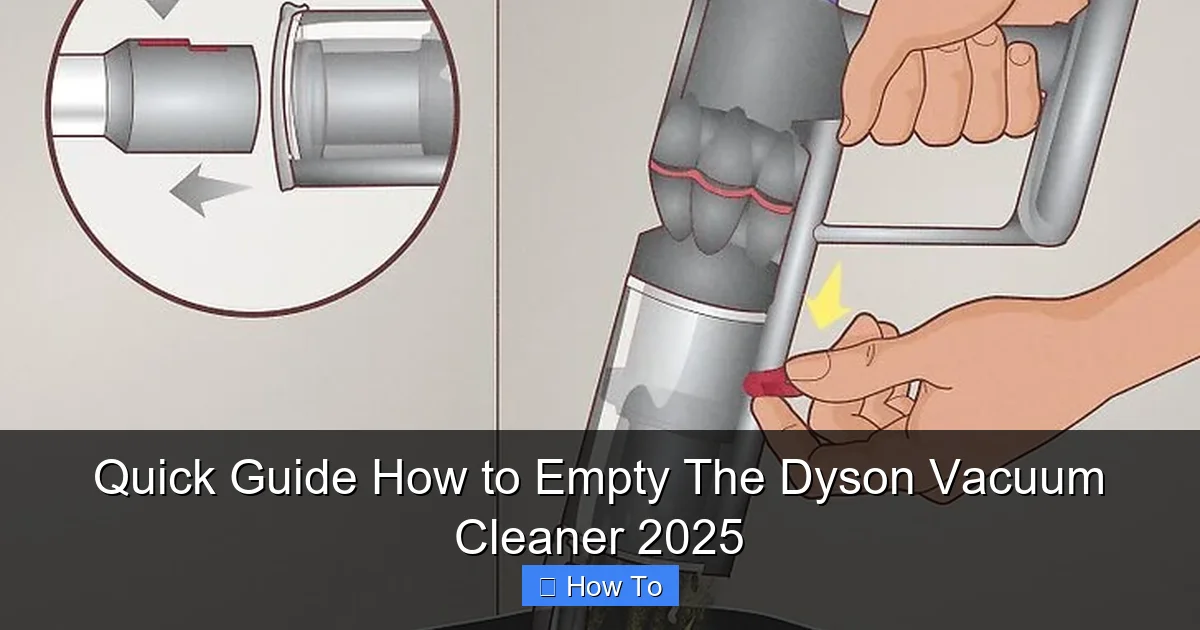
Dyson has evolved its dustbin designs over the years, but the core function remains consistent: collecting dirt and debris. Most modern Dyson vacuum cleaner models feature a clear polycarbonate bin, allowing you to see when it’s full. The release mechanism is typically designed for a quick, hygienic “point and shoot” action.
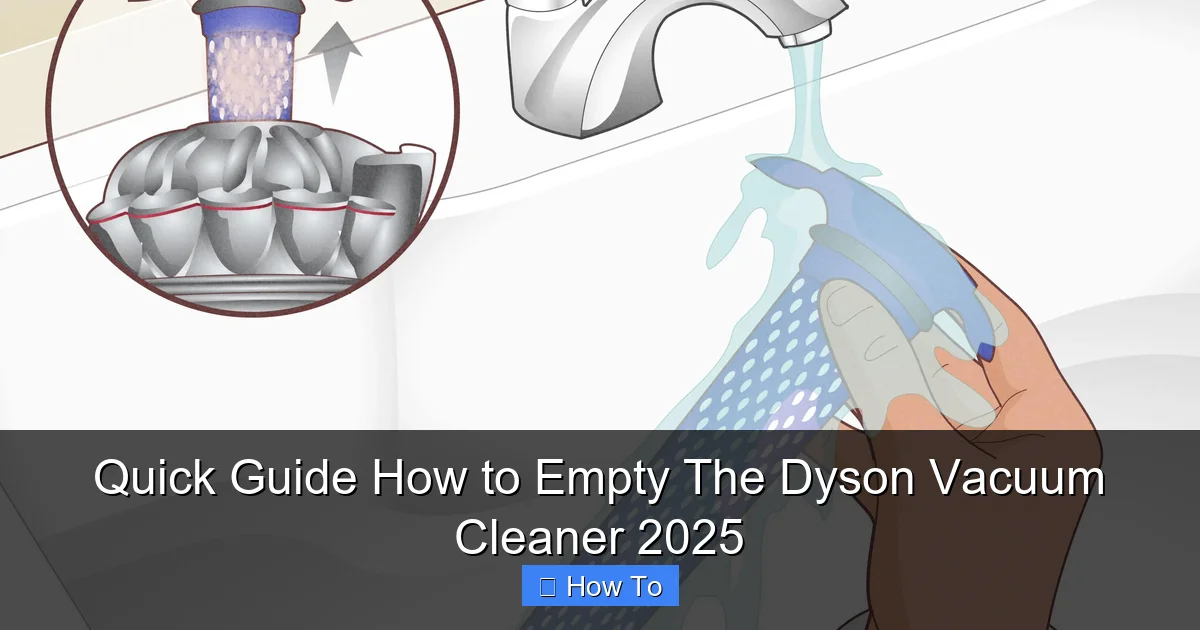
Visual guide about Quick Guide How to Empty The Dyson Vacuum Cleaner 2025
Image source: wikihow.com
While the exact button or lever might differ, the goal is always to release the base of the bin, allowing gravity to do its work and drop the collected debris into your trash receptacle.
Step-by-Step: How to Empty Your Dyson Vacuum Cleaner
Let’s get into the nitty-gritty. We’ll guide you through the process, covering the most common Dyson vacuum cleaner bin types.
Step 1: Detach the Wand or Accessories (If Applicable)
For stick vacuums (V-series, Outsize), it’s often easiest to remove the wand and cleaner head first. This makes the main unit lighter and easier to maneuver, especially when you’re positioning it over the trash can.
- For Stick Vacuums: Press the red wand release button, typically located where the wand connects to the main unit, and pull the wand away.
- For Upright/Cylinder Vacuums: You generally don’t need to detach anything specific from the main body just to empty the bin, but ensure no hoses or tools are obstructing the bin’s path.
Step 2: Locate the Dustbin Release Mechanism
This is where your specific Dyson model comes into play. Dyson prides itself on intuitive design, so the release is usually a prominent, often red or clearly marked, button or lever.
For Dyson Stick Vacuums (V-series, Outsize, Gen5detect, etc.)
These are the most common Dyson vacuum cleaner models nowadays, and their emptying mechanism is designed for ease and hygiene.
- Locate the Red Lever/Button: On most modern stick vacuums, you’ll find a red lever or button on the cyclone assembly, above the clear bin. This lever often has an arrow indicating which way to push or pull.
- Hold Over Trash: Hold the main unit of your Dyson vacuum cleaner firmly over a trash can. Position the bottom of the clear bin as deep into the trash can as possible to minimize dust dispersion.
- Push the Red Lever: Firmly push or pull the red lever/button. You’ll feel and hear a click as the bin’s base plate opens downwards, releasing the dirt. On some models, pushing this lever also pushes the cyclone shroud down, helping to scrape debris out.
For Dyson Upright Vacuums (Ball Animal, Cinetic Big Ball, etc.)
Upright Dyson vacuum cleaner models often have a slightly different process for removing and emptying the bin.
- Remove the Bin: First, you usually need to remove the entire dustbin assembly from the main body of the vacuum. There’s typically a clear red button or lever on the vacuum’s body that releases the bin. Press this button and lift the bin away.
- Take to Trash: Carry the detached bin to your trash can.
- Locate Bin Release: On the bottom of the bin assembly, or sometimes near the handle of the bin itself, you’ll find another red button or lever. This is the bin’s bottom release.
- Hold Over Trash & Press: Position the bin over the trash can and press the red button or pull the lever. The bottom flap will swing open, emptying the contents.
For Dyson Cylinder Vacuums (Big Ball, Cinetic Big Ball Canister, etc.)
Similar to uprights, cylinder Dyson vacuum cleaner models require you to remove the bin first.
- Remove the Bin: Locate the bin release catch, usually a large button or handle on the main body of the vacuum. Press it and lift the clear dustbin away.
- Take to Trash: Carry the bin to your trash can.
- Locate Bin Release: On the handle of the bin itself, or on the top, you’ll find a red button.
- Hold Over Trash & Press: Position the bin over the trash can and press the red button. The base of the bin will open, releasing the dirt.
Step 3: Disposing of Debris and Checking for Blockages
Once the base is open, the debris should fall out. Sometimes, however, particularly if you’ve vacuumed fine dust, pet hair, or larger items, debris can get stuck.
- Gentle Tap: If debris doesn’t fall out immediately, gently tap the side of the dustbin. Avoid vigorous shaking or banging, as this can damage the plastic.
- Clear Obstructions: Look inside the clear bin. Is there a clump of hair, a stray sock, or a larger piece of debris blocking the exit? Carefully reach in and remove it. You can use a long stick, a pair of tongs, or even your hand (if it’s safe and you’ve unplugged the machine).
- Check the Shroud: For stick vacuums, ensure the metal cyclone shroud (the perforated cone inside the bin) is free of wrapped hair or debris. Some models have a mechanism that pushes this shroud down to help dislodge dirt. Make sure this mechanism moves freely.
Step 4: Close and Secure the Dustbin
Once the bin is empty and clear, it’s time to close it securely.
- Close the Base Plate: Push the base plate of the dustbin upwards until it clicks firmly into place. Ensure it’s fully sealed. You should hear a satisfying click.
- Reattach the Bin: For models where you removed the entire bin, carefully slide it back onto the main body of the Dyson vacuum cleaner. Push it firmly until it clicks securely into its position.
- Reattach Wand/Accessories: If you removed the wand or cleaner head, reattach them now.
Advanced Tips and Best Practices for Your Dyson Vacuum Cleaner
Beyond the basic steps, these tips will help you maintain your Dyson vacuum cleaner’s peak performance and cleanliness.
Don’t Overfill Your Dyson
Every Dyson dustbin has a “MAX” fill line. It’s there for a reason! Overfilling your Dyson vacuum cleaner can severely restrict airflow, reducing suction power and putting unnecessary strain on the motor. It also makes emptying messier.
Empty Frequently
The more often you empty your Dyson vacuum cleaner, the better. Not only does it maintain suction, but it also prevents fine dust from caking onto the inside of the bin, which can be harder to remove later. Aim to empty it after every significant cleaning session, or whenever it reaches the MAX line.
Clean the Dustbin (Occasionally)
Over time, fine dust and grime can build up on the inside of the clear dustbin, making it look cloudy or dirty. While you generally shouldn’t wash the main cyclone assembly, the clear bin itself can often be cleaned.
- Wipe Down: With the bin removed (and empty!), use a damp cloth to wipe the inside and outside of the clear plastic. Allow it to air dry completely before reattaching.
- Rinsing (Specific Models Only): Some Dyson vacuum cleaner models explicitly state that the clear bin can be rinsed with cold water. *Always check your specific model’s manual first.* If rinsing is allowed, ensure no water gets into the cyclone assembly or any electrical components. Let it air dry for at least 24 hours, or until completely dry, before reassembling.
Managing Static Electricity
Dyson vacuum cleaner bins are made of plastic, and vacuuming creates static electricity. This can cause fine dust and pet hair to cling to the inside of the bin, making it harder to empty. Gently tapping the bin or using a slightly damp cloth to wipe it down can help reduce this effect.
Filter Maintenance (Briefly)
While not directly related to emptying, remember that your Dyson’s filters also need regular cleaning (typically monthly for most models). A clean filter works in tandem with an empty bin to ensure maximum suction. Consult your manual for specific filter cleaning instructions.
Troubleshooting Common Dyson Emptying Issues
Even with the best intentions, you might run into a snag. Here are a few common issues and their solutions:
Bin Not Opening
- Check for Obstructions: Something might be physically blocking the release mechanism. Inspect the area around the button/lever.
- Firm Press: Sometimes, the button or lever requires a firm, decisive push or pull. Don’t be afraid to apply a little more pressure (but don’t force it to the point of breaking).
- Internal Jam: If the bin is overfilled or something is wedged inside, it might prevent the base from opening. Try to gently dislodge any visible blockages from the top first.
Debris Stuck in the Bin
- Upside Down Tap: With the bin open and over the trash, try turning the entire vacuum (for stick models) or just the bin upside down and tapping the sides firmly but gently.
- Use a Non-Sharp Tool: A blunt stick, the handle of a brush, or even a gloved hand can be used to carefully dislodge stubborn clumps of hair or debris. Never use sharp objects that could scratch the plastic.
- Rinsing (If Allowed): If your Dyson model’s manual permits rinsing the clear bin, this can help loosen caked-on fine dust after you’ve removed the main bulk of debris.
Bin Not Closing Properly
- Check for Debris: A small piece of debris or a clump of hair might be caught in the hinge mechanism or the latch. Inspect thoroughly and remove anything that shouldn’t be there.
- Proper Alignment: Ensure the base plate is aligned correctly before pushing it up. It should click into place smoothly.
- Damaged Latch: In rare cases, the latch mechanism itself might be damaged. If you suspect this, contact Dyson customer support for assistance.
Conclusion
Mastering the art of emptying your Dyson vacuum cleaner is a simple yet crucial skill that contributes significantly to its performance and longevity. By following these steps and incorporating our practical tips, you ensure your Dyson continues to deliver powerful, consistent suction, year after year.
Regular emptying prevents blockages, maintains hygiene, and extends the life of your appliance, saving you time and money in the long run. So, embrace the habit of a quick and clean empty after every use, and enjoy a cleaner home with your perfectly maintained Dyson vacuum cleaner in 2025 and beyond!
🎥 Related Video: how to empty ur dyson V8…#dyson #dysonv8 /mayang rosales
📺 Mayang Rosales